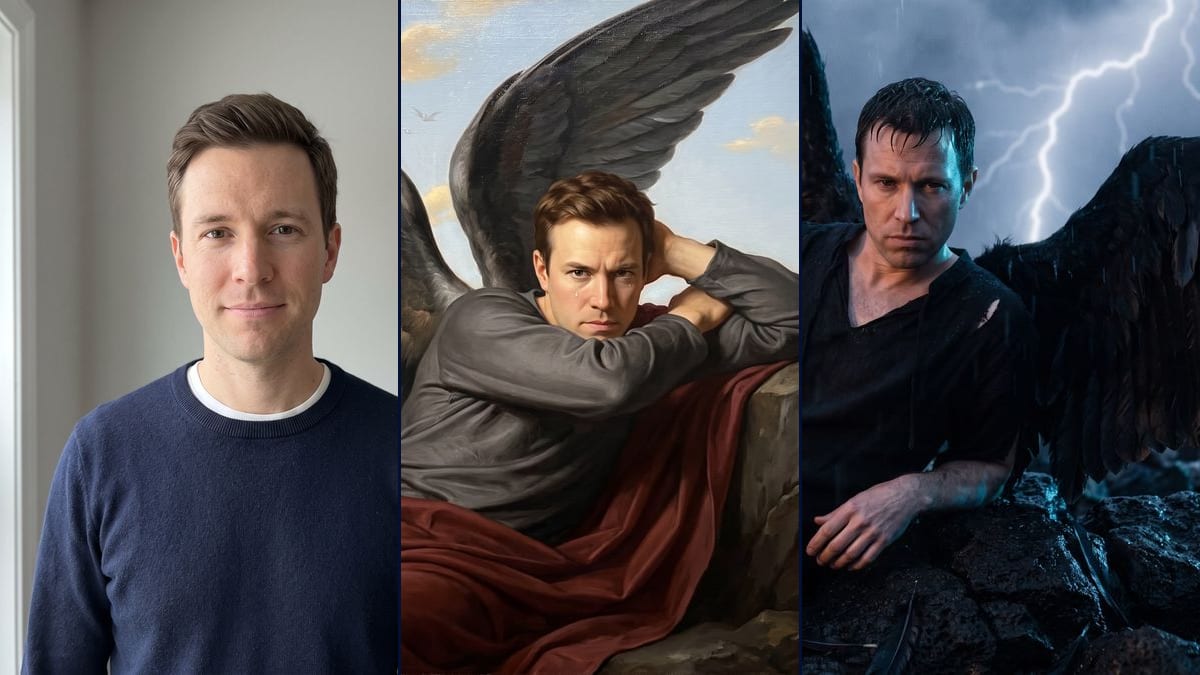
Side by side with Cabanel
The format the effect apps use: your painted version next to the original painting, which is in the public domain. The pose will not match exactly, the demo showed that, but the golden sky and the wings tie them together.
Your photo as a fallen angel, as a 19th century painting on a cliff, then as a film still in a storm, with your own face and fully dressed. Workflow visible here, no account needed.
Real workflow: a portrait of a clean-shaven man with short chestnut hair in a navy jumper, then the same man as an angel with grey-black wings, reclining on rocks in a painting with a golden sky, a tear on his cheek, and at night on wet volcanic rocks in the rain, lightning behind him. He is recognisable in both, with redder hair in the painting and a more lined face in the film version.
At a glance
AI effect apps are offering it right now, often for TikTok and Reels: you take your photo and drop it into The Fallen Angel, the painting Alexandre Cabanel made in 1847, now in the Musée Fabre in Montpellier. This workflow does it with yours. One photo goes in, two images come out: an academic painting where he reclines at the edge of a cliff, wings spread, and a film still, at night, in the rain and the storm.
Cabanel's angel is nude. Here the subject wears a tunic and a cloak, and the prompt insists on it: the first try of the painting came out bare-chested, so it had to spell out a long-sleeved tunic and no bare chest. For the face, the prompt lists the features to keep one by one. Nano Banana Pro holds a face from a single photo, and in the demo you recognise the man from the portrait in both renders.
To turn a photo into a painting without the angel scene, see photo to painting. Another October effect with your own photo: the witch on a flying broom, or the Halloween costume. Both renders cost thirty-eight credits.
These are the files of the workflow above, exactly as the models produced them, unretouched. The starting point is shown when there is one.
Starting point
Render
People who want to recreate the fallen angel effect with their own photo, fans of Cabanel's painting, content creators looking for an October picture.
A sharp, well-lit front-facing photo of you or of someone who agreed, and the scene described with the pose, the wings and the outfit.
Pick a front-facing photo
Sharp, in soft light, face clear, no sunglasses or cap. A phone selfie is enough. Your photo, or one of someone who said yes.
Describe the pose and the outfit
Reclining on the rocks, the wings, the tear, the look, and the outfit piece by piece. Write "fully clothed" and "no bare chest": without that, the model copies the nude angel from the painting.
List the features to keep
Face shape, eyes, eyebrows, nose, lips, hair and hairline, shaved or bearded, and the instruction not to beautify or age. Without that list, the model smooths the face out.
Compare with the photo
Put the render next to the original portrait. If the outfit slipped or the face gained a few years, rerun that node on its own: nineteen more credits.
The same canvas, tuned for different needs: each variation is two or three lines of prompt away.
The format the effect apps use: your painted version next to the original painting, which is in the public domain. The pose will not match exactly, the demo showed that, but the golden sky and the wings tie them together.
The night image, with the rain, the lightning and the torn feathers, makes an end-of-October picture with no costume or pumpkin. It works as a profile picture if you crop on the face.
Nothing says it has to be a man: replace "the man from the photo" and adapt the list of features to the starting face, long hair included. The outfit and the setting stay the same.
They recreate the effect on their own photo, then connect a Video node to the image to make the wings beat or the rain fall. The still works as a thumbnail while the video is on its way.
Change the colour of the wings in the prompt for an angel who hasn't fallen yet. Keep the rest as it is, the list of features and the outfit, so the face holds.
The painting prompt names Cabanel, but the style sentence can be swapped: another academic painting from the same period, other sky colours. The setting and the pose can stay.
An actor, a singer, an athlete: no. This workflow is for putting yourself in the painting, or someone who agreed and will see the picture.
Cabanel's painting shows a nude angel, and the model knows it. The first try in the demo came out bare-chested despite the cloak asked for. Write the long-sleeved tunic and "no bare chest".
The demo asked for both forearms crossed above the head and a sideways look: it got one arm behind the head and a straight look. If the pose matters, check before keeping the image.
The model invents what it can't see, and a face half in shadow comes back older or harder. A front-facing photo in soft light keeps that drift down.
It stays recognisable without being a perfect copy. In the demo, the hair is a little lighter and redder in the painting, and in the film still the face is more lined and looks a little older, with darker wet hair.
No. In the painting he looks straight at the viewer instead of sideways, only one arm is folded behind his head instead of both forearms crossed, and it is hard to see where the wings attach. In the film still he leans on his elbow instead of raising his arm, and the lightning strikes close by instead of far away.
Because the template is made to put your own photo into the scene, tunic and cloak included. The first try of the painting still came out bare-chested: the prompt was tightened and the second try is clothed.
Thirty-eight credits, nineteen per render on Nano Banana Pro in 2K. Rerunning a single image costs nineteen more.
Because it holds a face from a single photo. Flux Kontext, which costs less, retouches the features, and the effect loses its point if you don't recognise yourself.
2400 x 1792 pixels, horizontal 4:3. The film still came out on the first try, the painting was redone once.
The Fallen Angel dates from 1847 and is in the public domain. The prompt borrows its style and pose, it does not copy the image.
Connect a Video node to the image you keep and describe the motion. This page has no video demo, so there is no promise on the result.
Turn yourself into a fallen angel from your own photo with AI
Use this workflowFree account, no card required. The workflow opens pre-filled in your canvas.
 Nano Banana Pro
 Seedream 5 Pro
 Flux Kontext