Make an AI underwater portrait from your own photo
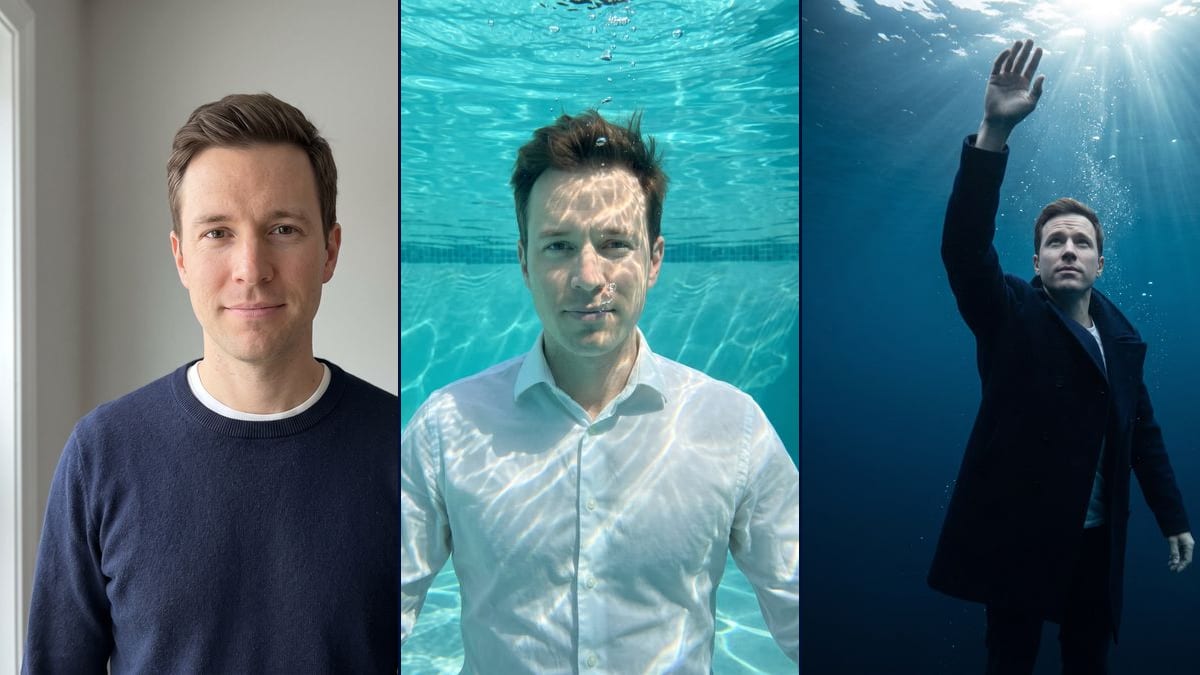
Your selfie as an underwater portrait: submerged in a turquoise pool in a floating white shirt, or reaching for the surface in deep sea. Face likeness and drift shown. Workflow visible here.
Real workflow: a man in a navy sweater, then the same man submerged in a turquoise pool in a white shirt, with bubbles and sun reflections on his face, and in midnight-blue open sea with a hand raised towards the surface, in a navy coat under sun rays. In the pool, the face stays faithful. In the sea, the features are smoother, the haircut shifts a little and he looks up at the light.
At a glance
You provide
1 photo · a text or a brief
What the workflow produces
2 images in 3:4
Canvas structure
6 nodes wired by 4 connections
Models wired in
Nano Banana Pro
Cost of one full run
about 38 credits, roughly $0.46
Account
The demo is visible without an account; generating requires a free account, trial credits included
The underwater portrait made from a selfie is a warm-season format that keeps coming back: you see yourself submerged, dressed, eyes open, in pool or sea light. We found it in a pixazo.ai guide updated on 23 September 2026, read on 2 November. That's one source with no audience figures, so there's nothing to back up talk of a wave under way. This workflow makes the two versions that show up most: the turquoise pool in a white shirt, and the open sea with a hand reaching for the surface.
The model, Nano Banana Pro, keeps the face well in the pool: same gaze, same closed mouth, same haircut, even with reflections streaking the forehead. In the sea it drifts: smoother features, a slightly different haircut, and the man looks at the sun instead of the camera. The coat hangs instead of floating, and the lower hand is badly drawn. If the face doesn't look like you, rerun the node or use a well-lit front-facing photo. Worth repeating: this is an AI render, not a real underwater photo.
These are the files of the workflow above, exactly as the models produced them, unretouched. The starting point is shown when there is one.
Starting point
Your selfie
Render
The same man submerged facing the camera in a turquoise swimming pool, in a white shirt, eyes open, hair a bit tousled by the water, bubbles rising around his face, sun reflections on his forehead and shirt, a band of tiles in the background; faithful face, but the reflections streak the forehead and the bubbles pass in front of his nose and chinGenerated with Nano Banana ProThe same man in midnight-blue open sea, seen from below, one hand raised towards a bright sun, in a navy coat over a white t-shirt, light beams, particles and bubbles rising, framed from the knees up; the face drifts a little from the photo, smoother features and a slightly different haircut, the gaze goes to the surface, the coat hangs instead of floating and the lower hand is badly drawnGenerated with Nano Banana Pro
Who it is for
People who want an underwater portrait from their selfie for their stories or profile picture, content creators who follow warm-season formats, friends planning a summer photo series.
Which files to provide
A sharp, front-facing, well-lit selfie of you or of someone who agreed, and the exact description of their hair and beard in the prompt. The photo is optional.
How it works
1
Take a sharp front-facing selfie
Face straight on, good light, no filter. A chest-up shot like the demo's is enough: the model makes up the body, the clothes, the water and the light.
2
Adapt the face description
The prompts say "clean-shaven" and "short hair", which matches the demo. If you have a beard or long or curly hair, write that instead, otherwise the model mixes your face with the description.
3
Pick the pool or the sea
The pool gives a bright, front-facing portrait that stays closer to the face. The sea gives a more dramatic image seen from below, but the face drifts further. Run both, or a single node for 19 credits.
4
Compare the face with your photo
Look at the features, the haircut and the free hand, especially in the sea. If the likeness isn't there, rerun that node: the result changes from one try to the next. A better-lit front-facing photo helps too.
Variations and use cases
The same canvas, tuned for different needs: each variation is two or three lines of prompt away.
The pool or the open sea
The pool makes a bright, front-facing portrait with sun reflections on the skin and the shirt: it's the one that stays closest to the face. The sea makes a more dramatic image, seen from below, where the face drifts a little. For a profile picture, start from the pool.
In a dress for a woman
Replace "the man" with "the woman" and the shirt with a light long dress that floats, saying the colour and fabric. Adapt the face and hair description too. This version was not tested on the demo.
Two people underwater
Start from a photo where both faces are sharp, and rewrite the prompt with two people facing each other, one line of description for each. Not tested here, and both people must agree to the use of their photo.
Emerald-green lake water
Change "clear turquoise swimming pool" to an emerald-green mountain lake with softer rays. The water will be less clear and the face less bright, so keep a well-lit input photo. Not tested on the demo.
Black and white, like an art portrait
Add at the end of the prompt "black and white photo, soft contrast, fine grain". The turquoise goes away and the reflections and rays stand out more. This version was not tested.
A short video rising to the surface
Plug a Video node into the sea render and describe the movement: the hand rises, bubbles lift, the sun rays shift. The demo stops at the two still images, this follow-up was not tested and video costs extra credits.
Common mistakes
A side-on or dim selfie
The model has only one photo to rebuild the face from. Side-on, blurry or badly lit, it fills in the gaps, and in the bluish light of water the difference shows even more.
Settling for the first sea render
In the demo, the sea render's face drifts from the photo. The result changes with each run: rerun the node once or twice before deciding, rather than accepting an image where you don't recognise yourself.
Using the image as a real photo
It's an AI render, not a photo taken underwater. Don't submit it for an ID, an application or an official document, and say so if you post it as a holiday picture.
Using someone's photo without their consent
The image is made so the person is recognisable. Only use photos of people who said yes, and never a photo of a well-known person.
No, it's optional. Without one, the model invents a person from the prompt. With your selfie, it keeps your face, which is the whole point of the trend.
Why not just ask Gemini directly?
You can. Here, the two prompts are ready and wired to the same photo, the model is picked for face fidelity, and the demo shows you in advance what it keeps and what it misses.
Why does the face change more in the sea than in the pool?
In the sea, the picture is seen from below, the gaze goes up to the surface and the light is darker: the model has fewer cues and smooths the features. In the pool, the face is square on and well lit, so it stays closer to the photo.
How much do the two portraits cost?
38 credits, 19 per render on Nano Banana Pro. Rerunning a single image costs 19 credits.
Is there a cheaper version?
Yes, by switching the node to Nano Banana 2.1 in 1K, 7 credits per render. The face is less faithful, and this option was not tested on this portrait. That's why the demo runs on Nano Banana Pro.
How big are the images?
1792 x 2400 pixels, in vertical 3:4. That's enough for a story, a profile picture or a small print, not for a poster.
Is it a real photo taken underwater?
No. It's an AI image generated from your selfie: the water, the light, the bubbles and the clothes are all made up. It isn't suitable for an ID, and it's better to say so when you share it.
What if the face doesn't look like me?
Rerun the node, or switch to a sharp, front-facing, well-lit photo. The pool holds the face better than the sea. You can also write your exact features and haircut into the prompt.
Make an AI underwater portrait from your own photo
 Nano Banana Pro
 Flux Kontext
 Seedream 5 Pro