The property listing
The house photographed by day, then the same at dusk, windows lit: the image that gets the clicks, without coming back in the evening with the camera.
Your daytime photo becomes the same view at night, windows lit, then a video timelapse from one to the other, place unchanged. Workflow visible here, no account needed.
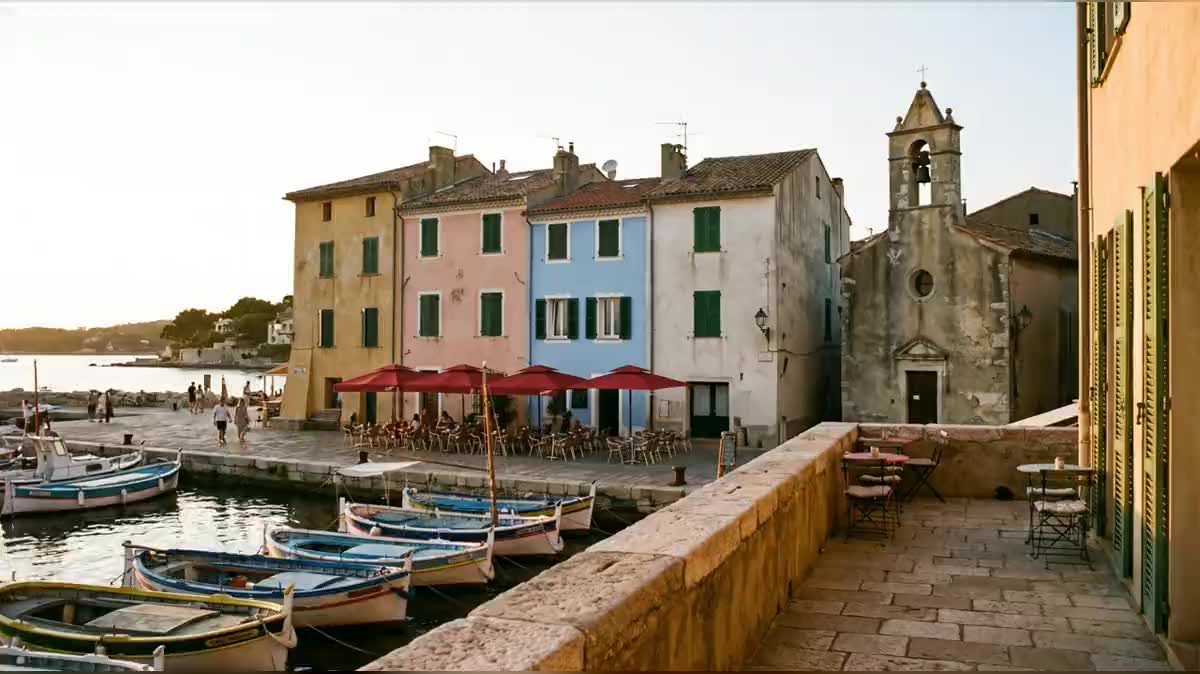
Real workflow: a small harbour in late afternoon, the same view an hour after sunset, then five seconds of timelapse where the sky reddens, turns blue and the windows light up. No house moves.
At a glance
A house, a street or a harbour at night, windows lit, sells better and gets shared more than in broad daylight. But coming back to shoot at the right moment, with the same framing, takes a tripod and an evening. This workflow starts from your daytime photo, makes the same view at night, then a five second timelapse from one to the other.
The hard part is keeping the place. A freely generated video makes façades ripple and moves the boats. The night version is therefore drawn from your photo, only the light changes, then Wan 3.0 gets the photo as its start frame and the night as its end frame: it only moves the light.
It is the same recipe as the Vertigo effect, where the end frame dictates the result. For a listing, also see the real estate listing video. The night and the timelapse cost seventy nine credits.
These are the files of the workflow above, exactly as the models produced them, unretouched. The starting point is shown when there is one.
Starting point
Render
Estate agents, hotels, restaurants, tourist offices and architects who want the evening mood without coming back to shoot.
A sharp, level daytime photo, and the list of what lights up at night.
Start from a steady photo
Taken on a tripod, braced or at least level, in daytime or late afternoon. A crooked framing shows twice as much in a timelapse.
Describe what lights up
Windows, street lamps, signs, string lights, a lit monument: night reads through its lights. Without them, the image is just darker.
Forbid any movement
The night prompt says nothing is added, removed or moved. Compare both images before running the video: a moving house makes a morph.
Give the video both ends
The photo as the start frame, the night as the end frame, fixed camera. Wan 3.0 moves the sky and the lights without touching the place.
The same canvas, tuned for different needs: each variation is two or three lines of prompt away.
The house photographed by day, then the same at dusk, windows lit: the image that gets the clicks, without coming back in the evening with the camera.
The façade or the terrace going from day to night in five seconds, for the booking site and social media: the evening mood without a photographer.
The terrace lighting up at sunset, string lights included: a short video that says "come for dinner" better than a menu.
A square, a bridge or a monument lighting up: a five second timelapse to open a presentation video of the town.
An architect or a landscaper shows what the lighting of a façade or a garden will look like, before installing the first floodlight.
The photo of the harbour where you had dinner becomes its evening: a small keepsake film that shares better than a series of photos.
In text alone, the model invents the night along the way and makes façades move. Give the night as the end frame, the place holds.
A timelapse is watched like a locked off shot: the slightest framing flaw jumps out. A level, sharp photo.
Darkening does not make a night. You need lit windows, street lamps, reflections: that is what the eye expects.
In a listing, the night view is a mood simulation. Say so, especially if the outdoor lighting does not exist yet.
Yes: swap the two cables. The video becomes a sunrise, lights going off and the sky brightening.
Yes, with a window in the frame: the sky outside darkens, the room's lamps switch on. Describe each lamp in the night prompt.
Yes, by describing it in the night prompt. But snow changes many surfaces: check that the place stays recognisable before the video.
Seventy nine credits: nineteen for the night view on Nano Banana Pro, sixty for five seconds of Wan 3.0 at 720p.
Because in text alone, a video model invents the night along the way and distorts the place. With the first and last frames set, it only moves the light.
On the demo, yes: same houses, same bell tower, same boats, from the first to the last frame. Only the sky and the lights change.
Wan 3.0 goes beyond five seconds, but the light change just slows down without adding anything. Five seconds loop well on social media.
16:9 at 720p for the video, the photo's format for the night. For stories, start from a vertical photo and set the video to 9:16.
Turn a daytime photo into night with AI, as a timelapse
Use this workflowFree account, no card required. The workflow opens pre-filled in your canvas.
 Nano Banana Pro
 Wan 3.0
 Kling V3
 Seedance 2.5