The online shop launching mugs
An illustrator sells her designs through print on demand. Two lifestyle photos per design for her product page, instead of the cut-out mockup everyone uses.
Your logo or drawing printed on a white mug on a counter, then on a stoneware mug held in two hands, without being redrawn. For your shop and social posts. Workflow visible here, no account needed.
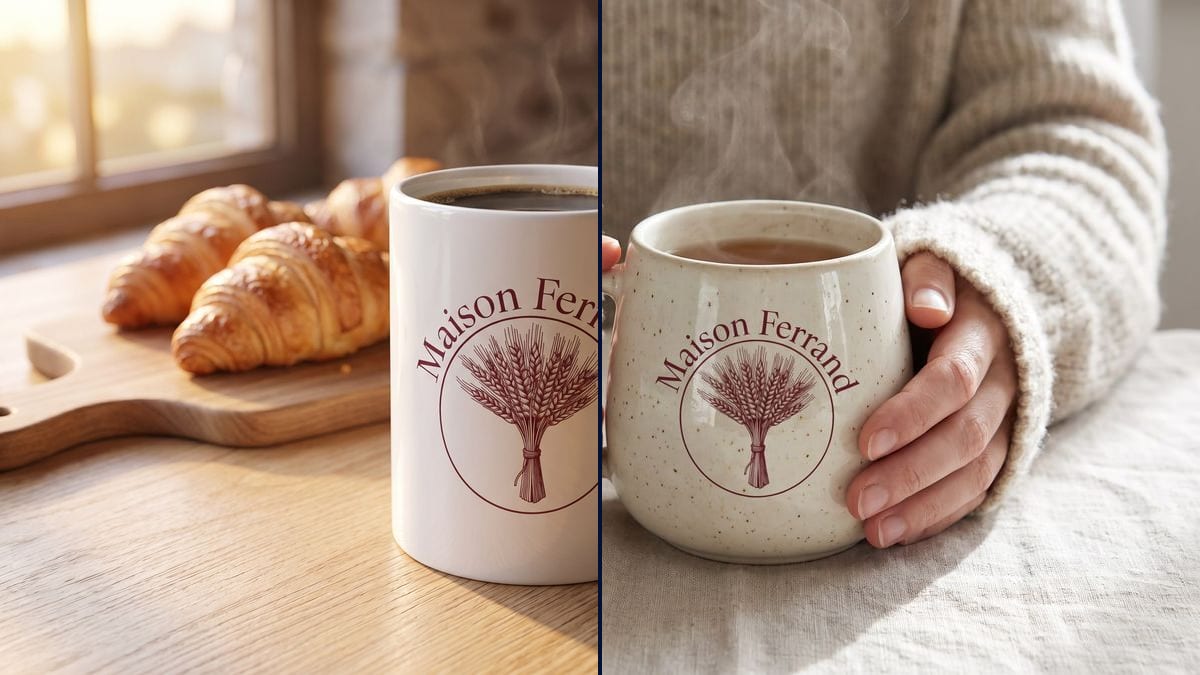
Real workflow: the burgundy emblem of the Maison Ferrand bakery, then the same logo printed on a white mug next to croissants and on a speckled stoneware mug held in sweater sleeves. Sheaf and name identical.
At a glance
Before ordering a hundred mugs with your logo, or listing them in your shop, you want to see them for real. Free mockups paste the logo flat on a cut-out mug, and it shows. This workflow prints YOUR logo on two mugs in real settings: a white mug on a counter, a stoneware mug held in two hands.
The hard part is fidelity. An image model tends to redraw a logo, change a letter or make it bigger. The prompt asks to print it as it is, at a realistic width, following the curve of the cup. Nano Banana Pro takes the reference image and spells the name correctly.
No logo yet? Start with the logo generator, which drew the one in the demo. For a matching t-shirt, go to the t-shirt mockup. Both mugs cost thirty-eight credits.
These are the files of the workflow above, exactly as the models produced them, unretouched. The starting point is shown when there is one.
Starting point
Render
Print-on-demand shops, businesses that want cups with their name, teams preparing corporate gifts.
A sharp logo, drawing or photo on a plain background, and the setting and mug material you want.
Drop in the logo
Sharp, on a plain background, preferably a PNG. A drawing, a child's photo or a quote work too.
Pick the setting
Your shop counter, a desk, a kitchen, hands holding the cup: choose the place where your customers will drink from it.
Describe the mug
Glossy white, matte black, speckled stoneware, glazed inside: one line per node, one material per render.
Post or order
The picture is for the product page and social posts. To print, send your original logo file to the printer.
The same canvas, tuned for different needs: each variation is two or three lines of prompt away.
An illustrator sells her designs through print on demand. Two lifestyle photos per design for her product page, instead of the cut-out mockup everyone uses.
A coffee shop wants cups with its name. It sees its logo on the counter, next to its pastries, before ordering a batch from the manufacturer.
The marketing team compares a white mug and a black mug with the company logo for end-of-year gifts, and shows the picture to management for sign-off.
The youngest's drawing on a mug for Grandparents' Day: check that the lines stay readable on the cup before ordering.
The sports club puts its crest on mugs to sell at the stand. One lifestyle photo for the club's social accounts is enough to open pre-orders.
The show's logo on a mug next to a microphone, to announce the merch shop at the end of the episode.
A logo photographed on cardboard or a blurry screenshot, and the model prints the background too. Supply the clean file, on a plain background.
Without a width, the logo sometimes covers the whole mug or shrinks to a stamp. About eight centimetres wide is a common print size.
In a two-handed shot, fingers can hide half the logo. Write "the hands do not cover the logo".
This is a picture to sell or approve, not a print file. The printer needs your original logo, high resolution or vector.
No: the prompt asks to print it as it is. In the demo, the wheat sheaf, the circle and "Maison Ferrand" match the original logo.
Yes: a family photo, a child's drawing, a pet. Write "print the photo from the image" and its size on the mug.
The same prompt works for a tote bag, a water bottle or a notebook: change the item and the setting, keep the sentence about the logo.
Thirty-eight credits, nineteen per render on Nano Banana Pro. A third setting with the same logo costs nineteen more.
Because it copies a reference image faithfully and spells correctly: the logo stays yours, name included, rather than a reinterpreted version.
Yes: generated content belongs to you, within the licences of the models used. Show the mug as it will really be, same colour and same print as the product you sell.
4:3 in the demo. Switch the node to square for a product page or a post, to 9:16 for a story.
Yes in the demo, the fine wheat sheaf stays sharp. Very small text, like an address under the logo, reads less well once curved around the cup.
Make a custom mug with your logo using AI
Use this workflowFree account, no card required. The workflow opens pre-filled in your canvas.
 Nano Banana Pro
 GPT Image 2.5 Sunburst
 Seedream 5 Pro
 Flux Kontext