Before ordering the sign
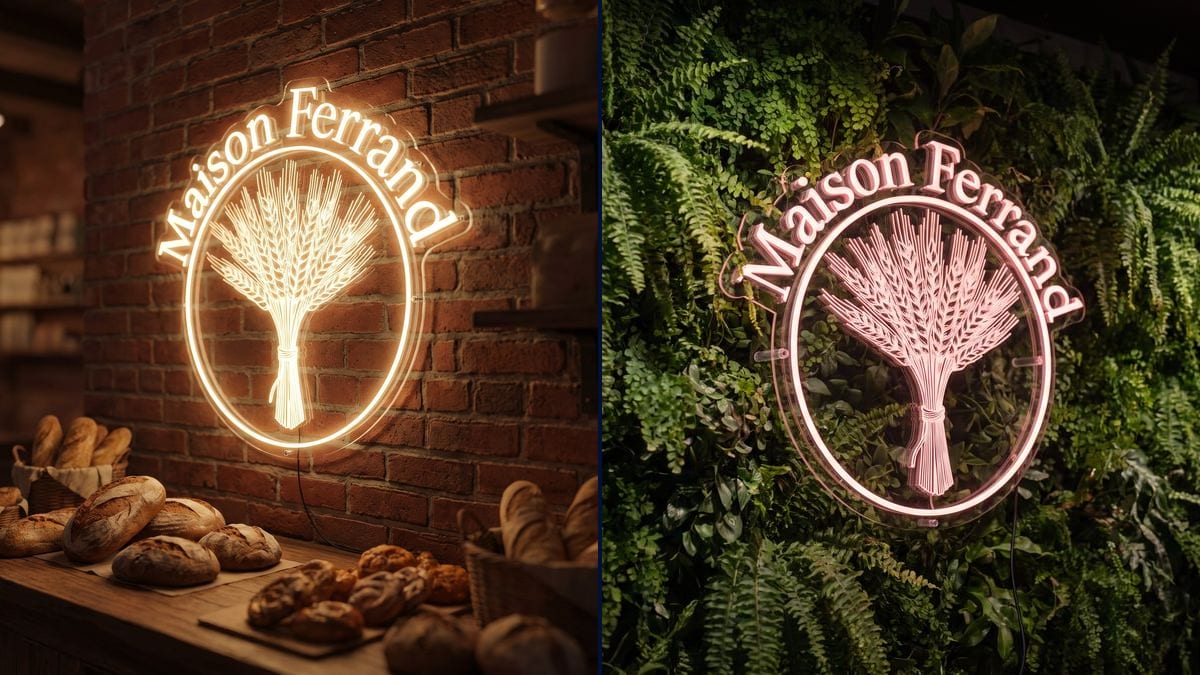
The shop owner compares warm white and pink on the real wall of the shop, then sends the picture to the maker as a mockup for the quote.
Your logo as a real neon sign, tubes lit on a brick wall or a plant wall. To choose colour and placement before ordering. Workflow visible here, no account needed.
Real workflow: a bakery's logo, then the same in warm white neon on the shop's bricks at night and in pink neon on a plant wall, the name written exactly.
At a glance
A custom neon sign is expensive and gets ordered from a simple sketch. This workflow starts from your logo and shows it lit, in real glass tubes, in two settings, so you can choose the colour and the wall before paying the maker.
The hard part is getting neon rather than a flat glowing logo. The prompt describes what makes a neon sign: bent tubes following the drawing, standoffs, a cable, the glow on the wall. The name is written exactly, in quotes.
To create the logo itself, see the logo generator; to animate it, the animated logo. Both neon signs cost thirty-eight credits.
These are the files of the workflow above, exactly as the models produced them, unretouched. The starting point is shown when there is one.
Starting point
Render
Shops, cafés, salons and creators who want to see their neon sign before ordering it.
The logo as a sharp PNG, ideally in simple lines, the neon colour and the setting wanted.
Load the logo
A sharp PNG on a light background. A logo made of simple lines gives a more faithful neon than a very detailed drawing.
Describe a real neon sign
Bent glass tubes following the lines, standoffs, cable, glow. Without those words, the model sticks the logo flat on the wall.
Choose the wall and colour
Brick, plant wall, concrete, wood; warm white, pink, icy blue. The setting and colour change the whole look.
Show it to the maker
The picture works as a mockup for the quote: size, colour, placement. The maker builds the tubes from your file.
The same canvas, tuned for different needs: each variation is two or three lines of prompt away.
The shop owner compares warm white and pink on the real wall of the shop, then sends the picture to the maker as a mockup for the quote.
A neon sign on a plant wall becomes the corner where customers take photos and post the café's name on social media.
A pink or white neon sign behind reception, tried on a photo of the salon before drilling the wall and running the cable.
A small standing neon sign to be seen from afar, tried in white and in colour against a wood or fabric backdrop.
The picture of the lit sign is used as an announcement on social media before opening, with the mascot or the animated logo.
The name of a channel or podcast in neon behind the desk, to see how it looks in the video set before giving it.
The model then sticks a flat glowing logo or a lightbox on the wall. Describe the bent tubes, the standoffs, the cable.
Fine details become a glowing surface, not tubes. Start from a simplified line version.
Without quotes, a letter can change. The exact name in quotes, and "nothing else written".
In full daylight the neon barely shows. A dim room or the evening makes the tubes and the glow shine.
In the demo, yes: "Maison Ferrand" on both signs. Always give the name in quotes and proofread.
A very fine drawing can't be bent into tubes: the model turns it into a glowing surface. A simple line logo works better.
Yes: describe the shop front and daylight. Neon is mostly judged in the evening, when it lights the wall.
Thirty-eight credits, nineteen per sign on Nano Banana Pro. A third setting costs nineteen credits more.
Because the scene is dark: Nano Banana Pro holds the logo and text in low light, while Sunburst writes poorly on dark backgrounds.
The overall shape, the circle and the name, yes. Very fine details are simplified into a glowing surface, like the wheat ears in the demo.
4:3, a photo of a wall. Switch to 9:16 for a story or 1:1 for a post.
It's a visual mockup, not a production drawing. The maker builds the tubes from your vector logo.
Turn your logo into a neon sign with AI
Use this workflowFree account, no card required. The workflow opens pre-filled in your canvas.
 Nano Banana Pro
 GPT Image 2.5 Sunburst
 Flux 3
 Seedream 5 Pro