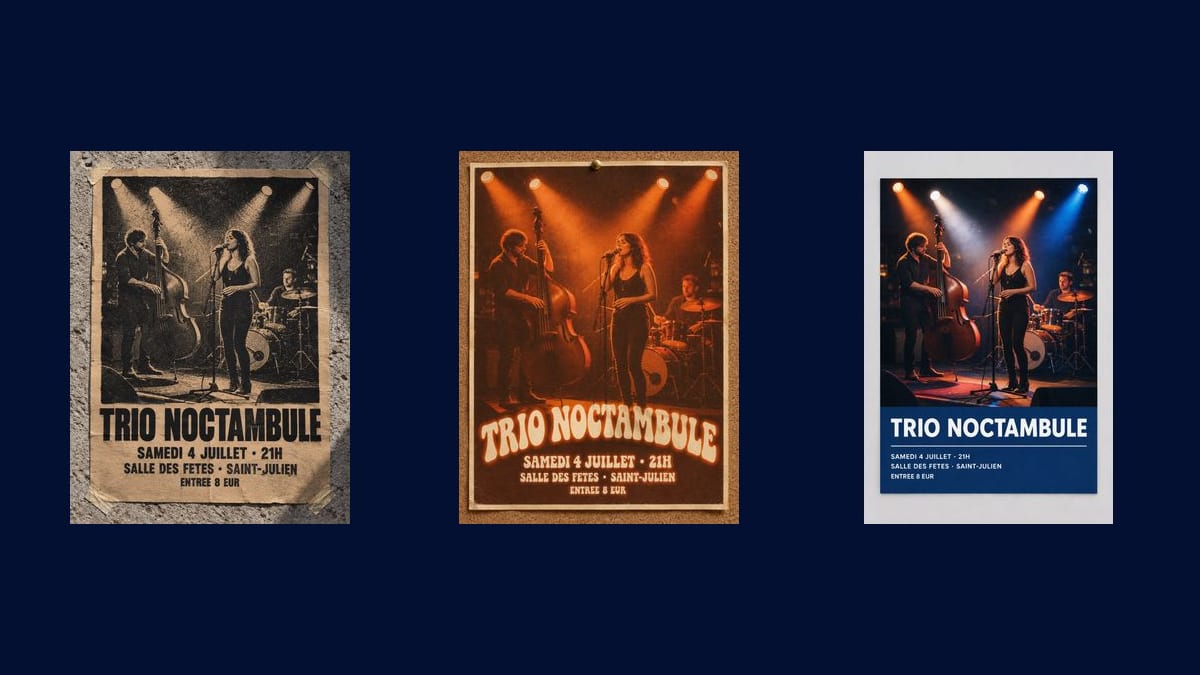
The gig poster
The demo's own case: a band, a date, a hall, a price. It is the most requested format, and the one where the photo of the band counts more than any invented illustration.
A photo of your band, your stall or your venue goes into three Image nodes that turn it into three posters, name, date and place written into the image: raw screen print, retro, modern colour block.
The real workflow: the photo of the band wired to three GPT Image 2.5 Flare nodes, one poster treatment per node. The three posters are the demo's own, with the same musicians.
At a glance
A gig in a village hall, a car boot sale, a farmers' market, an association evening: the poster gets made the day before, often in a word processor, and it shows. This workflow starts from the photo you already have, of the band or of the place, and comes back with three complete posters carrying the name, the date, the place and the price.
The three treatments do not tell the same story: the screen print reduces the photo to two colours on kraft, blunt and a little punk; the retro seventies one turns it into an orange and brown duotone with rounded lettering; the modern one keeps the photo in full colour and lays the text on a flat ink blue block.
Do not confuse this with the poster generator, which starts from a brief and invents the illustration. Here you already have your photo, and it has to stay: the band playing on Saturday, not a drawn band that looks like them. GPT Image 2.5 Flare writes the four lines without a mistake for nine credits the three posters.
These are the files of the workflow above, exactly as the models produced them, unretouched. The starting point is shown when there is one.
Starting point
Render
Bands, venues and promoters who have a photo and a date, no designer.
Choose a contrasty photo
A photo with clear contrast works better than a flat one, especially on the screen print, which reduces it to two colours. A lit stage, a clean sky, a dark background.
Replace the four lines between quotes
Name, date and time, place, price. Everything between quotes after the word "exactly" is copied as is, accents included.
Keep it short
A poster is read from three metres away. Four lines are enough, and the rest, the running order, the partners, the booking link, goes in the post that comes with the poster.
Generate all three, then check the date
"Generate all" produces the three treatments. Then read the date and the time on the render: it is the one piece of information whose mistake really costs something.
The same canvas, tuned for different needs: each variation is two or three lines of prompt away.
The demo's own case: a band, a date, a hall, a price. It is the most requested format, and the one where the photo of the band counts more than any invented illustration.
A photo of the village square or of last year's stalls, and the three posters come out with the date. The screen print treatment gives the handmade feel that suits the event.
A crate of vegetables or a stall shot in daylight is enough. The retro duotone makes any produce look appetising, which a plain photo does not always manage.
Bingo, dinner, tournament, village fete: the same mechanic, with the photo of the place or of last year's edition. The series is recognised from one year to the next if you keep the same treatment.
Keep the photo and the treatment, change the date and place line for each stop. Three credits per poster, so a ten date tour costs thirty credits.
If the event has not happened yet and there is nothing to photograph, the poster generator starts from a brief and makes the illustration for you.
A photo with no contrast turns into grey mush once reduced to two colours by the screen print. Choose an image where the shapes stand out clearly.
A poster carrying eight lines is no longer read from three metres away. Name, date, place, price, and the rest in the caption of the post or on the event page.
Without it, the model rewords the band name or translates the date. With it, it copies them. That word is what holds the whole workflow together.
A poster pasted up with the wrong date is the worst case this workflow has, and ten seconds of proofreading on the render settles it.
The generator starts from a brief and invents the illustration, which suits you when you have nothing. This one starts from your photo and keeps it, which suits you when the subject of the poster is a real person, a real place or a real product.
Yes, the photo is recoloured or cropped by the treatment, not redrawn. On the screen print it is reduced to two colours, so the features are simplified: that is what a screen print does, not a fault of the model.
The render is about a thousand pixels wide, which is enough for an A4 or for sharing online. For an A3 pasted up around town, run the render through the Enhance node, which enlarges it without reinventing the text.
Nine credits, three per poster. Redoing the only one you keep, with a different date, therefore costs three credits.
Yes, as for any publication: the workflow changes nothing about image rights. The musicians in the demo are invented, precisely so the question does not arise.
An image model always redraws a logo a little. Generate the poster without it, then place the logo pixel for pixel in your editing or retouching tool.
The portrait of the three posters works as a story and as a post. The guide on format and resolution for social gives the expected sizes network by network.
Yes, in any of the site's fourteen. Give the lines in the language you want and say so in the instruction, exactly as the demo does in French.
A poster for your event, from your own photo
Use this workflowFree account, no card required. The workflow opens pre-filled in your canvas.
 GPT Image 2.5 Flare
 Nano Banana Pro
 Seedream 5 Pro