A man or a pair of friends instead
Change "the woman" to "the man" or describe two people. With two on the float, say who falls and who stays on, or whether you both go in, or the model picks for you. Not tested on the demo.
One selfie is enough: you on a pink flamingo float in a rooftop pool, then in the water when it flips. 38 credits for both pictures, flaws shown.
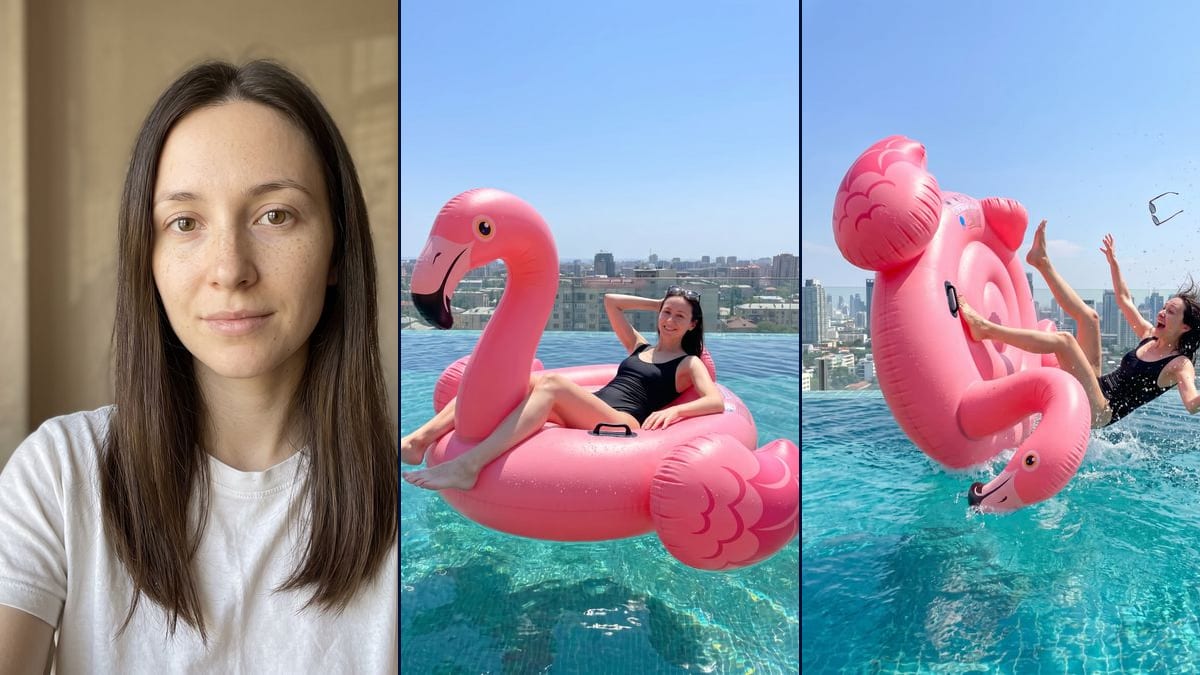
Real workflow: a freckled woman in a white T-shirt, then the same woman in a black swimsuit lying back on a pink flamingo float in an infinity pool, and thrown into the water as the float flips, sunglasses in the air. In the fall, the face is small and less faithful, and the flamingo's neck curls under the float.
At a glance
The flamingo float trend, also known as "Hey Bro Thank You Bro", starts from a single photo: you lounge on a giant float in a rooftop infinity pool, then the float flips and you end up in the water. The videosi.io tracker added it on 7 November 2026 with the "Just starting" status (page updated on 11 November), and media.io has a page on it. Here you upload your selfie and an image model builds the scene around your face.
You get two still pictures, no video. In the first, you lounge in the float, one hand behind your head, sunglasses pushed up, the city behind the glass. In the second, the float flips and you fall backward into the water, legs in the air, sunglasses flying. On the demo, the relaxed shot keeps the face well, but small. In the fall, the face is less faithful and the flamingo has an impossible neck.
For another take on water, see the underwater portrait. For another photo trend made from a selfie, there is the ghost photoshoot, and to put yourself in a setting of your choice, the scene placement tool. Both renders cost 38 credits, see pricing.
These are the files of the workflow above, exactly as the models produced them, unretouched. The starting point is shown when there is one.
Starting point
Render
People who want to try the flamingo float trend on their own photo for a story, an Instagram or TikTok post, and creators who want the starting picture for a holiday gag video.
A sharp selfie of you or of someone who agrees, ideally facing the camera, and a description of their face in the prompt (hair colour and length, beard, glasses), plus the swimsuit you want. The photo is optional.
Take a front-facing, well-lit selfie
The model starts from your face and makes up the rest, body and swimsuit included. A sharp photo, facing the camera, with no sunglasses and no hand over your mouth helps, especially for the fall, where the face ends up small in the frame.
Describe yourself in the prompts
The prompts describe a woman with brown eyes, freckles and long dark brown hair in a black one-piece swimsuit. Put in your own hair, beard, glasses or the swimsuit you want, or the model falls back on the demo's.
Keep the framing lines
"Taken by a friend, not a selfie" and "whole body and whole float in frame" were added after a failed first try that came out as an arm's-length selfie. If you rewrite the prompt, keep them.
Check the face at full size before you post
On the demo, the relaxed shot kept the features but small, and the fall changed them. Zoom in on the face, compare it with your photo, and rerun only the failed render for 19 credits if you do not recognise yourself.
The same canvas, tuned for different needs: each variation is two or three lines of prompt away.
Change "the woman" to "the man" or describe two people. With two on the float, say who falls and who stays on, or whether you both go in, or the model picks for you. Not tested on the demo.
The flamingo is what makes the trend, but the prompt works with a white swan, a unicorn or a giant doughnut. Keep "giant inflatable pool float" and the lying-back pose, and describe the shape and colour in one sentence. Not tested.
Keep the float and the fall, change the place: a villa pool with palm trees, a mountain lake, a hotel pool by the sea. Always say that you fall into the water, well away from the edge. Not tested on the demo.
On the demo, the fall shows the whole float and the face is small and less faithful. Add "tighter framing, her face sharp in the upper third of the picture" to give the features more room, even if part of the float gets cut off. Not tested.
On the demo, the relaxed shot shows mid-rise buildings and the fall shows towers. Replace "tall buildings" with the same precise description in both prompts, for example "eight-storey buildings with flat roofs, the sea on the horizon". Not tested.
Start from the relaxed shot and plug in a Video node: describe the push, the float rearing up and the backward fall into the water, over a few seconds. The template does not include this node. Not tested on the demo, and paid separately.
The demo prompts describe a woman with long dark brown hair and freckles. If you have short hair, a beard or glasses and do not say so, the model may take them away.
On the demo's first try, without "taken by a friend, not a selfie", the relaxed shot came out as an arm's-length selfie cropped at the waist. Keep "whole body and whole float in frame" too.
On the first try, the fall only showed her rocking on the float. It took spelling out the float tipped on its side, her thrown off backward, the flying sunglasses and the splash to get the actual moment of the fall.
No. The demo starts from a head-and-shoulders portrait in a white T-shirt, and the model invented the body and the black swimsuit. So the body is not yours: the model made it up.
In the relaxed shot, yes, but the face takes up little room and the freckles no longer show. In the fall, less so: mouth wide open, wet hair, a small face, and the model changed the features. If likeness matters, go with the relaxed shot.
The template only makes two pictures. You can plug a Video node into the relaxed shot yourself and describe the push and the fall into the water. We did not test it, and the video costs extra credits.
38 credits, 19 per render on Nano Banana Pro at 2K. If one face does not work for you, rerun just that render for 19 credits.
Yes, by switching the node to Nano Banana 2.1 at 1K, which costs less per render and gives smaller pictures. We did not test it on this scene, where the face is already small. The demo runs on Nano Banana Pro.
1792 x 2400 pixels, portrait, in a 3:4 ratio. Plenty for an Instagram story or post, and enough for a print of about 15 x 20 cm.
We do not know who started it or where the name "Hey Bro Thank You Bro" comes from. videosi.io added it to its tracker on 7 November 2026 with the "Just starting" status, and media.io has an undated page called "flamingo-float-ai-video". Imaginode has no link with these sites.
The photo is optional in the canvas, but without it the model invents a person. For it to be you on the float, you need your selfie.
Flamingo float AI trend photo from your own selfie
Use this workflowFree account, no card required. The workflow opens pre-filled in your canvas.
 Nano Banana Pro
 Flux Kontext
 Seedream 5 Pro