Your selfie as a premiere photo: walking the red carpet between photographers or posing at the photocall under the flashes. Face kept, drift shown. Workflow visible here.
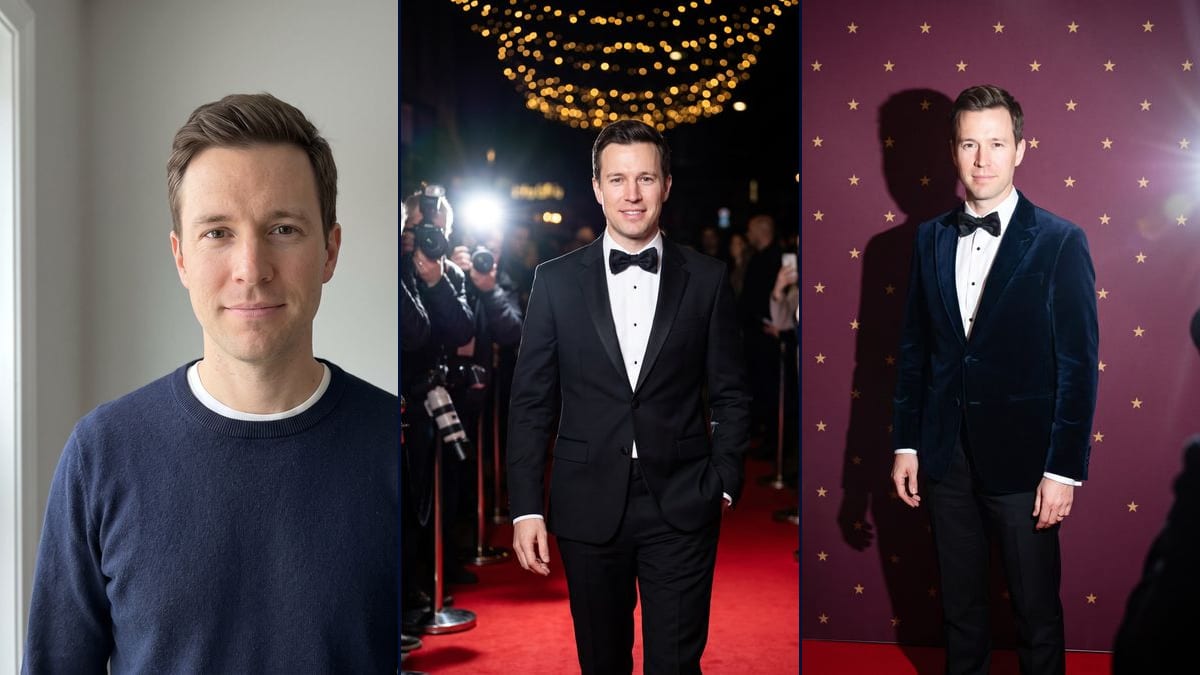
Real workflow: a man in a navy sweater against a grey wall, then the same man in a black tuxedo on a red carpet at night, photographers on the left and fans with phones on the right, and in a midnight blue velvet jacket in front of a burgundy backdrop with gold stars. On the carpet he smiles with his teeth showing and his shoes are out of frame. At the photocall, a photographer gets into the shot and a wedding ring appeared.
At a glance
You provide
1 photo · a text or a brief
What the workflow produces
2 images in 3:4
Canvas structure
6 nodes wired by 4 connections
Models wired in
Nano Banana Pro
Cost of one full run
about 38 credits, roughly $0.46
Account
The demo is visible without an account; generating requires a free account, trial credits included
The AI red carpet photo made from a selfie comes back several times a year: in May with gala season, during premiere season, then again before the holidays. You send your photo with a prompt and end up in a tuxedo under the flashes. The templates and guides we reread on 2 November 2026 give no audience figures, so there's nothing to back up talk of a huge wave. This workflow makes the two pictures that show up most: the arrival on the carpet between photographers and fans, and the solo pose in front of the photocall backdrop.
The model, Nano Banana Pro, keeps the demo's face, shave and haircut. It still takes liberties. On the carpet, the man smiles with his teeth showing when his photo has a closed-mouth smile, his hair comes out darker, and the frame stops at mid-shin instead of showing his shoes. At the photocall, a blurred photographer gets into the frame despite the prompt, and a wedding ring appeared on his hand.
For a cover with your own headlines, use the magazine cover. For a set of portraits without the evening theme, it's the AI photoshoot, and to try on formal wear for a ceremony, the wedding suit. If you'd rather act in a film scene than arrive at its premiere, see put yourself in a film. Both renders cost 38 credits, see pricing.
Actual renders from the demo
These are the files of the workflow above, exactly as the models produced them, unretouched. The starting point is shown when there is one.
Starting point
Your selfie
Render
The same man arriving at night on a red carpet in a black tuxedo and bow tie, one hand in his pocket, photographers and flashes on the left, fans with phones on the right, ropes and posts, a string of golden lights; face, shave and haircut kept, but the hair is darker, he smiles with his teeth showing, the frame cuts his legs at mid-shin with no shoes in sight, the photographers fill only one side and a blurred sign stays in the backgroundGenerated with Nano Banana ProThe same man posing alone in front of a burgundy backdrop with small gold stars and no letters, in a midnight blue velvet dinner jacket and black bow tie, crisp shadow on the backdrop and flash glare on the right; faithful face and closed-mouth smile, but a blurred photographer gets into the frame on the right, a wedding ring appeared, and he's framed almost full length and square on instead of turned to the sideGenerated with Nano Banana Pro
Who it is for
People who want to do the AI red carpet photo trend for their stories or profile picture, friends planning a film-themed party, content creators following the formats that come around with galas and premieres.
Which files to provide
A sharp, front-facing, well-lit selfie of you or of someone who agreed, and the exact colour of their hair written into the prompt. The photo is optional.
How it works
1
Take a sharp front-facing selfie
Face straight on, good light, no filter. A chest-up shot like the demo's is enough: the model makes up the body, the tuxedo and the setting.
2
Fix the hair description
The prompts say "short dark hair" when the demo's hair is brown, and the carpet render darkened it. Write the exact colour and length of yours, and add "closed-mouth smile" if that's how you smile.
3
Pick the carpet or the photocall
The carpet shows an arrival in motion, at night, with the crowd around. The photocall gives a posed, tighter portrait in the hard light of the flashes. Run both, or a single node for 19 credits.
4
Check the edges and the hands
In the demo, a photographer spills into the photocall frame and a wedding ring was added. If that bothers you, make the prompt stricter ("no ring", "nobody else in the frame") and rerun that node.
Variations and use cases
The same canvas, tuned for different needs: each variation is two or three lines of prompt away.
The carpet arrival or the photocall pose
The carpet tells an arrival: he walks, the crowd surrounds him, flashes go off at the side of the frame. The photocall isolates the person against a plain backdrop, with a hard shadow and closer framing. The first makes a mood shot, the second a cleaner profile picture.
In an evening gown for a woman
Change "the man" to "the woman" and the tuxedo to a long gown, with the colour, fabric and neckline spelled out. Add "no designer jewellery, no logo" to keep brands out. Not tested in the demo, and remember to update the face and hair description.
As a couple on the carpet
Start from a photo where both faces are sharp and rewrite the prompt with two guests, arm in arm, and one line of description each. Not tested here, and both people have to agree to their photo being used.
A photocall backdrop in your colours
Replace "deep burgundy with gold stars" with your colours and a simple pattern, diamonds or circles. Keep "no letters, no logo": the model is quick to invent fake sponsor names that come out misspelled. Not tested in the demo.
Black and white like a press photo
Add at the end of the prompt "black and white photo, film grain, strong contrast, like a 1960s press photo". The red of the carpet goes, and the flash and shadow stand out more. This version hasn't been tested.
A short video of the arrival
Connect a Video node to the carpet render and describe the motion: he takes a few steps, turns towards the photographers, the flashes pop. The demo stops at the two still images, this step hasn't been tested and the video costs extra credits.
Common mistakes
A profile or dim selfie
The model has one photo to rebuild the face from. In profile, blurry or badly lit, it fills in the gaps, and under the hard flash light the difference shows even more.
Leaving "short dark hair" in the prompt
In the demo, that line darkened brown hair. If you're blond, red-haired or have long hair, rewrite it, or the model blends your face with the description.
Using someone's photo without asking
The image is meant to look like the person, and the setting suggests a real event. Only use photos of people who said yes, and never a famous person.
Do I need a photo to see myself on the red carpet?
No, it's optional. Without one, the model invents a guest from the prompt. With your selfie, it keeps your face, which is the whole point of the trend.
Why not just ask Gemini?
You can. Here, both prompts are ready and wired to the same photo, the model is picked for face accuracy, and the demo shows you up front what it keeps and what it gets wrong.
Why does a photographer show up at the photocall?
The prompt asks for photographers out of frame, but the model still put one, blurred, on the right edge, with his lens and hand. Crop the image or rerun the node: the result changes from one try to the next.
How much do the two photos cost?
38 credits, 19 per render on Nano Banana Pro. Rerunning a single image costs 19 credits.
Is there a cheaper option?
Yes, by switching the node to Nano Banana 2.1 in 1K, 7 credits per render. The face is less faithful, especially at the photocall where it takes up more of the frame. That's why the demo runs on Nano Banana Pro.
How big are the images?
1792 x 2400 pixels, vertical 3:4. That's enough for a story, a profile picture or a small print, not for a poster.
Why can't I see the shoes on the carpet?
The prompt asked for the whole body, but the frame cuts the legs at mid-shin. Add "wide shot, feet and carpet visible below the shoes" and rerun if you want the full figure.
Where does the wedding ring at the photocall come from?
The starting photo has none and the prompt doesn't mention one: the model added it on its own. Write "no ring, no jewellery" to avoid it.
 Nano Banana Pro
 Flux Kontext
 Seedream 5 Pro