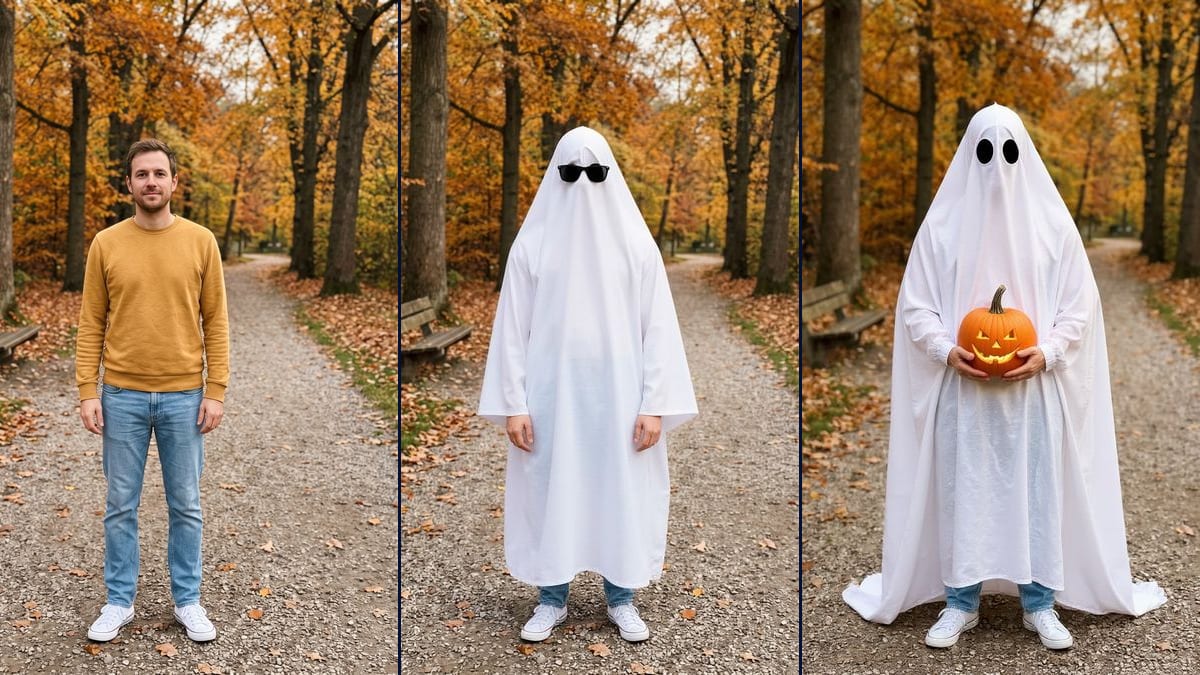
Sunglasses or pumpkin
Sunglasses on the sheet are the version you see most often in the trend; the carved pumpkin feels more autumnal. Only the prop line of the prompt changes, the sheet and the setting are described the same way.
The ghost photoshoot trend on your own full-length photo: white sheet, sunglasses or a pumpkin, your jeans and sneakers kept. Workflow visible, no account.
Real workflow: a full-length photo of a man with brown hair and a short beard, in a mustard jumper, light blue jeans and white canvas sneakers, on a gravel path in an autumn park, then the same man under a white sheet with black sunglasses, and under a sheet with a carved pumpkin against his belly. The path, the bench and the sneakers come from the photo; in both renders his hands stick out of the sheet, though the pumpkin prompt asked for them to stay hidden.
At a glance
The ghost photoshoot comes back every October on TikTok and has done since 2020. A white bedsheet with two holes cut in it, sunglasses perched on top, a path covered in fallen leaves, and at the bottom, the person's jeans and sneakers. Doing it for real takes a sheet you don't mind ruining, a pair of scissors and a friend holding the phone. This workflow starts from a full-length photo of you and puts the sheet on it. Two images come out: one with the sunglasses and one with a carved pumpkin.
The model edits your photo as it is. In the demo, the gravel path, the orange trees and the bench all come from the original picture, and so do the white sneakers. That gives you the one real rule: your feet have to be in the shot, because the shoes are how anyone knows who's under the sheet. The sheet itself didn't follow every instruction. It hangs like a long-sleeved robe in the sunglasses version, it trails on the ground in the pumpkin version, and the hands come out in both.
If your photo was taken in midsummer, run it through change the season of a photo first. For heavier film grain there's the 90s photo look, and for a full costume instead of a sheet, the Halloween costume. Both renders cost twelve credits.
These are the files of the workflow above, exactly as the models produced them, unretouched. The starting point is shown when there is one.
Starting point
Render
People who want to do the TikTok ghost photoshoot without a sheet or a photographer, starting from a full-length photo of themselves, groups of friends doing it together in the autumn, content creators who follow trends.
A full-length photo, head to toe, of you or of someone who agreed, plus the prop you want: sunglasses, a carved pumpkin or something else.
Take a full-length photo
Standing, facing the camera, head to toe with a bit of ground below your feet. The jeans and shoes stay exactly as they are in the final image, so wear the ones you want people to see.
Describe the sheet
How far down it goes, how many holes, and what must not show: sleeves, a cape, a second layer. The demo says "to the knees" and the sheet still reaches the ankles, so check before you keep it.
Pick the prop
Sunglasses on the sheet or a carved pumpkin. If the prop needs two hands, write that the hands stay under the fabric, then check: in the demo they came out anyway.
Look at the bottom of the image
The jeans and sneakers should be yours, in the same spot. If the sheet covers too much of them or the hands stick out, rerun that node on its own: six more credits.
The same canvas, tuned for different needs: each variation is two or three lines of prompt away.
Sunglasses on the sheet are the version you see most often in the trend; the carved pumpkin feels more autumnal. Only the prop line of the prompt changes, the sheet and the setting are described the same way.
Everyone takes a full-length photo in the same spot, everyone goes under a sheet, and you guess who's who from their shoes. Only with friends who are happy for their photo to be used.
The sunglasses prompt already asks for a 35mm film look, and the demo kept only a faint grain. For something stronger, write "heavy grain, faded colours, slightly soft focus".
A wood, a living room with fairy lights, a pumpkin patch. The model keeps the setting of the input photo, so the place you pose in is what decides where the ghost ends up.
Lots of photos in the trend show a sheet with no arms poking out. Spell it out, "no hands, no arms, no skin visible", and plan for a rerun: the pumpkin prompt said so and the hands still came out.
They make the image here, then cut it into their video with the trend's sound. A Video node connected to the image can move the sheet or the leaves, but this page has no video demo.
Without the feet, the model has to invent the jeans and shoes, and the image loses the part that makes it yours. Frame head to toe, with some ground underneath.
With no limit written down, the sheet drops to the ground and hides everything. Even with "to the knees", the demo went down to the ankles: write the height, then check.
The face disappears, the person doesn't: the outfit, the place and the build stay recognisable to anyone who knows you. Only use someone else's photo with their consent.
The model keeps the light of the photo. A dark picture gives you a grey sheet, and asking for golden light doesn't change much: in the pumpkin demo it barely warmed the scene.
Because under a white sheet everyone looks the same. Your jeans and shoes are what's left of you in the picture, and in the trend that's the detail people look at. Without the feet, the model makes up the bottom half and you're left with a sheet in a park.
No. The sheet was meant to stop at the knees and goes lower in both images. The sunglasses version has sleeves and lets the hands out; the pumpkin version shows the hands even though the prompt wanted them hidden, and the sheet trails on the ground. The pumpkin image was redone once before it was kept.
Yes, that's the point: the path, the trees, the bench and the light in the demo all come from the original photo. The framing can shift a little. In the sunglasses version, the bench is smaller and the figure taller.
Twelve credits, six per render on Flux Kontext. Rerunning a single image costs six more, which is what happened with the pumpkin during the demo.
Because the face disappears under the sheet: there are no features to hold, just a photo to edit. Flux Kontext keeps the background and the visible clothes for six credits a render, against nineteen for Nano Banana Pro in 2K.
880 x 1184 pixels, close to vertical 3:4, smaller than the input photo. That's enough for a post or a story, a bit tight for a large print.
Write "no hands, no arms visible" in both prompts, not just the pumpkin one: the sunglasses version didn't say it, and the hands came out. Then rerun the node that got it wrong, it sometimes takes two tries.
Yes, only the prop line changes: a mug, a string of fairy lights, a basket of leaves. Say how the prop is held, or the model brings the hands out to carry it.
Do the ghost photoshoot trend with your own photo and AI
Use this workflowFree account, no card required. The workflow opens pre-filled in your canvas.
 Flux Kontext
 Nano Banana 2.1
 Seedream 5 Pro