The couple who entertain in summer
They often eat outside and can't choose between discreet bollards and string lights. Seeing both evenings on a photo of their own lawn settles it before they pay for an outdoor circuit.
A daytime photo of your garden turned to night, with bollards, uplights and a wall light, then under festoon string lights. Choose before you buy. Workflow visible here, no account needed.
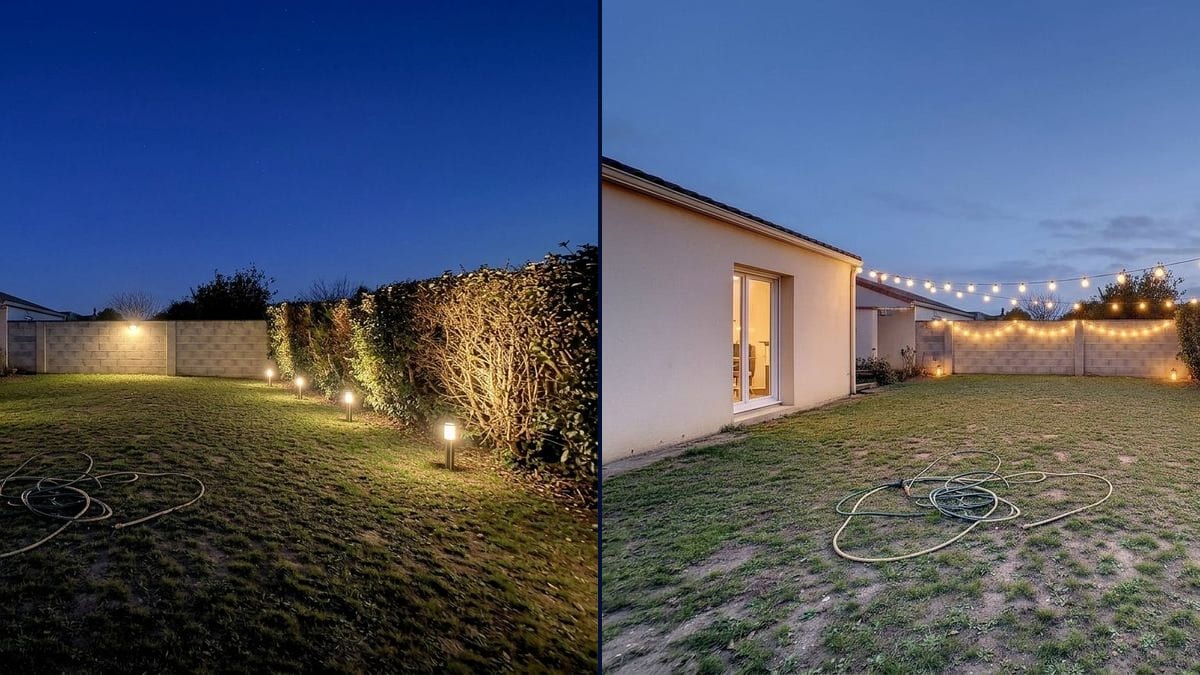
Real workflow: a lawn between a beige house, a breeze block wall and a hedge under a grey sky, then the same garden at night with bollards and a wall light, and at dusk under festoon string lights with lanterns.
At a glance
Garden lights get picked from a catalogue in broad daylight, and then one evening you find the bollards are glaring or the string lights only cover half the lawn. This workflow starts from a daytime photo of YOUR garden and shows you two evenings: low-key lighting with bollards, uplights and a wall light, then festoon lights with lanterns.
The hard part is going to night without losing the garden. Darkening a photo gives a grey picture; letting the model run free risks an invented patio or pool. The prompt names each light and its place. Nano Banana 2.1 relights the whole scene while keeping the lawn, the wall and the hedge.
For the front of the house, see the day to night photo; to lay out the lawn first, the garden design tool. Both evenings cost fourteen credits.
These are the files of the workflow above, exactly as the models produced them, unretouched. The starting point is shown when there is one.
Starting point
Render
Homeowners lighting their garden, electricians and landscapers attaching a picture to a quote, hosts planning a party.
A daytime photo of the garden, the mood you want and where each light goes.
Shoot in daylight
From the house or the patio, in daylight, with the walls, hedge and paths you want lit in frame. Clear away anything lying on the lawn.
Pick the time of day
Deep blue night to judge practical lighting, dusk for a party mood. The time of day changes the whole colour of the picture.
Place every light
Uplights at the foot of the hedge, bollards along the lawn, a light on the wall, string lights between two anchor points. Name the spot, or the model puts lights everywhere.
Show it to your electrician
They'll tell you where the cables can run, how many light points to plan and which fittings are rated for outdoor use.
The same canvas, tuned for different needs: each variation is two or three lines of prompt away.
They often eat outside and can't choose between discreet bollards and string lights. Seeing both evenings on a photo of their own lawn settles it before they pay for an outdoor circuit.
The electrician photographs the garden in daylight during the visit and attaches the same view lit up to the quote. The client sees where the lights go, not just a list of part numbers.
The garden has just been planted. The landscaper offers a lighting option and shows the client the hedge uplit at night, to sell the lighting alongside the rest of the job.
For her husband's fortieth, she wants to know if a string of lights and a few lanterns are enough to dress the lawn. The picture gives her the mood before she orders the metres of lights.
The owner of a holiday rental compares the two moods, installs the one he likes, then photographs the real garden lit up for his listing, so guests know what summer evenings there look like.
A retired man wants to light the path to the gate and the back of the garden without blasting the neighbours. He judges low, soft lighting on the picture before buying motion sensors.
Turning down the brightness on a daytime photo gives a grey garden with no real light. Ask the model for night: it redoes the sky, the shadows and the reflections.
"Light up the garden" puts lamps everywhere, including places no cable will ever reach. Name each spot: foot of the hedge, edge of the lawn, back wall.
In the demo, the garden hose stays in the middle of the lawn on both renders. Tidy up before the photo: the model keeps what it's told to keep.
The number of light points, their power and the cable runs are for an electrician to decide. The picture helps you choose a mood.
No: same lawn, same wall, same hedge, same framing. Only the sky and the light change. In the demo, the house's glass door also lit up from inside.
Because the prompt says to keep the garden exactly as it is, and Nano Banana 2.1 did, hose included. Put it away before the photo, or remove it first with the object remover.
Yes: write the colour, cool blue, amber, multicoloured for a party. Warm white is still closest to everyday garden lighting.
Fourteen credits, seven per render on Nano Banana 2.1. A third mood on the same photo costs seven more.
Because going from day to night changes all the light in the picture, not just one object. Nano Banana 2.1 redoes the sky, the shadows and the reflections while keeping the garden as it is.
In the demo you mostly see their effect, a hedge lit from below, more than the fittings themselves. The bollards and the wall light are clearly visible.
Yes: describe the anchor points, from the house wall to the hedge, around a pergola, along a wall. In the demo they run from the house to the hedge and along the back wall.
The format of your photo, here 4:3. A garden photographs best in landscape, from the house.
Visualize your garden lighting with AI
Use this workflowFree account, no card required. The workflow opens pre-filled in your canvas.
 Nano Banana 2.1
 Flux Kontext
 GPT Image 2.5 Sunburst