James Bond AI photo, made from your own selfie

Your selfie as a secret agent in a tuxedo: at the casino table, then full length in the spiral tunnel. 38 credits for both, demo flaws shown.

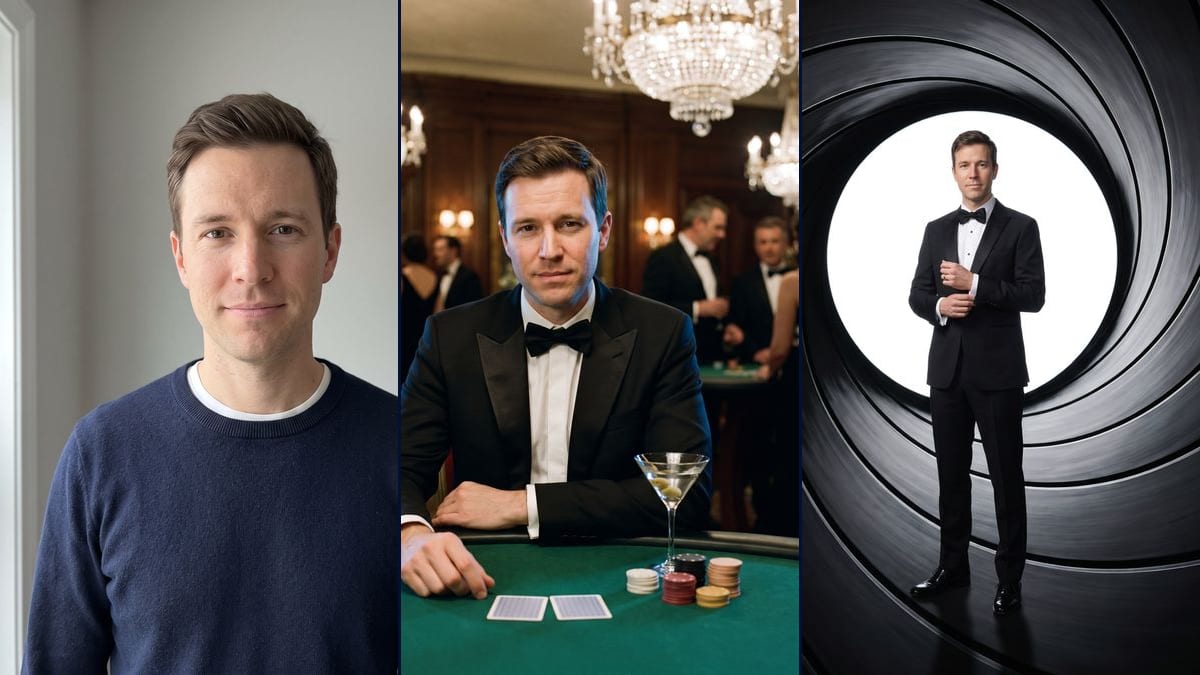
The starting photo: a clean-shaven man in his thirties with short brown hair combed to the side and a slight smile, in a navy sweater over a white T-shirt, framed head and shoulders against a light grey wallInteractive demo

Real workflow, real results. Pan and zoom freely.

Use this workflow

Real workflow: a clean-shaven man in a navy sweater against a light grey wall, then the same man in a tuxedo at a casino table with two face-down cards, chips and a martini glass, and finally standing in a white circle at the end of a spiral tunnel, adjusting his shirt cuff. At the casino he looks a little older than in the photo. In the tunnel his legs extend below the circle and a wedding ring appeared on his left hand.

At a glance

You provide
1 photo · a text or a brief
What the workflow produces
2 images in 3:4
Canvas structure
6 nodes wired by 4 connections
Models wired in
Nano Banana Pro
Cost of one full run
about 38 credits, roughly $0.46
Account
The demo is visible without an account; generating requires a free account, trial credits included

The page videosi.io/trending, updated on 20 November 2026, lists a "James Bond AI Photo" trend. It was added there on 17 November 2026 with the status "Just starting", since 16 November 2026. The page sums it up in one line: yourself in a tuxedo, in the gun barrel or at a casino table, from a photo, as a still image. We have read no other dated source, and we have no view counts to give you.

This template remakes the trend in its own format, the still image. Upload a selfie and you get two portrait photos in a tuxedo. In the first you sit at a casino table with two face-down cards in front of you, chips and a martini glass beside them. In the second you stand in a white circle, seen from inside a dark tube with spiral grooves, adjusting your shirt cuff. The hands are empty: the demo shows no weapon. It does show what went wrong. At the casino the light ages the man in the photo a little and the glass holds three olives instead of one. In the tunnel his legs extend below the circle and a wedding ring appeared on his left hand.

"James Bond" is the name of the trend people search for. Imaginode has no link with the rights holders of the films, and these pictures are meant for personal use. For another black-tie evening, see the red carpet photo or the 1920s Gatsby toast. Both renders cost 38 credits, see pricing.

Actual renders from the demo

These are the files of the workflow above, exactly as the models produced them, unretouched. The starting point is shown when there is one.

Starting point

Your selfie

Render

The same man in a black tuxedo and bow tie, seated at a casino table with plain green felt, two face-down cards in front of him, five stacks of chips and a martini glass on the right, blurred crystal chandeliers and wood panelling behind him; the harder light marks his features and slicks his hair down, so he looks a little older than in the photo, the glass holds three olives instead of one, the black and red chips have small pale notches on the edge and a few guests' faces can still be made out in the blurGenerated with Nano Banana Pro
The same man full length in a black tuxedo and polished shoes, standing in a white circle seen from inside a dark tube with spiral grooves, adjusting his left shirt cuff, hands empty; his legs and shoes extend below the circle although the prompt asked for the whole body inside it, a wedding ring appeared on his left hand, he stands almost square to the camera and his face, small in the frame, is less detailed than at the casinoGenerated with Nano Banana Pro

Who it is for

People who want to try the secret agent in a tuxedo trend on their own selfie, for a profile picture, an invitation to a themed party with friends or a birthday card, without hiring a tuxedo or going to a casino.

Which files to provide

A sharp selfie of you or of someone who agrees, front-facing and taken in daylight, plus the right person, their hair and their outfit (evening gown or tuxedo) in the prompts. The photo is optional.

How it works

  1. 1

    Upload a sharp, front-facing selfie

    Taken in daylight, face uncovered, no sunglasses. The demo starts from a head-and-shoulders portrait against a pale wall. That photo is all the model has to rebuild your face under the casino chandeliers, and again at a much smaller size in the tunnel.

  2. 2

    Fit the prompt to the person

    Both prompts say "the man in this photo" and "short brown hair brushed to the side", which describe the demo. Put in the right person and their hair, change the pronouns if needed, and take out "do not add a beard" if you have one. The setting and the sentence about the face can stay.

  3. 3

    Run both renders

    Each Image node costs 19 credits. On the demo the tunnel was kept on the first try. The casino was redone once, because fake lettering was printed on the green felt. The prompt now asks for plain felt with no lines, letters or symbols.

  4. 4

    Check the face, the hands and the background

    Open each picture at full size next to your selfie. Check how old you look at the casino, your hands (a wedding ring was added on the demo) and the guests' faces in the blur. If one render does not work, rerun only that one for 19 credits.

Variations and use cases

The same canvas, tuned for different needs: each variation is two or three lines of prompt away.

A version for a woman

Replace "the man in this photo" with "the woman in this photo" in both prompts, change the pronouns and take out "do not add a beard". For the outfit, write "a black evening gown" in place of the tuxedo, or keep the tuxedo if that is what you want. Describe her hair too. Not tested.

A white dinner jacket at the casino

In the casino prompt, replace "a black tuxedo with satin peak lapels" with "an ivory dinner jacket with black trousers". Keep the black tuxedo in the tunnel, where a pale jacket would blend into the white circle. Not tested.

A tighter frame in the tunnel

For a bigger face, replace "He stands full length" with "He is framed from the knees up" and remove the sentence "His whole body is inside the white circle" along with the mention of the shoes. The circle should then sit around the torso, as it does on the demo. Not tested.

Square, for a profile picture

Switch the casino node from 3:4 to 1:1 before you run it. A round avatar will cut off the cards and chips at the bottom of the picture, so if you want them in, ask for them to be placed closer to him, at chest height. Not tested.

A themed party invitation

Add "the top quarter of the image is left empty" to the tunnel prompt, then put the date and address in afterwards with your usual layout tool. Leave out any film title or 007 number, and keep the invitation for your friends. Not tested.

A different drink on the table

Replace "a martini glass with an olive" with "a glass of sparkling water with a slice of lemon", or whatever drink you like. On the demo the model put in three olives instead of one, so expect a rerun or two for a detail that precise. Not tested.

Common mistakes

Leaving "the man" and "short brown hair" in for someone else

Those words describe the man on the demo. With a selfie of a woman with long hair, the model gets two descriptions that contradict each other and may masculinise the face or shorten the hair. Fix the person, the pronouns, the hair and the outfit before you generate.

Counting on the whole body inside the circle

The tunnel prompt spells it out, and on the demo the legs and shoes still extend below it. He also stands on the dark floor of the tube, where his shoes are reflected, instead of the soft shadow we asked for. If that framing matters to you, allow for a rerun or two.

Posting without checking the hands and the background

On the demo a wedding ring appeared on the left hand in the tunnel, cufflinks at the casino, and a few guests' faces can still be made out in the blur although the prompt wanted them seen from behind or blurred. Those people do not exist, but look at them before you share the picture.

Adding a logo, a film title or an actor's name

The prompt rules out any resemblance to an actor and any text, logo or number. The tunnel composition already recalls a very well-known title sequence. Add a brand to it or use it in an advert and you are outside the personal use this template is made for.

Frequently asked questions

Will my face still look like me?

Partly. On the demo you can recognise the man from the photo in both renders. At the casino the harder light marks his features, deepens the forehead lines and slicks his hair down, so he looks a little older. In the tunnel he is shown full length, so his face is small and less detailed, and his eyes look lighter.

Is there a weapon in the pictures?

No. The casino prompt says "No weapon", and the tunnel prompt says his hands are empty, with no gun or weapon of any kind. On the demo one hand rests near the cards at the casino, and in the tunnel he is adjusting his shirt cuff.

Why do the legs extend below the white circle?

The model did not follow the prompt, which asks for the whole body inside the circle, from hair to shoes. On the demo the circle stops at mid-thigh and the legs stand out against the dark wall of the tube. We kept the picture as it came out. A rerun may frame it differently.

How much do the two images cost?

38 credits, 19 per render on Nano Banana Pro at 2K. On the demo the tunnel was kept on the first try and the casino was redone once, because of fake lettering on the green felt. If one of yours does not work, rerun just that one for 19 credits.

Can I pay less?

Yes, by switching the node to Nano Banana 2.1 at 1K, which costs less per render and gives smaller pictures. We did not test it on this template, and the full-length face in the tunnel, small to begin with, is the part most likely to suffer. The demo runs on Nano Banana Pro.

How big are the images?

1792 x 2400 pixels, portrait, in a 3:4 ratio. Enough for a story, a profile picture or a print of about 15 x 20 cm, for a birthday card for instance.

Do I get a video?

No, two still images. The page we cite describes the trend as a still image, and the template remakes it in that format. You can plug a Video node in after the image in the canvas. We have not tested that on this template.

Where does the James Bond AI photo trend come from?

We do not know who started it. The page videosi.io/trending, updated on 20 November 2026, added it on 17 November 2026 with the status "Just starting", since 16 November 2026. It is our only dated source, and Imaginode has no link with that site.

Can I use these pictures in an advert?

We advise against it. The renders carry no logo, no number and no film title, and look like no actor, but the tunnel is a deliberate nod to a very well-known title sequence. Imaginode has no link with the rights holders of the films. Keep these pictures for a profile picture, an invitation among friends or a birthday card.

Do I have to provide a photo?

The photo is optional in the canvas, but without it the model invents a face. For the person in the tuxedo to be you, it needs your selfie. If you upload a photo of someone else, they must agree to it.
James Bond AI photo, made from your own selfie

Use this workflow

Free account, no card required. The workflow opens pre-filled in your canvas.