The undecided groom
Navy or black, tie or bow tie: he has been going round in circles for weeks. Two pictures on his own portrait, and the conversation with his fiancée moves forward in one evening.
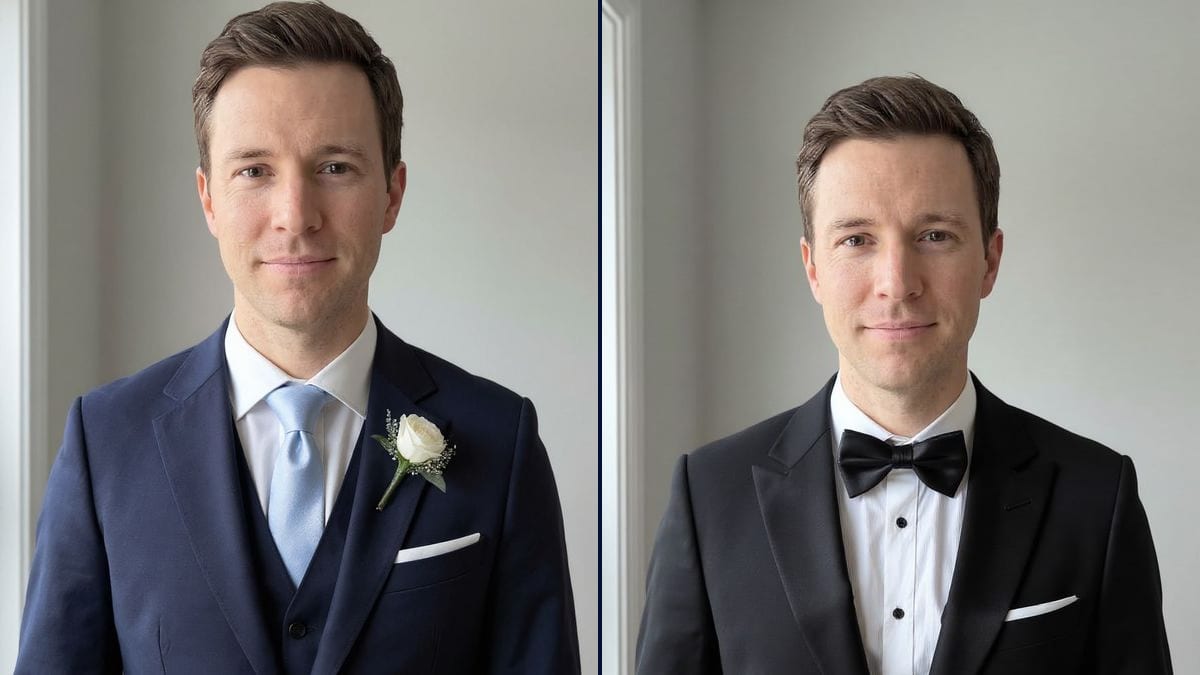
Your portrait in a navy suit with a buttonhole flower, then in a black tuxedo with a bow tie. To walk into the tailor's with a clear idea. Workflow visible here, no account needed.
Real workflow: a portrait of a dark-haired man in a navy sweater, then the same man in a navy three-piece suit with a light blue tie and a white rose, and in a black tuxedo with a bow tie. The framing is a little tighter than the photo.
At a glance
Picking a wedding suit usually means afternoons in shops trying on jackets under unflattering lights, often with no idea where to start. This workflow starts from YOUR portrait and gives you two directions before the first appointment: a navy suit with tie and buttonhole, and a black tuxedo.
The hard part is changing everything below the neck while keeping the face. A model that rebuilds the image makes you younger, restyles your hair or slims you down, and the choice means nothing. Flux Kontext dresses the groom and keeps his face, his haircut and his smile.
Once the outfit is chosen, it can go on the wedding invitation; for the haircut on the day, see the hairstyle changer. Both outfits cost twelve credits.
These are the files of the workflow above, exactly as the models produced them, unretouched. The starting point is shown when there is one.
Starting point
Render
Grooms and their groomsmen, tailors and suit rental shops, guests at a black-tie event.
A front-facing portrait framed to the shoulders, and the outfit described piece by piece, with what must not be added.
Take a portrait with shoulders
Front-facing, head and full shoulders in frame, soft light. A suit needs the shoulders to sit right.
Describe it piece by piece
Jacket colour and cut, shirt, tie or bow tie, buttonhole, waistcoat or not, pocket square or not.
Rule out the extras
The model likes to add a waistcoat or a pocket square. If you don't want them, write "no waistcoat, no pocket square".
Take the pictures to the tailor
They show the colour and the look you're after. The tailor handles fabric, cut and measurements.
The same canvas, tuned for different needs: each variation is two or three lines of prompt away.
Navy or black, tie or bow tie: he has been going round in circles for weeks. Two pictures on his own portrait, and the conversation with his fiancée moves forward in one evening.
The tailor photographs the client on the first visit and shows him two outfits on his own face. Fabric comes next, from a starting point they both agree on.
The groom wants his best men in the same shade. Each sends a portrait, and everyone sees the light grey suit on his own face before the group order goes in.
No tuxedo at thirty degrees in a barn. He compares a beige linen suit and a light blue one, no tie, open collar, before he sets foot in a single shop.
A rental shop shows the client its stock on his own photo, so he books the right model and size from home and only comes in once, for the final fitting.
Not a wedding, but the invitation says black tie and he has never worn one. He checks that the satin-lapel tuxedo suits him before renting or buying one.
In the demo, Flux Kontext added a pocket square to both jackets and a waistcoat to the navy suit. Say what you don't want, or it fills the gaps.
Without the shoulders, the model invents your build and the jacket sits badly. Frame down to mid-chest.
A jacket described on its own leaves the collar and shirt colour to the model. Name it: white, classic collar, or wing collar for the tuxedo.
The picture shows a colour and a look, not a cut to your measurements. Shoulders and sleeve length are the tailor's job.
No: same face, haircut, smile and skin tone. In the demo, only the framing got a little tighter.
Yes: light grey, midnight blue, sage green, beige for a summer wedding. One node per colour.
Yes, that's the demo: the navy sweater becomes a jacket with shirt and tie.
Twelve credits, six per render on Flux Kontext. A third outfit on the same photo costs six more.
Because it changes the clothes and keeps the face: in the demo, the man in the suit and the tuxedo is clearly the man in the photo, same haircut and smile.
The model tightened the portrait while dressing the groom: the head sits higher and larger. For closer framing, start from a chest-up photo and stress "the same framing".
Yes: a watch, cufflinks, a flower in a specific colour. Add them to the prompt one by one, with where they go.
The format of your photo, here 3:4, enough to show the jacket down to the first button.
Try on a wedding suit with AI
Use this workflowFree account, no card required. The workflow opens pre-filled in your canvas.
 Flux Kontext
 Nano Banana 2.1
 GPT Image 2.5 Sunburst