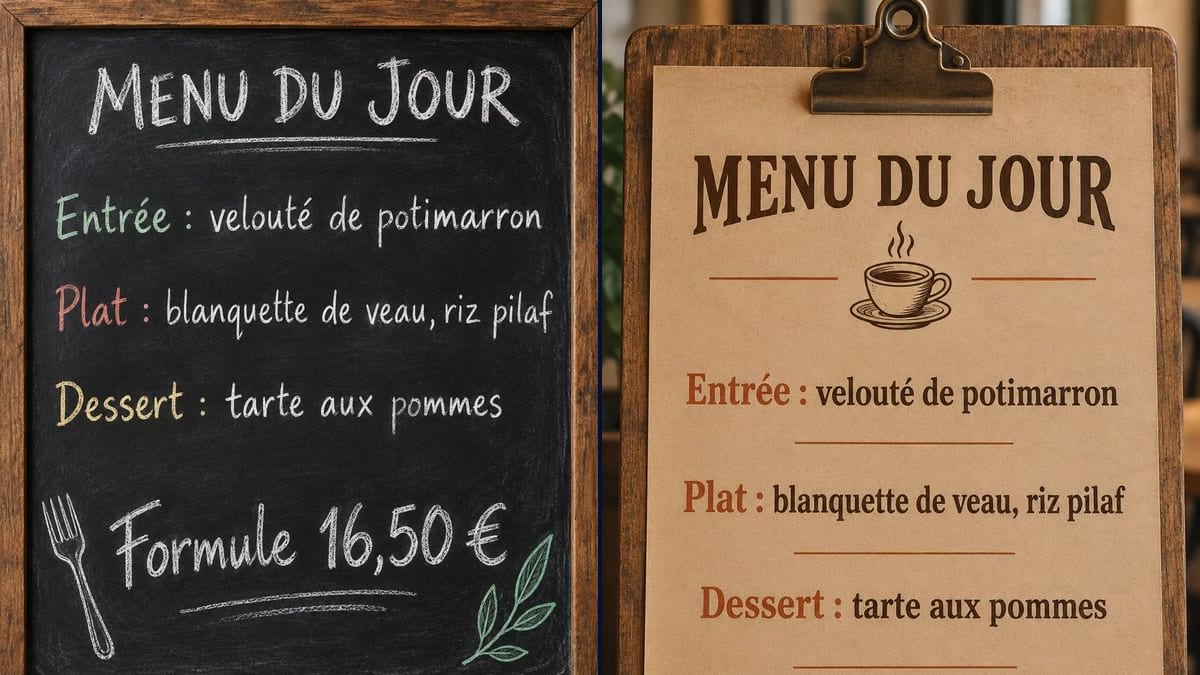
The bistro in the business district
The owner posts his board as a story at 11 every morning. Regulars from the offices nearby check it before coming down, and book a table when it's the blanquette.
Your daily menu on a chalkboard or a kraft sheet on a clipboard, starter, main, dessert and price written letter for letter, for screens or print. Workflow visible here, no account needed.
Real workflow: the same French daily menu on a black chalkboard in a wooden frame, dish labels in colour, a chalk fork and leaf, then on a kraft sheet clipped to a board with a coffee cup.
At a glance
The daily specials get chalked up every morning, and the people who read them are mostly the ones walking past. For everyone else, checking their phone at half eleven and wondering where to eat, you need an image. This workflow turns out the same set menu in two versions: a framed chalkboard and a kraft sheet on a clipboard for a café.
The hard part is chalk that looks real with no spelling mistakes. One wrong letter in a dish name or the price and the menu looks careless. The prompt gives every line in quotes and forbids adding any. Sunburst writes them letter for letter for three credits, cheap enough to redo every day.
For the full restaurant menu, see the restaurant menu maker; for the door, the opening hours sign. Both versions cost six credits.
These are the files of the workflow above, exactly as the models produced them, unretouched. The starting point is shown when there is one.
Render
Bistros, cafés, diners, delis, food trucks and canteens that post their menu every day.
The menu lines in quotes: heading, starter, main, dessert and set price, plus the look you want.
Write today's set menu
Starter, main, dessert, each with its label, as on the real board. One line per dish, in quotes.
Put the price at the bottom
"Set menu €16.50" or "Main only £12", large. It's the first thing customers look for.
Pick the look
The chalkboard for a bistro or a pub, kraft for a café, a canteen or a tea room.
Post before noon
Proofread, then post the image as a story, on your online listing or on the dining room screen around 11, when people pick where to have lunch.
The same canvas, tuned for different needs: each variation is two or three lines of prompt away.
The owner posts his board as a story at 11 every morning. Regulars from the offices nearby check it before coming down, and book a table when it's the blanquette.
A café serves one set lunch. The kraft version, with its coffee cup, matches the room's decor and shows on the counter screen as well as on the café's page.
A transport café changes its main every day. The waitress makes the board on her phone in the morning and sends it to the regulars' group, who know what's on before pulling in.
A deli offers a dish of the day to take away. The board goes on its online listing and on a small screen in the window, with "to take away" as the bottom line.
The manager of a company canteen posts the daily menu on the intranet. A chalkboard is friendlier than a table of text, and staff decide at a glance whether to go down.
A food truck changes pitch and dish every day. The board announces the menu on social media each morning, with today's location as the last line instead of the price.
Three starters, four mains, desserts and drinks: the board can't be read on a phone. Stick to today's set menu; the full menu lives elsewhere.
A menu with no price makes people hesitate. Put the set price large at the bottom, with the currency sign, as in the demo.
Sunburst gets it right nearly every time, but a misspelled dish seen by three hundred followers gets noticed. Read every line on the image.
A daily menu that never changes makes it look like the food never does. At three credits a board, redo it every morning.
In the demo, yes: the heading, the three dishes and the set price are exact on both versions, French accents included.
Yes: "Main: veal blanquette or roast cod" on one line, or two lines in quotes. Beyond six lines the board gets crowded.
No: it's an image for screens, social media or print. The chalk on the pavement is still what stops passers-by.
Six credits, three per render on GPT Image 2.5 Sunburst at medium quality. If you stick to one look, each day's menu costs three credits.
Because it spells correctly, accents, decimal separators and currency signs included, and it's the cheapest model in the catalogue. It's most reliable on a light background; in the demo, the black slate comes out typo-free too.
2:3 portrait, 1024 x 1536 pixels, close to A4. Right for a story or a vertical screen; to print it on A4, leave a thin margin.
A short line, yes, such as "Ask us about allergens". The full list goes elsewhere as usual; it won't fit on a readable board.
The model redoes the layout on each render: same style, same look, but not pixel for pixel. For a strictly identical board, keep one background and change the text in an editor.
Make a daily menu chalkboard with AI
Use this workflowFree account, no card required. The workflow opens pre-filled in your canvas.
 GPT Image 2.5 Sunburst
 Nano Banana 2.1
 Recraft V4.1