The birthday tea at home
Printed cards slipped into classmates' school bags, with the party time and address, on the child's favourite theme.
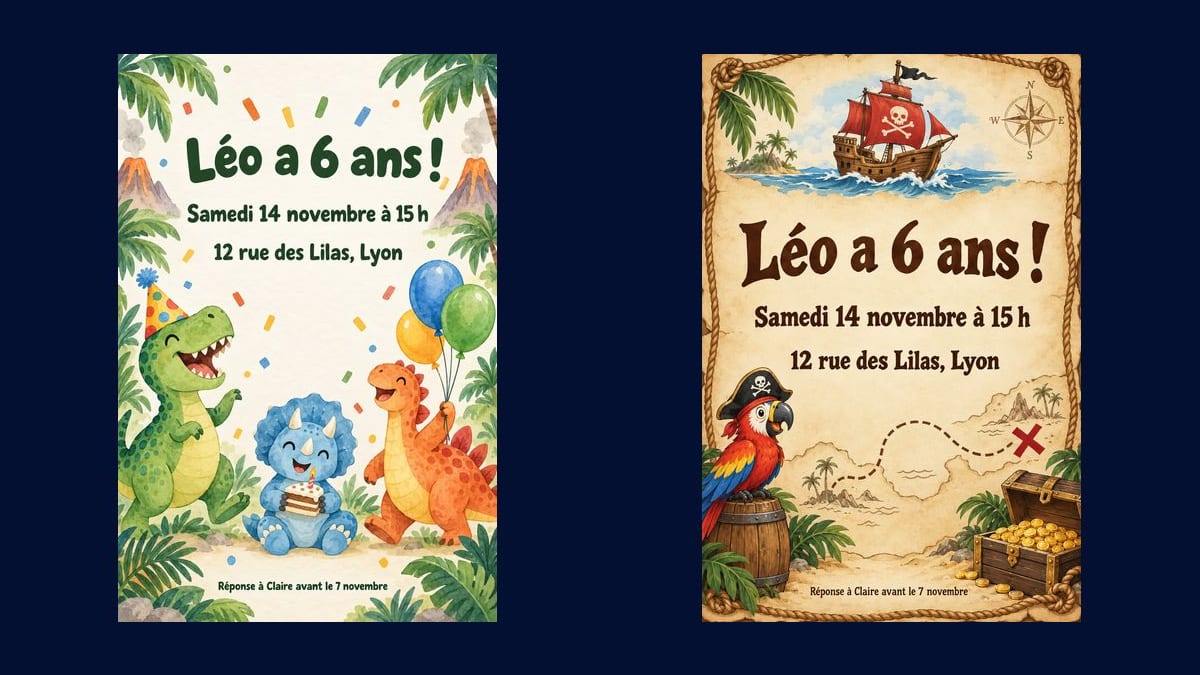
Two illustrated birthday invitations, dinosaurs or pirates, with the name, age, date and address written without a mistake. To print or to send. Workflow visible here, no account needed.
Real workflow: two prompts with the same four lines of text, two 3:4 invitations, watercolour dinosaurs and pirates on parchment, every word exact.
At a glance
A birthday invitation has to excite a six-year-old and give parents the date, time and address without an error. This workflow makes two, on two themes, with exactly the text you give it.
The hard part is the text. An image model happily invents a letter or a time. Each line is given in quotes, in order, and nothing else gets written; Sunburst writes accurately on a light background.
For a video of the child blowing out the candles, see the birthday video; for a wedding, the wedding invitation. Both invitations cost eighteen credits.
These are the files of the workflow above, exactly as the models produced them, unretouched. The starting point is shown when there is one.
Render
Parents planning a child's birthday, and party venues that provide the invitations.
Write the four lines
Name and age, day and time, address, who to reply to and by when. Each line in quotes, in order.
Pick the theme
Dinosaurs, pirates, unicorns, space, football: describe the characters, the objects and the font. Keep a light background.
Rule everything else out
No other words, no other numbers, no logo. Without that sentence, the model adds a tagline or an extra date.
Proofread and print
3:4 portrait, to print as a card or send by message. Check every line before sending it to the parents.
The same canvas, tuned for different needs: each variation is two or three lines of prompt away.
Printed cards slipped into classmates' school bags, with the party time and address, on the child's favourite theme.
The invitation gives the venue name, arrival time and pick-up time, with no risk of a typo in any of them.
The same design sent to parents through a messaging app, in a portrait shape that reads well on a phone, with a number to reply to.
Twins or two children celebrated on the same day each get their theme, dinosaurs for one and pirates for the other, with the same text.
A fortieth at a restaurant, a themed evening, a picnic: the theme changes, the recipe of quoted text stays the same.
A venue that hosts birthdays gives its customers an invitation in their colours, with its own address already written correctly.
The model rephrases, adds a tagline or changes the time. Each line in quotes, in order, nothing else.
Sunburst writes poorly on a dark flat colour. For a space party, keep a light sky or put the text on a light panel.
A full programme on the card becomes unreadable. Four lines are enough: who, when, where, who to reply to.
Film and TV heroes belong to their rights holders. Describe your own dinosaurs, pirates or unicorn.
In the demo every word is. Still proofread before printing: a rare or very long name can come out with a typo.
Yes: add a Media node wired into the Image node and describe where the photo goes. Keep the text in quotes.
Change the theme and font: an elegant evening, a picnic, bowling. The text recipe stays the same.
Eighteen credits, nine per invitation on Sunburst at high quality. A third theme costs nine credits more.
Because it writes the requested text letter for letter on a light background, measured on the sale banner and the infographic.
3:4 portrait, which prints well as a 5 × 7 inch card or A6 with a small margin.
Yes: write the four lines in the language you want, in quotes. The model copies them as they are.
You need an account to run the workflow; the picture then downloads and prints wherever you like.
Make a birthday invitation with AI
Use this workflowFree account, no card required. The workflow opens pre-filled in your canvas.
 GPT Image 2.5 Sunburst
 Nano Banana Pro
 Flux 3
 Seedream 5 Pro