Drop your screenplay PDF on the canvas: a Text node writes the visual bible, the characters are drawn as sheets, every scene gets its director's prompt, its first frame and its Wan 3.0 video with the dialogue performed, and the montage cuts the film together. The demo shoots an original three-scene screenplay. The whole workflow is visible without an account.
The real workflow: a three-scene screenplay PDF in a Media node, Claude Sonnet 5 writing the visual bible then one prompt per scene, Nano Banana Pro for the character sheets and the first frames, Wan 3.0 for the three fifteen-second scenes, a Montage node. The texts shown are the models' answers, untouched.
At a glance
You provide
1 PDF · a text or a brief
What the workflow produces
5 images in 16:9 · 3 videos of 45s in 720p, 16:9
Canvas structure
15 nodes wired by 27 connections
Models wired in
Claude Sonnet 5.5, Nano Banana Pro, Wan 3.0
Cost of one full run
about 647 credits, roughly $7.76
Account
The demo is visible without an account; generating requires a free account, trial credits included
A screenplay is already a breakdown: scenes, characters, sets, lines. The PDF goes into a Media node, and any Text node set to a model that reads documents receives it through its "Image or PDF to analyze" port. The first node writes the visual bible: a style block to repeat everywhere, each character in three lines, each set in two.
The bible feeds the rest. Two Image nodes on Nano Banana Pro draw the character sheets: front, three-quarter, profile, full body. Three Text nodes on Claude Sonnet 5 each write one scene's prompt in the format of the Seedance 2.5 guide, shot by Wan 3.0: the style, a one-sentence summary, three or four timestamped shots over fifteen seconds with shot size, camera movement, quoted lines and sound. Every scene has its first frame, drawn with the two sheets and wired as the start image: faces hold from one scene to the next.
The demo shoots "North of Silence", an original three-scene screenplay written for the example: a lighthouse keeper, an official sent to switch off the lamp, a storm. The dialogue is performed by the model, in English, the language of the PDF. Replace the screenplay with yours, copy your sluglines into the scene instructions, add one row of nodes per extra scene, and the montage cuts it all together. A scene's price follows its duration, adjustable from 4 to 30 seconds on the Video node.
Actual renders from the demo
These are the files of the workflow above, exactly as the models produced them, unretouched. The starting point is shown when there is one.
Render
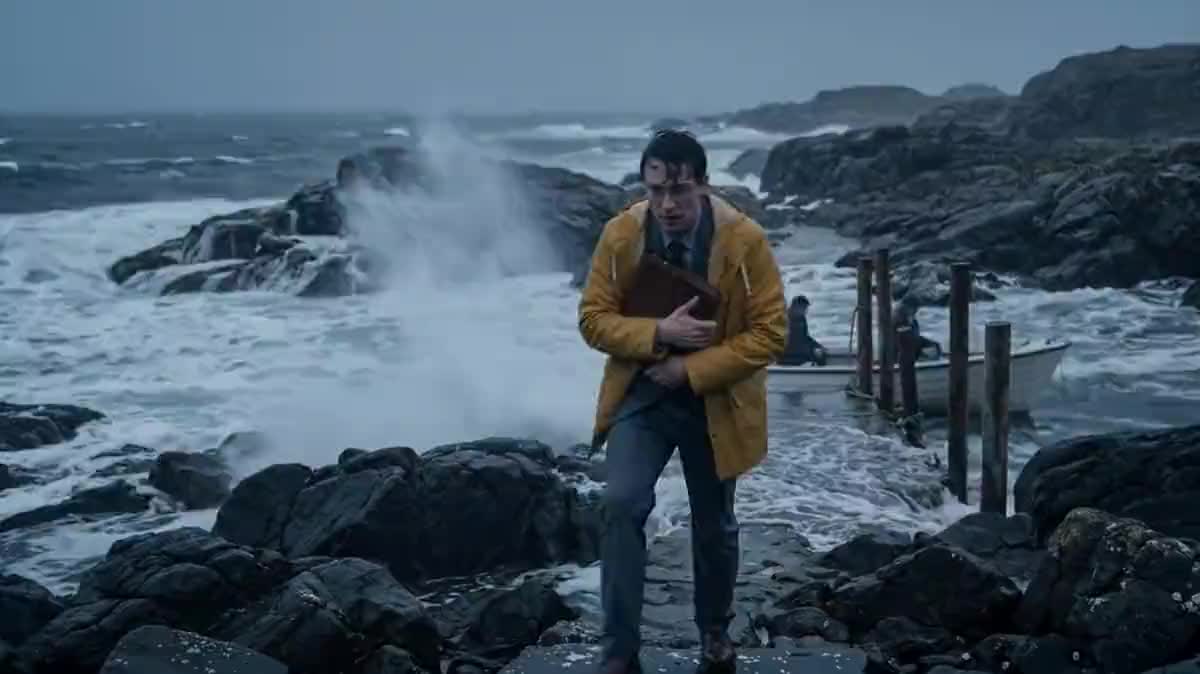
Character sheet of Maren, the lighthouse keeper, four views on a neutral background, drawn by Nano Banana Pro from the visual bibleGenerated with Nano Banana ProCharacter sheet of Elias, the official sent to switch off the lamp, same methodGenerated with Nano Banana ProFirst frame of scene 1: the lamp room at dusk, framed like the first shotGenerated with Nano Banana ProFirst frame of scene 2: the rocks and the jetty in the windGenerated with Nano Banana ProFirst frame of scene 3: the lamp room in the storm, at nightGenerated with Nano Banana ProScene 1 shot by Wan 3.0 from its first frame, dialogue performed, fifteen secondsGenerated with Wan 3.0Scene 2: Elias climbs the jetty and holds out the decommission order, dialogue performedGenerated with Wan 3.0Scene 3: the lamp cranked back to life during the stormGenerated with Wan 3.0The edited film: the three scenes in cable order, no credit spent on the edit
Who it is for
Writers, screenwriters and film students who want to see their screenplay shot before looking for a crew.
Which files to provide
A text PDF screenplay, in classic format or plain prose, with legible sluglines: the model reads the whole document and derives the visual bible from it.
How it works
1
Drop your screenplay PDF on the canvas
A Media node receives it. Standard screenplay format or plain text, it does not matter: the model reads the whole document. Up to three documents per node, so a character bible or a synopsis can come separately.
2
Let the first node write the visual bible
Wired to the PDF, a Text node on a model that reads documents returns the style, the characters and the sets in three short sections. It is the text that holds the film together: everything else receives it by cable.
3
Generate the character sheets
Two Image nodes receive the bible and each draw one character in four views on a neutral background. These sheets go into every scene's first frame: that is what keeps the same face from one scene to the next. One more character, one more node.
4
One prompt, one first frame and one video per scene
Each scene Text node reads the PDF and the bible and writes a director's prompt: timestamped shots, shot size, camera, quoted dialogue, sound. The first frame sets the framing of shot one; Wan 3.0 shoots the scene from it, dialogue performed, sound included.
5
Cut the film together in the Montage node
The three scenes arrive in cable order. The montage renders in the browser, no credits, and exports as mp4. For a longer film, add one row of nodes per scene and change each video's duration.
Variations and use cases
The same canvas, tuned for different needs: each variation is two or three lines of prompt away.
The complete short film, scene by scene
This is the demo: three scenes, one row of nodes each, the montage at the end. For a ten-scene film, duplicate one row per scene and keep the same bible wired everywhere: it is what holds the style and the faces from start to finish.
The video pitch for a producer
Shoot only the opening scene and the key scene, twenty seconds each, and cut them with a title card: two minutes on the canvas to show the directing intention rather than describe it.
The novel adapted before it is written as a screenplay
A novel chapter in PDF works too: the bible instruction then asks to split the chapter into scenes and invent the sluglines. The rest of the workflow does not change, one scene node per scene found.
The demo reel of a dialogue scene
To test a two-character scene, keep a single row of nodes and stretch the video to thirty seconds: Wan 3.0 chains several shots in a single generation, with the quoted lines and their speaker.
The photoreal storyboard rather than the film
Replace the Video nodes with extra Image nodes, one per shot in the list: you get a storyboard with consistent characters, for a fraction of a video's price, to show before shooting.
Common mistakes
Characters whose faces change
The sheets must go into EVERY scene's first frame, and every video must start from its first frame: Wan 3.0 ignores its references as soon as a start image is there. And the bible must describe two or three distinctive traits, repeated in every scene prompt: that is what the model follows.
Too much action in fifteen seconds
A two-page scene does not fit in fifteen seconds: the model cuts or starts improvising. Extend the video, up to thirty seconds, or split the scene into two nodes, one row each.
Sluglines that do not match the PDF
Each scene instruction quotes the exact slugline from the screenplay. If you replace the PDF without changing the instructions, the model looks for a scene that does not exist. Copy your scene headings before generating.
Seedance refusing the scene
"The request failed because the input image may contain real person": Seedance 2.5 currently refuses any photoreal image of a person as input, sheet or first frame, even a generated one. The template therefore runs on Wan 3.0, which takes faces without complaint; the prompt stays in the Seedance guide format, to put back on the node when ByteDance reopens faces.
A bible in the language of the PDF
Scene prompts go out in English, even for a French screenplay: it is the language video models follow best. The dialogue, though, stays in the language of the lines quoted in the prompt.
The Text node reads the whole PDF, the price following its size. The demo fits in three fifteen-second scenes, three rows of nodes. A ten-scene short is built the same way, one row per scene, or in thirty-second scene blocks, the maximum duration of Wan 3.0.
Is the dialogue really performed?
Yes: Wan 3.0 generates the voice and the lips from the lines quoted in the prompt, in the language of the text. The demo is in English, the language of the screenplay. A French screenplay gives French dialogue.
How much does a scene cost?
A fifteen-second scene in 720p costs about 125 credits on Wan 3.0, a character sheet or a first frame around ten, reading the PDF a few credits per node. The price is shown on every node before you click, and a failed generation is refunded.
Do I need a professionally formatted screenplay?
No. Sluglines, names in capitals and lines help the model break it down, but a plain block of text works too: the bible instruction can ask it to propose the scene breakdown.
Can I keep my own actors or my own face?
Yes: replace a generated sheet with your photos in a Media node wired to the same ports. Wan 3.0, already on the Video nodes, keeps a real face as well as a generated one.
In which language is the dialogue performed?
In the language of the lines quoted in the prompt, so the language of the screenplay. The demo is in English. Wan 3.0 and Seedance 2.5 speak about ten languages natively.
How many scenes can the montage chain?
Up to twenty-four clips and two hundred and forty seconds per Montage node, rendered in the browser without credits. Beyond that, a second Montage node takes over.
What happens to the PDF?
It is stored with your project, read by the models you choose and never reused elsewhere. The reading price is reserved at upload from the file size, then adjusted to the tokens actually read.
 Wan 3.0
 Claude Sonnet 5.5
 Nano Banana Pro
 Seedance 2.5