The building caretaker
She knows everyone and gets the party going every year. This time the poster comes out in colour, one in the hallway, one in the lift, and the new third-floor tenants come down with a tart.
Two A4 posters for your building or street party, a night-time garden party or a gingham picnic, with the date, time and place written correctly. Workflow visible here, no account needed.
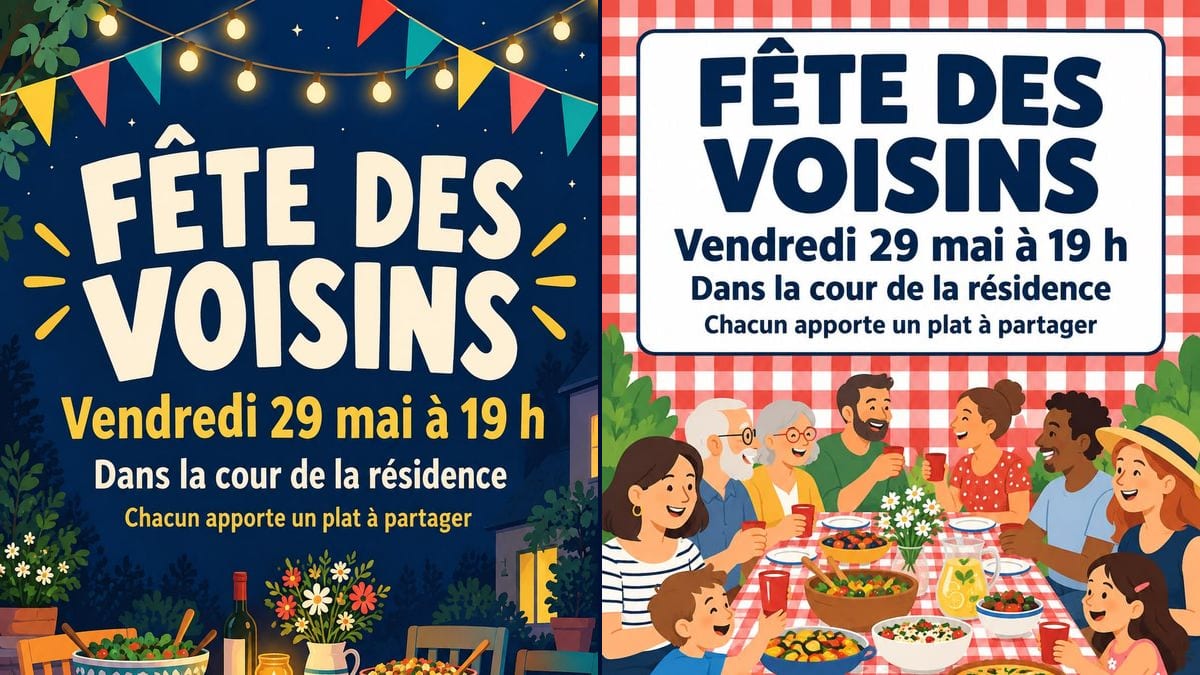
Real workflow (demo in French): two posters for a neighbours' party on Friday 29 May at 7 pm in the residents' courtyard. One in night blue with festoon lights and a laid table, the other on red gingham with a long table of smiling neighbours.
At a glance
Every spring someone in the building volunteers to organise the neighbours' get-together, and the poster in the hallway usually ends up handwritten in marker on squared paper. This workflow makes two print-ready A4 posters, a night-time garden party and a gingham picnic, with your details in the right place.
The hard part is the four lines that matter: the title, the day and time, the place, what to bring. A model left alone adds a programme or garbles an accent. The prompt gives each line in quotes and forbids the rest. GPT Image 2.5 Sunburst writes them letter for letter.
For the street's car boot sale, see the garage sale poster; for the school fundraiser, the bingo night poster. Both posters cost six credits.
These are the files of the workflow above, exactly as the models produced them, unretouched. The starting point is shown when there is one.
Render
Caretakers, residents' committees, housing associations and neighbours organising a street or building party.
The four lines to write in quotes: the title, the day and time, the place, what everyone brings.
Set the date
Day, date and time on a single line. Check the weekday in a calendar before you type it.
Say where
The courtyard, the garden, the car park, the end of the road: one simple line everyone understands, without a full address on a public poster.
Add the practical bit
A dish to share, your own chair, your own glass: one smaller line at the bottom. Everything else goes in the building's group chat.
Put it up early
Two to three weeks ahead, in the hallway, the lift and on the garage doors. Keep a copy for the residents' group chat.
The same canvas, tuned for different needs: each variation is two or three lines of prompt away.
She knows everyone and gets the party going every year. This time the poster comes out in colour, one in the hallway, one in the lift, and the new third-floor tenants come down with a tart.
The committee chair wants the party to bring owners back together after a tense annual meeting. A tidy poster, also slipped into letterboxes, sets a friendlier tone for the evening.
The people on a cul-de-sac carry their tables into the middle of the road. The picnic poster, taped to every front door, gives the time and explains the bring-a-dish idea.
A community officer at a housing association plans the party for five blocks. Same poster, same date, only the place changes from one courtyard to the next: one line to swap per block.
Twenty houses handed over at once, neighbours who have never met. A welcome party announced on the noticeboard at the entrance, and the estate has its first shared memory.
The activities coordinator plans a shared afternoon tea in the garden. She asks for very large letters and strong contrast, so every resident can read the poster without their glasses.
"Saturday 29 May" when the 29th is a Friday, and half the neighbours turn up on the wrong night. The model writes what you give it: check a calendar.
A poster in a hallway can be seen from the street. "In the residents' courtyard" is enough for the people who live there, without telling every passer-by.
Drinks, barbecue, raffle, music, tidying up: in six lines, nothing reads at a glance. Keep four lines and put the detail in the group chat.
Up three days before, the poster arrives when evenings are already booked. Two to three weeks gives people time to plan a dish.
In the demo, yes: all four lines are exact on both posters, accents and time format included. Proofread yours before printing.
Yes: add a line in quotes, "Plane Tree Court" for example, and say where it goes. One extra line stays readable, three extra lines less so.
Yes: change the place to "Lilac Road, numbers 10 to 30" and keep the rest. The festoon-light style suits an evening outdoors.
Six credits, three per render on GPT Image 2.5 Sunburst at medium quality. A third version, for another block or date, costs three more.
Because it spells correctly, accents and numbers included, and costs three credits a render, the cheapest in the catalogue. In the demo it held the text on night blue as well as in the white box.
Portrait. The prompt asks for 3:4 and Sunburst returns 2:3, which prints on A4 with a thin margin at the sides; for A3, run it through the Enhance node first.
Yes: reuse the prompt and ask for A6 or half a page, with the same lines. Four fit on one A4 sheet for cutting.
Better not on the poster: a tear-off strip clutters it and reads badly. Ask instead for one line in quotes, "Sign up with the caretaker".
Make a street party poster with AI
Use this workflowFree account, no card required. The workflow opens pre-filled in your canvas.
 GPT Image 2.5 Sunburst
 Nano Banana 2.1
 Recraft V4.1