Make your New Year 2027 photo with AI from a selfie
Your selfie as a New Year 2027 photo: standing on giant numbers above the clouds or sitting on gold numbers at midnight. Face kept, drift shown. Workflow visible here.
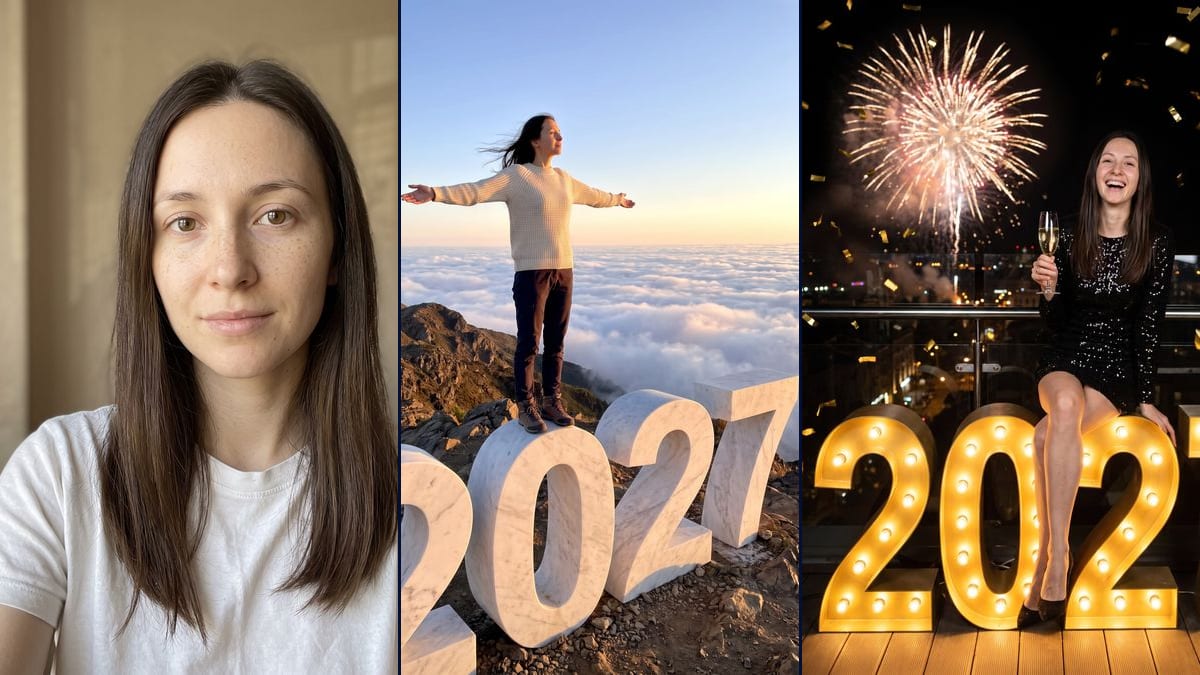
Real workflow: a woman in a white t-shirt against a beige wall, then the same woman standing with her arms out on white marble 2027 numbers above a sea of clouds, and sitting in a sequin dress on gold light-bulb 2027 numbers with fireworks behind. On the summit her face is in profile and the first 2 is cut by the frame. At midnight she laughs with her teeth showing and a ring appeared.
At a glance
You provide
1 photo · a text or a brief
What the workflow produces
2 images in 3:4
Canvas structure
6 nodes wired by 4 connections
Models wired in
Nano Banana Pro
Cost of one full run
about 38 credits, roughly $0.46
Account
The demo is visible without an account; generating requires a free account, trial credits included
A New Year format is starting to go around for 2027: "Hello 2027", where you stand on huge white marble numbers of the year above a sea of clouds at sunset. We spotted it in early November 2026, from a single source, with no audience figures published. These photos get shared mostly between late December and the first days of January. This workflow makes two versions from your selfie: the summit above the clouds, and a New Year's Eve version, sitting on glowing gold numbers under fireworks.
The model, Nano Banana Pro, keeps the face well at midnight, less so on the summit. Up there, the demo's woman is in profile, small in the frame, eyes half closed against the sun: the hair and features fit, but the likeness is hard to judge. The first "2" is cut off by the bottom of the frame. At midnight, she laughs with her mouth wide open when her photo has a closed-mouth smile, and a ring appeared on her hand.
These are the files of the workflow above, exactly as the models produced them, unretouched. The starting point is shown when there is one.
Starting point
Your selfie
Render
The same woman standing on the 0 of white marble 2027 numbers, on a rocky ridge above a sea of clouds at sunset, arms stretched out in a T, hair in the wind, cream knit sweater, navy trousers and hiking boots; hair and features consistent, but the face is in profile, small and with eyes half closed, the first 2 is cut by the bottom of the frame, the 7 touches the right edge and the numbers are about two thirds of her height instead of several metresGenerated with Nano Banana ProThe same woman sitting on gold light-bulb 2027 numbers on a rooftop terrace at night, black sequin dress, glass of sparkling wine in hand, fireworks over the city and gold confetti; very faithful face, but she laughs with her mouth wide open instead of the closed-mouth smile, her freckles are faded, a ring appeared, she sits between the 0 and the 2 rather than on top, and a glass railing and a wooden deck were addedGenerated with Nano Banana Pro
Who it is for
People who want a New Year 2027 photo of themselves for their stories, profile picture or first messages of the year, and content creators planning their late December posts.
Which files to provide
A sharp, front-facing, well-lit selfie of you or of someone who agreed, with their own features written into the prompt in place of the demo's. The photo is optional.
How it works
1
Take a sharp front-facing selfie
Face straight on, good light, no filter. A chest-up shot like the demo's is enough: the model makes up the body, the outfit, the numbers and the setting.
2
Replace the face description
The prompts describe the demo's woman: brown eyes, freckles, long hair with a centre parting. Write your own features instead, and add "closed-mouth smile" if that's how you smile.
3
Pick the summit or New Year's Eve
The summit makes a bright landscape shot where you're small in the frame. New Year's Eve shows the face better, at night, in party clothes. Run both, or a single node for 19 credits.
4
Check all four digits
In the demo, the summit's first "2" runs off the bottom of the frame and the "7" touches the edge. If a digit is cut or misshapen, add "all four digits whole, with space around them" and rerun the node.
Variations and use cases
The same canvas, tuned for different needs: each variation is two or three lines of prompt away.
The summit or New Year's Eve
The summit is about the landscape: the clouds, the evening light, a figure standing on the year. New Year's Eve is closer, at night, with party clothes and a face you can actually see. The first works as a wallpaper or a carousel slide, the second as a profile picture.
A year other than 2027
Replace "2027" with the year you want everywhere in the prompt, for a birth year or a wedding anniversary for example. Check the render digit by digit: the model can swap or double a number. Not tested in the demo.
In 9:16 for stories
Switch the node to 9:16 instead of 3:4 and add "empty space at the top and bottom" so the story interface doesn't cover the face or the numbers. This version hasn't been tested.
Two people on the numbers
Start from a photo where both faces are sharp and rewrite the prompt with two people, one on the "0", the other on the "2", with one line of description each. Not tested here, and both have to agree.
Numbers in another material
Change "white marble" to gold balloons, ice, neon or raw wood. Ice suits a snowy mountain setting, balloons suit New Year's Eve. Keep "all four digits complete and readable". Not tested in the demo.
A short video from the photo
Connect a Video node to the summit render and describe the motion: the clouds drift, her hair moves, she opens her arms. The demo stops at the two still images, this step hasn't been tested and the video costs extra credits.
Common mistakes
A profile or dim selfie
The model has one photo to rebuild the face from. In profile, blurry or badly lit, it fills in the gaps, and on the summit, where the face is already small, not much of you is left.
Keeping the demo's face description
The prompts mention brown eyes, freckles and long hair with a centre parting. If you have blue eyes or short hair, rewrite that line, or the model blends your face with the description.
Posting without checking the digits
A cut, warped or doubled digit stands out straight away on a photo whose subject is the year. In the demo, the first "2" runs out of the frame. Look at all four digits before you share.
Using someone's photo without asking
The image is meant to look like the person, and it will get passed around over the holidays. Only use photos of people who said yes, and never a famous person.
No, it's optional. Without one, the model invents a person from the prompt. With your selfie, it keeps your face, which is the point.
Why not just ask Gemini?
You can. Here, both prompts are ready and wired to the same photo, the model is picked for face accuracy, and the demo shows you up front what it keeps and what it gets wrong.
Why is the face in profile on the summit photo?
The prompt asks for golden light on her face, and the model turned her head towards the sun. Add "she looks at the camera, three-quarter face" and rerun if you want to recognise yourself.
How much do the two photos cost?
38 credits, 19 per render on Nano Banana Pro. Rerunning a single image costs 19 credits.
Is there a cheaper option?
Yes, by switching the node to Nano Banana 2.1 in 1K, 7 credits per render. The face is less faithful, which shows most on the New Year's Eve photo where it takes up more of the frame. That's why the demo runs on Nano Banana Pro.
How big are the images?
1792 x 2400 pixels, vertical 3:4. That's enough for a story, a post or a small print, not for a poster.
Why do the midnight numbers have light bulbs?
The prompt asks for "glowing gold" numbers, and the model made marquee letters with bulbs, like a funfair sign. For smooth numbers, write "polished gold metal numbers, lit from inside, no bulbs".
Where does the ring on the midnight photo come from?
The starting photo has none and the prompt doesn't mention one: the model added it on its own. Write "no ring, no jewellery" to avoid it.
Can I turn it into a greeting card?
This workflow makes a photo, with no greeting text. For a card with a written message, use the greeting card, starting from your New Year photo if you like.
Make your New Year 2027 photo with AI from a selfie
 Nano Banana Pro
 Flux Kontext
 Seedream 5 Pro