The family getting started
The parents want a vegetable plot so the kids can watch things grow. Two pictures of their own lawn show how much room six beds really take before they buy the timber.
A photo of your garden with six wooden raised beds, then a small greenhouse and corten beds, at the scale of your lawn. Decide before you buy. Workflow visible here, no account needed.
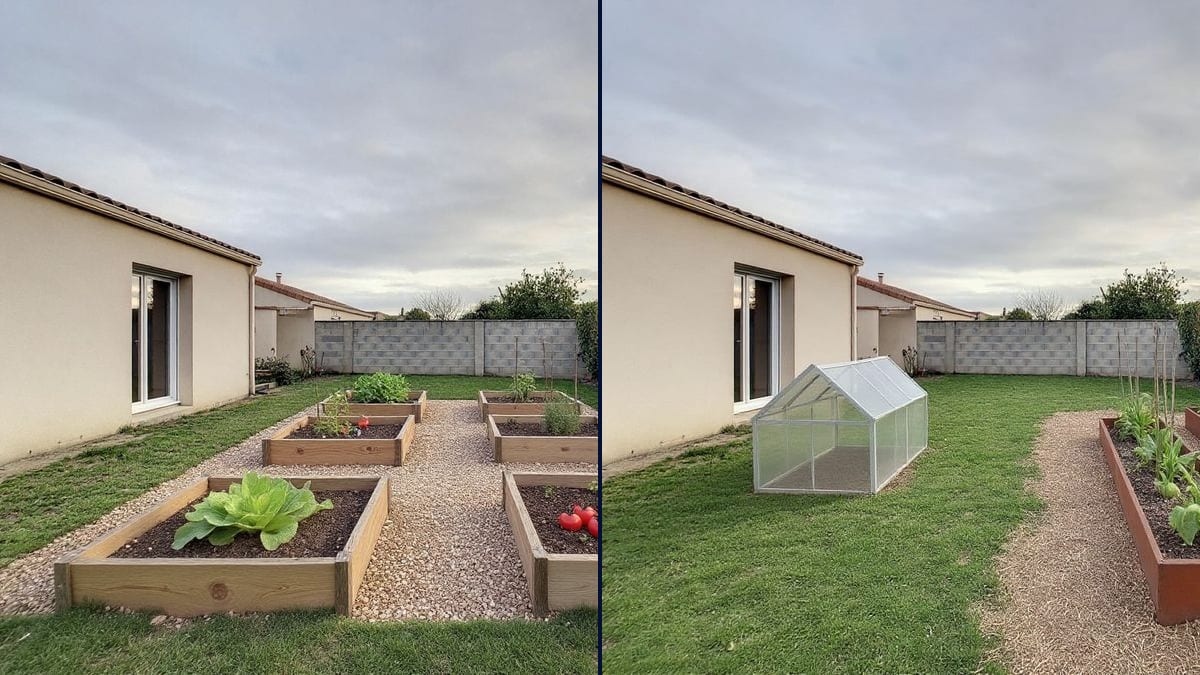
Real workflow: a patchy lawn between a beige house, a breeze block wall and a hedge, then the same garden with six wooden beds on gravel paths, and with a small greenhouse and two corten steel beds along a straw path.
At a glance
A vegetable plot usually starts as a sketch on the back of an envelope, and then in spring you find the beds eat the whole lawn or the wheelbarrow won't fit between them. This workflow starts from a photo of YOUR garden and lays out two plots: six wooden raised beds with gravel paths, then a small greenhouse with corten steel beds.
The hard part is scale. An image model left alone draws beds that are too big, plants fantasy vegetables or changes the garden around them. The prompt gives the bed size, the number and the crops. Flux Kontext keeps the house, the wall and the hedge, and the demo also shows two slips worth rerunning.
To rethink the whole garden, start from the garden design tool; for a cabin at the bottom, from the garden office. Both plots cost twelve credits.
These are the files of the workflow above, exactly as the models produced them, unretouched. The starting point is shown when there is one.
Starting point
Render
Families starting a vegetable plot, landscapers attaching a picture to a quote, community groups and schools presenting a project.
A photo of the lawn taken from the house, the size and number of beds, and what you want to grow.
Photograph the lawn
From the house or the patio, the whole area in frame, in daylight. Put the hose and toys away first: the model doesn't always remove them.
Give the size and number
Six 1.2 metre squares, three long beds, a two-metre greenhouse: numbers, or the model picks the scale for you.
Say what grows
Lettuces, staked tomatoes, climbing beans, strawberries. Named crops make a believable plot rather than a vague green mass.
Check on the ground
Measure with a tape, push four stakes in at the corners, see where the sun falls at midday. The picture helps choose the layout; the plot decides.
The same canvas, tuned for different needs: each variation is two or three lines of prompt away.
The parents want a vegetable plot so the kids can watch things grow. Two pictures of their own lawn show how much room six beds really take before they buy the timber.
The landscaper photographs the garden during the visit and attaches the lawn turned into a vegetable plot to the quote. The client sees paths and beds in place, not a dimensioned drawing.
The residents' group shows the council and the neighbours the site with a greenhouse and beds, so the project gets discussed over a concrete picture instead of a sketch.
He compares wooden squares with tall corten beds so he can garden without getting down on his knees. The two pictures help him choose the material before he goes to the supplier.
The teachers show parents the playground with six planted beds, to kick off a collection for materials or a volunteer build day on a Saturday morning.
The agent shows buyers what a vegetable corner would look like on the bare lawn, labelled as a simulation, to help a family picture themselves using the garden.
"Add a vegetable garden" lets the model decide: giant or tiny beds, dropped anywhere. Give the size of one bed and how many you want.
In the demo, Kontext removed it while placing the beds, but nothing guarantees that: another render may keep it or blend it into a bed. Put it away before the photo.
The demo's tomatoes are huge and lying on the soil. The picture shows the look of the plot, not a harvest: check the details before you show it to anyone.
A plot at the foot of the hedge, shaded all afternoon, makes a nice picture and few vegetables. Put the beds where the sun actually reaches.
The house, the back wall and the hedge stay. In the demo, Kontext also removed the garden hose and made the lawn greener without being asked.
Yes: cut the number of beds, two squares or one long bed against a wall. On a patio, ask for raised planters on legs.
Yes: write your own crops in place of the ones in the prompt, squash, potatoes, soft fruit. Stick to plants you can recognise from a distance.
Twelve credits, six per render on Flux Kontext. A third layout on the same photo costs six more.
Because it adds elements to a photo and keeps the setting: the beige house, the breeze block wall, the hedge and the sky stayed the same on both renders.
That's a slip by the model in the demo, which also drew a low greenhouse rather than one you can stand in. Run it again, or write "three clearly visible beds" and the greenhouse height.
In the demo, yes: the patchy lawn came out thicker. To keep it as it really is, add "the same patchy lawn" to the prompt.
The format of your photo, here 4:3. A garden photographs best in landscape, from the house, to show the full depth.
Plan a vegetable garden on a photo of your yard with AI
Use this workflowFree account, no card required. The workflow opens pre-filled in your canvas.
 Flux Kontext
 Nano Banana 2.1
 GPT Image 2.5 Sunburst