The couple expecting a baby
A tender moment for two during the pregnancy: you imagine the baby, laugh at which features came from whom, and keep the picture as a keepsake.
Two photos, one of each parent, and the AI imagines your child at one and at six with a mix of your features. Just for fun, no account needed to see the workflow.
Real workflow: Frank's selfie and the portrait of an invented woman go into two Nano Banana Pro nodes, which imagine their child at one and then at six.
At a glance
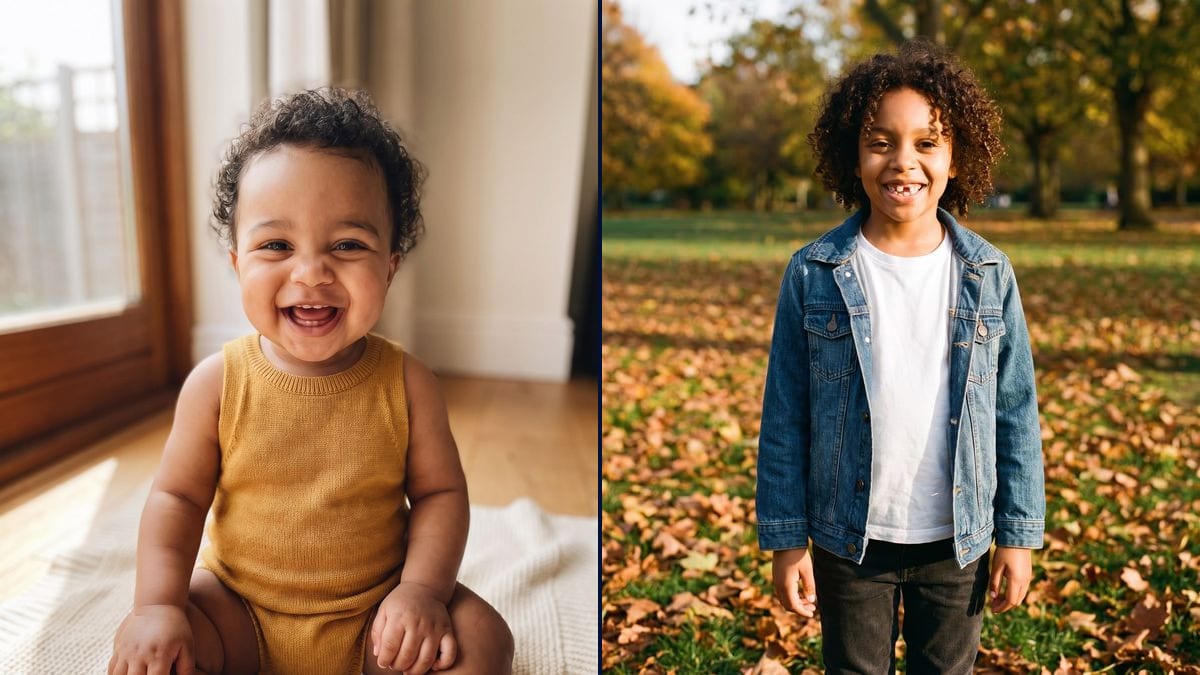
"What will our baby look like?" Every couple asks it, laughing. This workflow takes a photo of each of you and imagines your child twice: at one, on a blanket, then at six, in a park with a missing tooth.
The hard part is the mix. Give a model two faces and it happily copies the sharper one. The prompt splits the features, the eyes and smile of one, the hair and brow of the other, a skin tone in between, and both ages start from the same photos so they stay the same child.
It is a dreamed-up picture, not a prediction: genetics can't be read off a selfie. To watch the child grow up, chain it with age progression; to put them next to you, the family photo. Both pictures cost thirty-eight credits.
These are the files of the workflow above, exactly as the models produced them, unretouched. The starting point is shown when there is one.
Starting point
Render
Couples expecting a child or thinking about one, and anyone curious to see two faces blended.
A front-facing photo of each parent, plus the age and scene wanted for the child.
One photo of each parent
Two front-facing, well-lit photos, one person per photo, no sunglasses. The sharper the face, the more of its features reach the child.
Say which feature comes from whom
The eyes and smile of one, the hair and brow of the other, a skin tone in between. The model blends instead of copying.
Pick the age and the scene
One on a blanket, six in a park, ten at the beach: one age and one setting per node, the same features everywhere.
Compare the ages
Both pictures start from the same photos, so you recognise the same child from one age to the next. Add a node for a third age.
The same canvas, tuned for different needs: each variation is two or three lines of prompt away.
A tender moment for two during the pregnancy: you imagine the baby, laugh at which features came from whom, and keep the picture as a keepsake.
The imagined child becomes the playful touch of a message to family and friends before the scan, with a note that it is only a dream.
Two curious friends, a wedding coming up, a party: you run the workflow and compare the imagined children, without taking any of it seriously.
An author imagines the child of two characters from a novel at several ages, then uses the same character for the rest of the story.
The six year old then goes through age progression to see the teenager and the adult they might become.
Parents and imagined child brought together in one picture with the group photo, for a gift or a card.
Without saying which feature comes from whom, the model copies the parent whose photo is sharpest. The eyes of one, the hair of the other.
A face you can barely see passes nothing on, and the child looks like one parent only. Two sharp, front-facing, well-lit photos.
"A child" lets the model pick anything from two to ten, and the features drift. Give an age and a detail that shows it.
The picture is a dream, it says nothing about the real baby. Shared without saying so, it can disappoint or mislead: say it is imagined.
No. It is a picture imagined from your two faces, for fun. Real genetics can't be read from a photo.
Yes: write it in each node's prompt. Without it, the model picks on its own, as in the demo.
Ideally, front-facing and sharp. An old blurry or side-on photo passes its features on poorly.
Thirty-eight credits, nineteen per picture on Nano Banana Pro. A third age costs nineteen credits more.
Because it holds several reference faces at once and blends their features, where other models fall back on a single face.
In the demo, yes: same curls, same smile, same skin tone at one and at six, because both nodes get the same photos and the same features.
3:4, the shape of a family photo. Change it in the node for a square to share.
They stay in your space, like all your media, and are only used for your own generations.
AI baby generator: imagine your future baby's face
Use this workflowFree account, no card required. The workflow opens pre-filled in your canvas.
 Nano Banana Pro
 GPT Image 2.5 Sunburst
 Seedream 5 Pro
 Flux Kontext