The grandparent you won't see
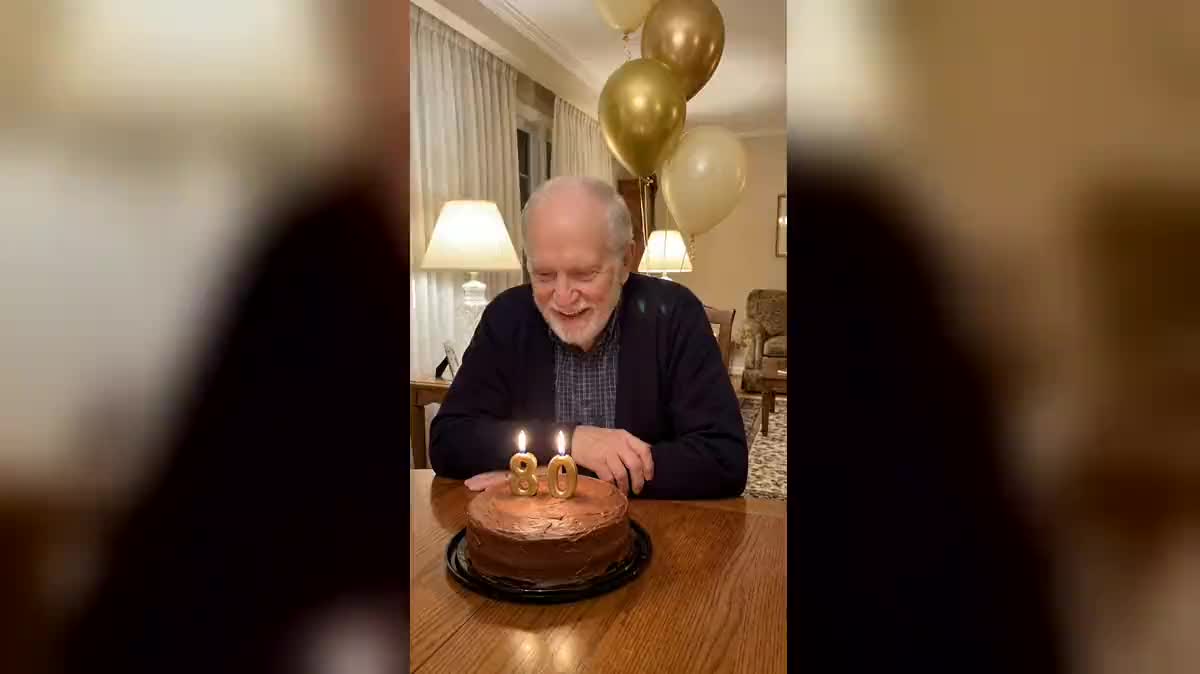
An eightieth birthday celebrated from afar: the video of him blowing out his candles lands on the whole family's phones that same morning, as a surprise.
One photo of the birthday person, and the AI shows them blowing out their candles at home, applause included. A surprise to send on the day. Workflow visible here, no account needed.
Real workflow: a grandfather's portrait becomes a birthday scene in his living room, 80 candles lit, then a video where he blows them out to applause.
At a glance
A birthday from far away, a grandfather you won't see on the day, a surprise for a group of friends: this workflow starts from a single photo of the birthday person and shows them blowing out their candles at home, with the family applauding.
The hard part is a precise gesture on a real face. The photo first becomes a built scene, cake, number candles and balloons, and then Wan 3.0 only has the gesture left to play: the breath, the blow, the flames going out, the laugh. The sound comes with the picture.
For the card that goes with the video, see the greeting card; for an old family photo, old photo animation. The video costs seventy-nine credits, scene included.
These are the files of the workflow above, exactly as the models produced them, unretouched. The starting point is shown when there is one.
Starting point
Render
Families, friends and colleagues who want to send a birthday surprise from afar.
A front-facing photo of the birthday person, their age for the candles and the setting wanted.
A photo of the birthday person
Front-facing, well-lit, the person alone. The model keeps their face, hair and clothes in the birthday scene.
Build the scene
The cake, number candles for their age, the setting, evening light. No written words: the numbers give the age with no spelling mistakes.
Describe the gesture and the sound
They take a breath, blow, the flames go out, they laugh. Off screen, the family applauds. The camera stays still.
Send it on the day
Five vertical seconds, ready for a messaging app or a story. Put your message in the text you send, not in the picture.
The same canvas, tuned for different needs: each variation is two or three lines of prompt away.
An eightieth birthday celebrated from afar: the video of him blowing out his candles lands on the whole family's phones that same morning, as a surprise.
A friend turning thirty abroad gets their own birthday video, in a setting that looks like them, with a three and a zero on the cake.
Number candles, a strawberry cake and coloured balloons: one more keepsake next to the real photos of the party, with the parents' consent.
A team sends a colleague their birthday video, cake on their desk, to go with the card everyone signed.
For a parent who has passed, from an old photo restored with photo restoration, a tender scene the family chooses to share among themselves.
The family dog in front of its dog cake, one candle lit, barking as it goes out: the same recipe, a different star.
A generated "happy birthday" often comes out misspelled and translates badly. Number candles in the picture, the message in what you send.
Without a built scene, the video model has to invent cake, setting and gesture at once, and the face drifts. Build the picture first.
A camera move during the blow makes the flames and the face wobble. "The camera stays still": only the gesture matters.
Every added face degrades a little during the movement. The person alone on screen, the family off screen, in the sound.
Better to write it in the message that goes with the video: text generated inside the scene often comes out with letters missing or doubled.
Applause and cheers come out well. A full, in-tune song needs another workflow, such as making a photo sing.
Yes, with the parents' consent: change the candles, the cake and the setting in the first prompt.
Seventy-nine credits: nineteen for the scene on Nano Banana Pro, sixty for five seconds of Wan 3.0 at 720p with sound.
Because it accepts a real person as the first frame and generates the sound with the video. Seedance refuses a real person in that slot.
In the demo, yes: the scene keeps his face, beard and cardigan, and the video only adds the gesture, with no camera move.
Five seconds in 9:16, the shape of a story or a messaging app. Ten seconds is possible in the node, for twice the video credits.
The prompt leaves it out to keep the blow and the applause clean. Add a track with the Montage node if you want music.
Make a personalised birthday video with AI
Use this workflowFree account, no card required. The workflow opens pre-filled in your canvas.
 Nano Banana Pro
 Wan 3.0
 Kling V3
 Seedance 2.5