The leaving do
A colleague leaves the team after ten years. Their felt-tip caricature, the camera swapped for their favourite object, is printed large and signed by the whole department.
Your front-facing photo becomes a street artist caricature in felt-tip and watercolour, then a full-colour magazine-style caricature. Big head, kind line, likeness kept. Workflow visible here, no account needed.
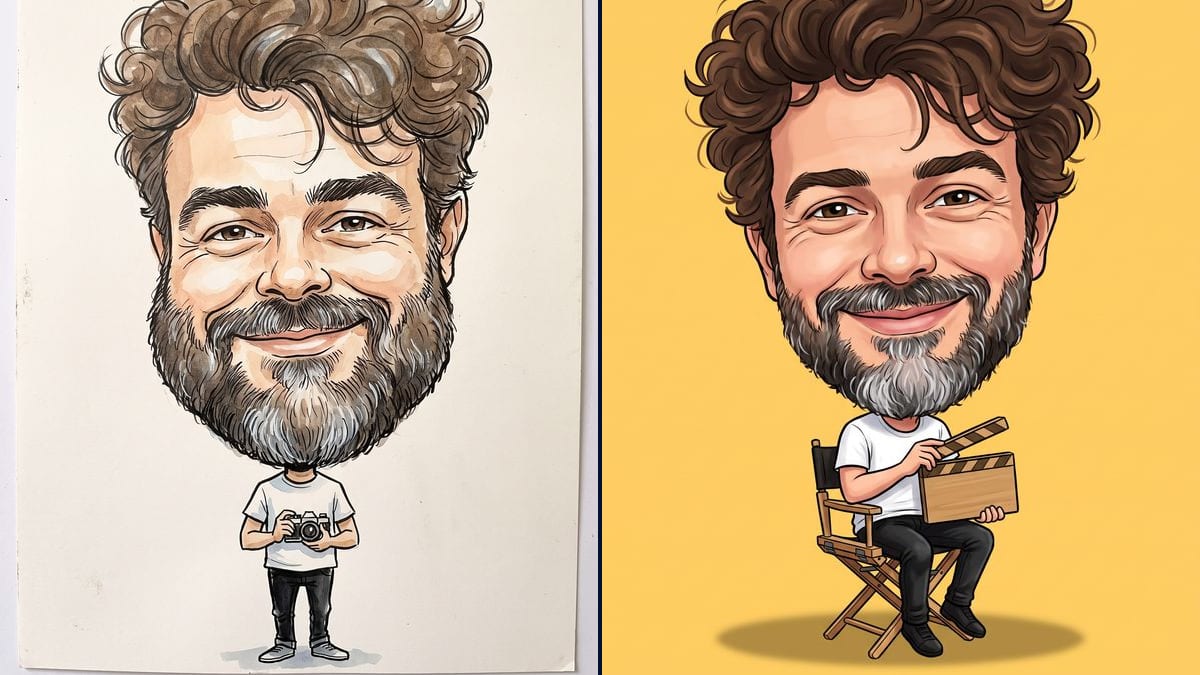
Real workflow: a selfie of a man with big brown curls and a salt and pepper beard becomes a black felt-tip and watercolour caricature on cream paper, a small camera in hand, then a bright full-colour caricature sitting in a director's chair with a clapperboard, on a yellow background. He is recognisable in both.
At a glance
A caricature is the gift people keep: for a leaving do, a birthday, a wedding, or simply as a profile picture. This workflow takes your front-facing photo and makes two of them, one the way street caricature artists do it, in black felt-tip and watercolour on cream paper, the other in bright colours like a magazine illustration.
The hard part is exaggerating THIS face. A big head is not enough: you have to enlarge what sets it apart, the hair, the beard, the eyebrows, the smile, without sliding into mean or unrecognisable. The prompt names those features and rules out the grotesque. In the demo, Nano Banana Pro held the likeness in both renders on the first try.
For a portrait that keeps the photo's proportions, see photo to drawing; for a manga look, photo to anime; for a story in panels, the comic strip. Both caricatures cost thirty-eight credits.
These are the files of the workflow above, exactly as the models produced them, unretouched. The starting point is shown when there is one.
Starting point
Render
People looking for a leaving, birthday or wedding gift, creators who want an avatar, teams illustrating their team page.
A sharp, front-facing photo showing the whole face, and the features to exaggerate, the outfit and the object in hand.
Take a front-facing photo
The whole face, sharp, in soft light, hair visible. Smile if you want the smile to be part of the caricature.
List what sets you apart
Swap the demo's features for your own: fringe, glasses, nose, dimples, ears, freckles. That is what the drawing will enlarge.
Choose the scene
The outfit, the object in hand, the background: a camera for a videographer, a guitar, a football, a cake. The small body tells what the person does.
Print or share
The felt-tip version goes in a frame or on a card; the colour version makes a good profile picture on a plain background.
The same canvas, tuned for different needs: each variation is two or three lines of prompt away.
A colleague leaves the team after ten years. Their felt-tip caricature, the camera swapped for their favourite object, is printed large and signed by the whole department.
The colour version shows him sitting in his garden chair, a fishing rod in hand instead of the clapperboard. Framed, it finds its place in the living room.
Both partners in the same picture, big heads and small bodies in suit and dress, for the invitation, the guest book or the welcome sign at the venue.
A YouTuber or podcaster wants a profile picture that looks like them without being a photo. A big head on a plain background stays readable when it is shrunk.
A small business replaces the ID photos on its team page with a caricature of each person, using the same prompt and the same background for the whole series.
Each member of the family goes through the same felt-tip style, then the drawings come together on the holiday card sent out in December.
A caricature exaggerates the face: if it is hard to see, the model makes up what is missing. Use a front-facing photo where the face fills a good part of the frame.
"Make a caricature" on its own gives a big head with nothing personal in it. Say what sets you apart, because that is exactly what the drawing enlarges.
More distortion doesn't make the drawing funnier: past a certain point, the person is no longer recognisable, or the picture becomes hurtful. Keep "kind, never grotesque".
Left alone, a model signs the drawing or writes in a corner, the way a caricature artist would. "No signature, no text" in the prompt saves you retouching the image later.
That is what the prompt is for: it asks for you to be recognisable at first glance and names the features to exaggerate. In the demo, the man is recognisable in both renders.
Yes: start from a photo where both faces are sharp, and name each person's features in the prompt. It is the classic wedding couple caricature.
The workflow is meant for your own photo or one of someone close who agrees. A public figure's image is protected: read rights on AI images before sharing anything.
Thirty-eight credits, nineteen per render on Nano Banana Pro. A third style on the same photo costs nineteen more.
Because it picks up the features of a reference photo without you describing them in detail, and it follows a long prompt: style, outfit, object, background, what to avoid.
Photo to drawing keeps the proportions and only changes the medium. A caricature distorts on purpose: huge head, small body, enlarged features.
Yes: replace "white t-shirt and black jeans" and "small film camera" with the outfit and object you want, a lab coat, a football shirt, a microphone.
For a sheet of several expressions to stick or send, start from the same photo in stickers, which produces six expressions on a single image.
Turn your photo into a caricature with AI
Use this workflowFree account, no card required. The workflow opens pre-filled in your canvas.
 Nano Banana Pro
 GPT Image 2.5 Sunburst
 Seedream 5 Pro
 Flux Kontext