Pinning down a role before the search
Telling a casting director what you are after is easier with two images than with a paragraph, and it saves three weeks of suggestions that miss the point.
A Text node describes the role, a first test photographs it, and the second keeps the framing and the light while the actress changes. Workflow visible here, no account needed.
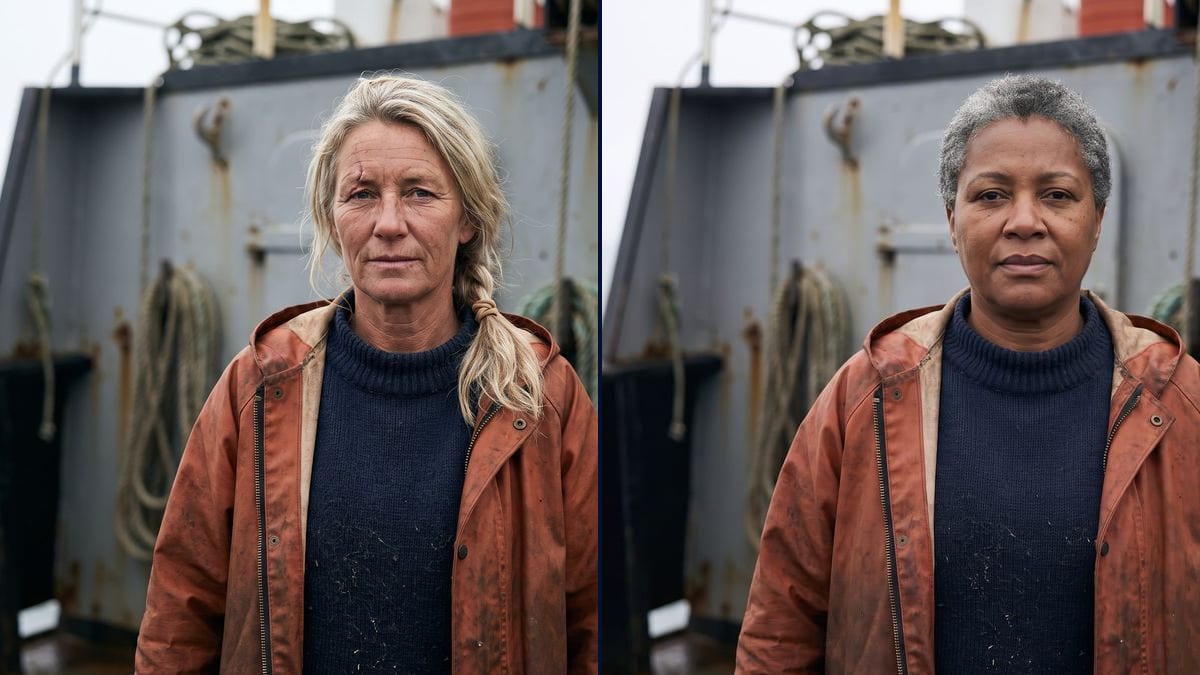
Real workflow: the role of a trawler captain, two invented actresses, same bulkhead, same light, same wardrobe. Both images come from the demo, the second starts from the first.
At a glance
Before calling anyone in, a director needs to see the role: what age, what face, what bearing. This workflow builds that board, two faces for the same role, in the same frame and the same light.
The hard part is the opposite of scene coverage: here everything must match EXCEPT the face. Two free generations would give two incomparable photos, one in a studio and one in the sun, and you would choose on the light instead of on the role.
The second test therefore starts from the first, and its prompt keeps the framing, the set, the wardrobe and the light. The faces are invented, which is the whole point: a casting board borrows nobody's face. Two tests cost thirty-eight credits.
These are the files of the workflow above, exactly as the models produced them, unretouched. The starting point is shown when there is one.
Render
Directors, casting directors and producers who need to pin down a role before calling anyone in.
Nothing to provide: the role is written in the Text node. An actor photo can serve as a reference, with their consent.
Write the role, not the person
The age, the job, what life left on the face, the wardrobe, the bearing. A well written role produces believable faces; a list of flattering adjectives produces models.
Fix the shooting conditions
The lens, the framing, the background, the light, no makeup. They are what make the tests comparable, exactly as in a real session.
Wire the first test back in
The image port of the second node receives the first photo. That cable is what keeps the frame and the light while the face changes.
Change one thing at a time
A rounder face, grey hair, darker skin. If you also change the wardrobe or the background, you are no longer comparing actresses.
The same canvas, tuned for different needs: each variation is two or three lines of prompt away.
Telling a casting director what you are after is easier with two images than with a paragraph, and it saves three weeks of suggestions that miss the point.
Funding files often show known actors as references. Two invented faces say the same thing without promising a name the film will not have.
Silhouettes and supporting parts are written fast and rarely seen. One board per role helps wardrobe and makeup work before the shoot.
For animation the same mechanics hold: two faces of one character in the same frame, then the character sheet to lock it across every shot.
The same actor at two ages compares the same way, provided you keep the frame and the light and let only the age move.
When a set has to be populated, the board picks a type of face, then the crowd of a music video takes care of the numbers.
This is the mistake that makes the board useless: two different lights, two different frames, and you pick the best lit photo instead of the truest face.
A role described in flattering adjectives gives smooth, interchangeable faces. What makes an actor believable are the marks: salt, tiredness, a scar, an age owned.
Wardrobe is half the character. If it changes, the comparison is about clothes, and the board no longer answers the question you asked.
An invented face does not act. The board frames the search, it does not replace the moment someone says the lines in front of you.
With their consent, yes, by giving it as a reference in a Media node. Without their consent, no: the workflow changes nothing about image rights, and a casting board circulates.
As many as you have Image nodes, all wired to the first test. Five faces cost under a hundred credits and are finally seen under the same conditions.
No, and it does not pretend to. An audition judges acting, a voice, a presence. This board comes before, when you have to decide what kind of face you are looking for.
Thirty-eight credits for the two tests in the demo, nineteen per image on Nano Banana Pro. One more face costs nineteen credits.
Yes, and it is written into both demo prompts. An image model does not copy an existing person when nothing asks it to, and the prompt forbids it explicitly.
In both demo images: same bulkhead, same ropes, same light, same sweater, same oilskin. Only the face changes, which is precisely the question asked.
4:3 in 2K, the format of a casting photo, which drops into a document without cropping. Ask for 16:9 in the prompt if you prefer.
Yes, but one pose at a time, and the same for every test. A board reads only when the single variable is the face.
Make a casting board with AI
Use this workflowFree account, no card required. The workflow opens pre-filled in your canvas.
 Nano Banana Pro
 GPT Image 2.5 Flare
 Seedream 5 Pro