Preparing a short shoot
On a one day shoot, knowing in advance which sizes you want saves the two hours lost looking for the right axis once the crew is on set and the light is turning.
Your actor's sheet gives a wide shot, and the wide shot becomes the reference for the close up: same man, same coat, same light. Workflow visible here, no account needed.
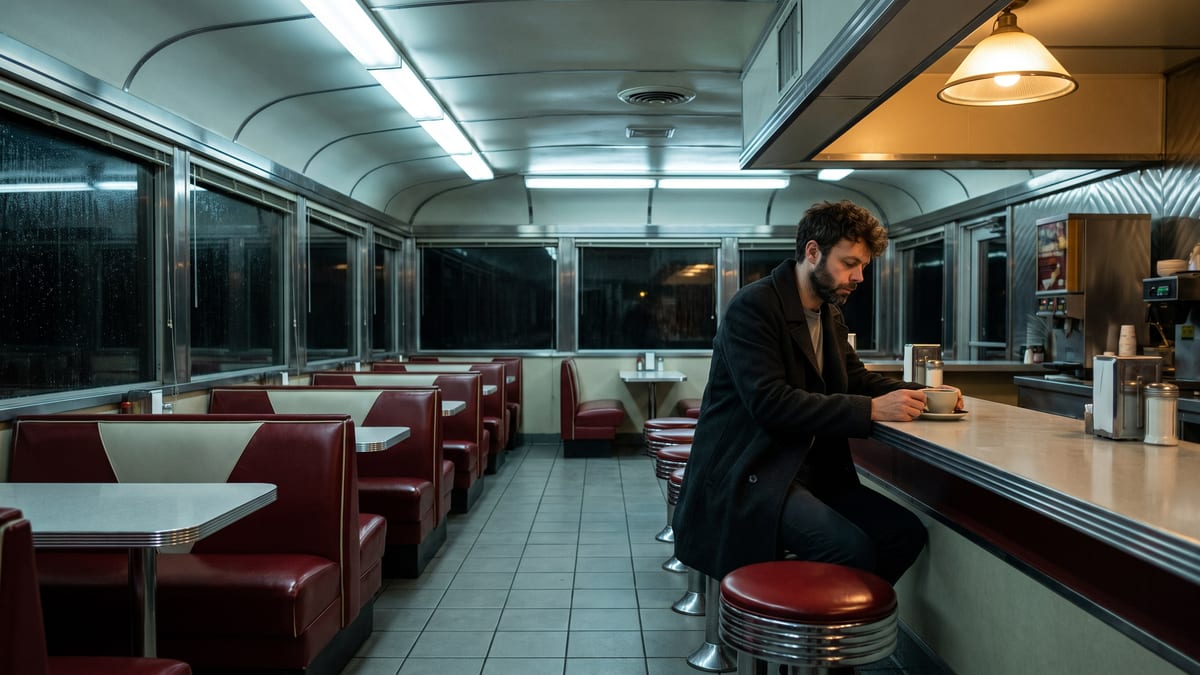
Real workflow: a night scene in a diner, the wide shot then the close up of the same moment. Both images come from the demo, the second starts from the first.
At a glance
Covering a scene means choosing how many shots it takes and where the camera goes. Doing it on paper takes experience; doing it in pictures used to take a storyboard artist. This workflow gives two shot sizes of the same moment, with the same actor.
The hard part is the CUT, and it is what makes most AI boards unusable: two independent generations give two different men in two different diners. The close up therefore receives two images on its image port, the actor sheet and the wide shot, and its prompt repeats everything that must not move.
Only one thing is allowed to change: the lens. It is exactly the move of location scouting, applied to the actor instead of the place. Both shots cost thirty-eight credits.
These are the files of the workflow above, exactly as the models produced them, unretouched. The starting point is shown when there is one.
Starting point
Render
Directors, cinematographers and assistants preparing a scene who want to see the shot sizes before the shoot.
A sharp photo of your actor from the front, or a board of several angles: that is what holds the face from shot to shot.
Give your actor's sheet
A sharp photo from the front, or better a board of several angles. That is what holds the face from one shot to the next, far more reliably than a written description.
Write the scene once
The place, the hour, the wardrobe, the light, what the character does. That description serves both shots: what changes afterwards is only the shot size.
Wire the wide shot into the close up
The image port of the second node takes the sheet AND the wide shot. That double cable is what makes the cut, and it is the one people forget.
Let only the lens change
Same set, same wardrobe, same light, same moment. The close up prompt should allow nothing but a change of lens and frame.
The same canvas, tuned for different needs: each variation is two or three lines of prompt away.
On a one day shoot, knowing in advance which sizes you want saves the two hours lost looking for the right axis once the crew is on set and the light is turning.
Two images beat a discussion about how many shots to cover: they state the lens, the height and where the actor sits in frame, and they get corrected in thirty seconds.
A key scene in two shot sizes defends itself better than a paragraph of screenplay, and it costs less than an hour of meeting to say the same thing.
Seeing the scene in close up sometimes says it does not need to exist. That is the kind of decision you would rather make before paying a crew.
The two chosen sizes become the shots to block in the 3D studio, where the camera is actually set before going to video.
On a film already shot, matching the light and the wardrobe of a scene to build the missing shot is the same exercise, with a set photo as the reference.
This is the mistake that breaks coverage. Without the wide shot as a reference, the close up invents another set, another light and often another face: the two images will not cut.
Words do not hold a face. A reference photo does, and a board of several angles does even better, including when the shot size changes.
Light that moves from one shot to the next is the most visible flaw in an edit. The hour and the sources must be written once and copied identically.
A board showing three frames in one picture is useless: you can neither crop it nor screen it. One node per shot size means one file per shot.
Yes: add one Image node per size, all wired to the actor sheet and to the wide shot. Wide, medium, close up, insert: four images for under eighty credits.
Same mechanics with two actors: each one's sheet, the shared wide shot, then one close up per character. What matters is still the wide shot as a reference, it is what holds the set and the light.
It replaces the board of shot sizes you show a crew. A storyboard tells movement and order: for that, the storyboard from a chapter is more direct.
Thirty-eight credits for the two shots in the demo, nineteen per image on Nano Banana Pro. One more shot size costs nineteen credits.
In both demo shots, yes: same face, same beard, same coat, same cup. The character sheet wired into both nodes obtains that, not luck.
Yes, with a sharp photo of you or your actor, and their consent. The workflow changes nothing about image rights: the demo uses the face of the founder of the site, with his consent.
16:9 in 2K, the format of a working board. For a wider cinema frame, write the ratio you want into the prompt and crop the render.
Because coverage is read frame by frame, and one image costs nineteen credits where a video costs sixty. Video comes later, once the sizes are chosen.
Break a scene into shots with AI
Use this workflowFree account, no card required. The workflow opens pre-filled in your canvas.
 Nano Banana Pro
 GPT Image 2.5 Flare
 Seedream 5 Pro