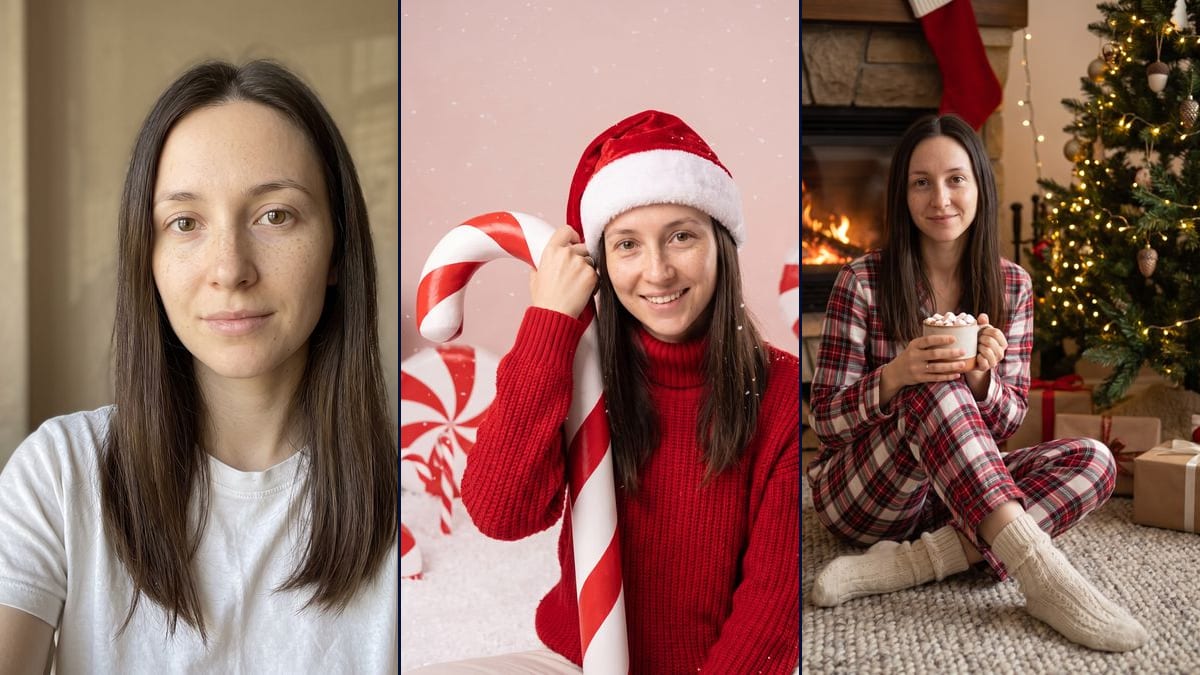
Real workflow: a woman in a white t-shirt against a beige wall, then the same woman in a red sweater and Santa hat with a candy cane against her shoulder on a pink backdrop, and in plaid pajamas in front of a lit fireplace, holding a mug of hot chocolate. Her studio smile shows teeth, and a ring appeared in both renders.
At a glance
You provide
1 photo · a text or a brief
What the workflow produces
2 images in 3:4
Canvas structure
6 nodes wired by 4 connections
Models wired in
Nano Banana Pro
Cost of one full run
about 38 credits, roughly $0.46
Account
The demo is visible without an account; generating requires a free account, trial credits included
Every year around Christmas, the selfie-to-Christmas-photo format comes back on TikTok and Instagram. People send a photo to Gemini or ChatGPT with a prompt they found online and get a portrait that looks like a session with a photographer. It isn't new in 2026: it's a seasonal format, and the prompt guides we reread on 1 November give no audience figures. Two sets come up again and again, and this workflow does both: the pink candy cane studio, then plaid pajamas by the fire.
The model, Nano Banana Pro, keeps the demo's face, eyes, freckles and hair, with no makeup added. It still takes liberties. In the studio, the woman smiles with her teeth showing when her photo has a closed-mouth smile, and she's wearing light trousers nobody asked for. In both renders, a ring showed up on one finger.
These are the files of the workflow above, exactly as the models produced them, unretouched. The starting point is shown when there is one.
Starting point
Your selfie
Render
The same woman in a Christmas studio portrait, sitting on fake snow in a chunky red turtleneck and a velvet Santa hat, a tall candy cane against her shoulder, pale pink backdrop, big wrapped peppermints and snowflakes; face, freckles and hair kept, but she smiles with her teeth showing, a thin ring appeared, the cane is cut off by the bottom of the frame and she's wearing light trousers nobody asked forGenerated with Nano Banana ProThe same woman sitting cross-legged on a wool rug in front of a lit stone fireplace, in plaid flannel pajamas and thick cream socks, holding a mug of hot chocolate with marshmallows, lit tree, kraft paper presents and red stockings with no names; faithful face and closed-mouth smile, but the plaid mixes in navy and black, the stockings are cut off by the top of the frame and a ring appearedGenerated with Nano Banana Pro
Who it is for
People who want to do the AI Christmas photo trend for their stories or their December profile picture, couples and families looking for a Christmas portrait without booking a photographer, content creators planning their end-of-year posts.
Which files to provide
A sharp, front-facing, well-lit selfie of you or of someone who agreed, and their face and hair described in the prompt. The photo is optional.
How it works
1
Take a sharp front-facing selfie
Face straight on, good light, no filter. The demo is framed down to the chest and that's enough: the model makes up the rest of the body and the outfit.
2
Rewrite the face description
Both prompts describe the demo's brown eyes, freckles and long straight hair. Replace those lines with your own features, or the model pulls your portrait toward the demo face.
3
Pick the studio or the fireplace
The studio gives a posed portrait on pink, with a hat and a candy cane. The fireplace gives a cosier living room scene, in pajamas. Run both, or a single node for 19 credits.
4
Check the smile and the hands
In the demo, the studio smile changed and a ring appeared in both images. If that bothers you, add "closed-mouth smile, no jewellery" and rerun the node.
Variations and use cases
The same canvas, tuned for different needs: each variation is two or three lines of prompt away.
The pink studio or the fireside
The studio is a front-on, very colourful portrait with a hat, red sweater and candy cane on pale pink. The fireside is a wider scene, sitting cross-legged, with the fireplace, tree and presents around. The first looks like a photo session, the second like a family photo taken at home.
A red backdrop instead of pink
The prompt guides also suggest the studio on a red backdrop. Replace "soft pale pink backdrop" with "deep red backdrop" in the candy cane prompt and leave the rest. This version wasn't tested in the demo.
As a couple or a family
Start from a photo where every face is sharp, and rewrite the prompt with the number of people and one line of description each. Matching pajamas suit the fireside well. Not tested here, and everyone has to agree.
With a man or a child in the photo
The prompts say "the woman in this photo". Change it to "the man" or "the child" and update the face, eyes and hair description. For a child, the parents' consent is a must.
A patterned Christmas jumper
In the studio prompt, swap the red turtleneck for a knitted Christmas jumper with reindeer and snowflakes. The model may add letters to the knit: write "no letters on the sweater" to keep the image clean.
A short fireside video
Connect a Video node to the fireplace render and describe the motion: she blows on the mug, the fire crackles, the tree lights twinkle. The demo stops at the two still images, and the video costs extra credits.
Common mistakes
A three-quarter or dim selfie
The model has one photo to rebuild the face from. In profile, blurry or badly lit, it fills in the gaps and the portrait stops looking quite like you.
Leaving the demo face in the prompt
The prompts name brown eyes, freckles and long straight dark brown hair. If your hair is short and blonde, change those lines, or the model blends the two faces.
Using someone's photo without asking
The portrait is meant to look like the person. Only use photos of people who said yes, and never a famous person.
No, it's optional. Without one, the model invents a person from the prompt. With your selfie, it keeps your face and hair, which is what the trend is about.
Why not just use Gemini or ChatGPT?
You can. Here, both prompts are already written and wired to the same photo, the model is picked for face accuracy, and the demo shows you up front what it keeps and what it changes.
Where does the ring in both images come from?
The starting photo has none and the prompts don't mention one. The model added it on its own. Write "no ring, no jewellery" in the prompt to avoid it.
How much do the two portraits cost?
38 credits, 19 per render on Nano Banana Pro. Rerunning a single image costs 19 credits.
Can I pay less?
Yes, by switching the node to Nano Banana 2.1 in 1K, 7 credits per render. On a tight portrait like the studio one, the face is less faithful. That's why the demo runs on Nano Banana Pro.
Can I print the Christmas photo?
The images come out at 1792 x 2400 pixels, vertical 3:4. That's enough for a story, a phone wallpaper or a small photo print, not for a poster.
Why isn't the candy cane taller than her?
The prompt asked for a cane taller than the person. The frame cuts it off at the bottom, so you can't see its real size. Ask for "full-length framing, the whole cane visible" if you want it to tower over you.
Do the pajamas always come out red and white?
The prompt asked for red and white plaid. The model added navy and black lines, like a classic tartan. Write "only red and white, no other colours" if you want just the two.
 Nano Banana Pro
 Flux Kontext
 Seedream 5 Pro