Put yourself in a snow globe with your photo and AI
Your full-length photo turned into a tiny figure inside a glass snow globe, on a decorated mantel or at a Christmas market. Face and clothes stay yours. Workflow visible here.
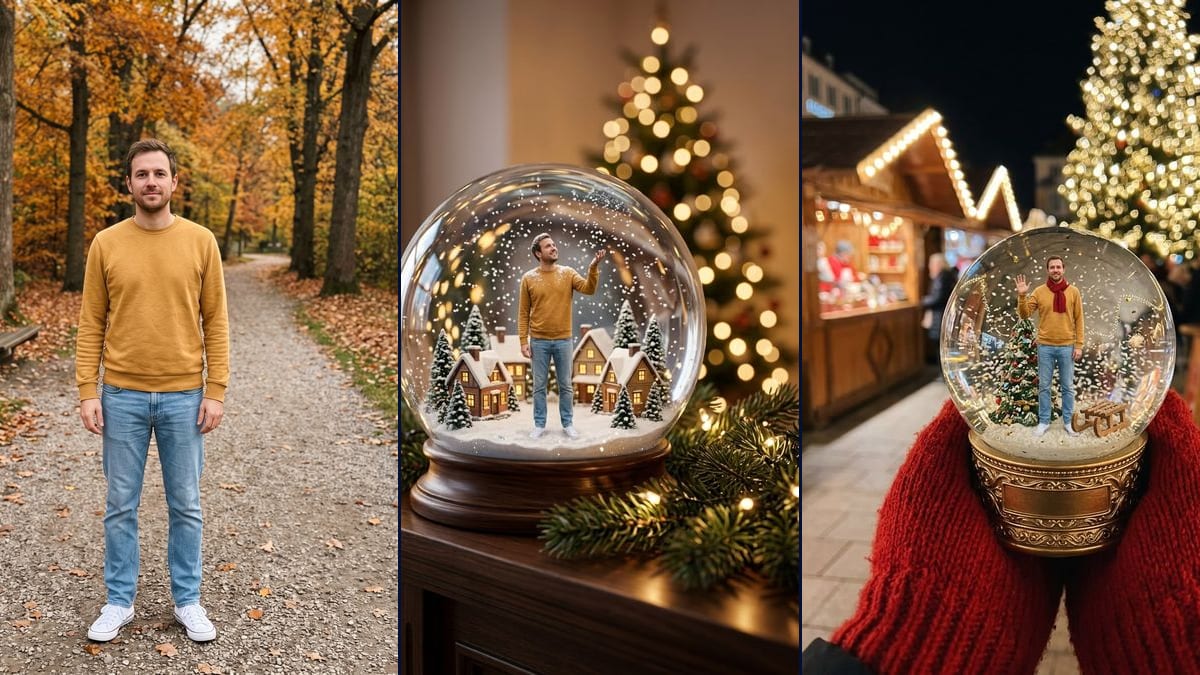
Real workflow: a man in a mustard sweater, light jeans and white sneakers standing on a gravel path in autumn, then the same man as a miniature in a snow globe on a mantel, in the middle of a snowy village, and in a globe held up in red mittens at a Christmas market, red scarf around his neck. He comes out bigger than asked in both globes, and an empty gold plate showed up on the base.
At a glance
You provide
1 photo · a text or a brief
What the workflow produces
2 images in 3:4
Canvas structure
6 nodes wired by 4 connections
Models wired in
Nano Banana 2.1
Cost of one full run
about 14 credits, roughly $0.17
Account
The demo is visible without an account; generating requires a free account, trial credits included
The snow globe with you inside comes back every Christmas on TikTok and Instagram. It isn't new, it's a seasonal format that climbs again as December gets closer. The "Christmas TikTok Trends 2026" guide from dromana.app, updated on 21 October, lists it among the AI Christmas formats to post between early and mid-December, and some photo apps already have a snow globe filter. This workflow starts from your full-length photo and makes two images: you in the middle of a small snowy village in a globe on a mantel, then in a globe held up at a Christmas market.
The model keeps the whole person: face, hair, sweater, jeans, shoes. The prompt asks for a figure about a third of the globe's height. In the demo, the man comes out bigger than that in both renders, taller than the village houses on the mantel. At the market, an empty gold plate appeared on the base, and there's hardly any glitter.
These are the files of the workflow above, exactly as the models produced them, unretouched. The starting point is shown when there is one.
Starting point
Your full-length photo
Render
The same man as a miniature inside a snow globe on a dark wooden base, sitting on a mantel with a fir garland, fairy lights and a blurred lit tree behind, standing in the middle of a snowy village, smiling, one hand raised to the flakes, same clothes and a little snow on his shoulders; he takes up more than half the globe's height instead of a third, looks taller than the houses, and there's almost no glitterGenerated with Nano Banana 2.1The same man as a miniature inside a snow globe on an engraved gold base, held up by two hands in red mittens at a Christmas market at night, standing next to a small decorated tree and a wooden sled, waving, with a red scarf added; he's about half the globe's height, the flakes are big with little gold glitter, an empty gold plate stays on the base and a blurred red sign shows unreadable textGenerated with Nano Banana 2.1
Who it is for
People who want to do the snow globe trend for their stories or holiday messages, couples and families looking for a different Christmas photo, content creators planning their December posts.
Which files to provide
A full-length photo, head to shoes, with a sharp, well-lit face, of you or of people who agreed, and your clothes described in the prompt. The photo is optional.
How it works
1
Use a full-length photo
Head to shoes, standing, sharp face, good light. The figure is whole inside the globe: whatever the photo cuts off, the model makes up.
2
Describe your clothes in the prompt
Both prompts name the demo's mustard sweater, light jeans and white sneakers. Swap in what you're wearing, or the model mixes the two outfits.
3
Pick the mantel or the market
The mantel puts you in a miniature village, the globe sitting in a living room. The market shows the globe held out at arm's length, with a red scarf added. Run both, or a single node for 7 credits.
4
Check the size of the figure
In the demo, the man grew past the third the prompt asked for. If you want him smaller, write "no more than a third of the globe's height, smaller than the houses" and rerun that node.
Variations and use cases
The same canvas, tuned for different needs: each variation is two or three lines of prompt away.
The living room or the Christmas market
On the mantel, the globe is part of the home decor, with a miniature village around you and one hand reaching for the flakes. At the market, red mittens hold the globe in front of the stalls and you wave at the camera. The first looks like an object sitting at home, the second like a photo taken outside.
As a couple or a family
Start from a photo where everyone is standing and fully in frame, then write in the prompt how many of you there are and what each person wears. The more people, the smaller each face gets in the globe. Not tested in the demo, and everyone has to agree.
With your dog or cat
Add the pet to the prompt, sitting at your feet in the snow, with its breed and colour. If it's in the same photo as you, the model has something to copy. If not, it invents one that fits the description. This version wasn't tested here.
On a windowsill or a festive table
Replace the mantel sentence with the spot you want: a windowsill with snow outside, a set table with candles and glasses. The rest of the prompt stays the same. The demo only shows the mantel and the market.
As a greeting card
The globe image can be the main picture on a card. For a finished card with text and layout, go through the greeting card and describe the snow globe in the scene. The vertical 3:4 format suits a card well.
A globe being shaken, on video
Connect a Video node to one of the two renders and describe the motion: a hand shakes the globe, the snow lifts and settles back around you. This isn't shown in the demo, which stops at the two still images, and the video costs extra credits.
Common mistakes
A photo cut off at the waist
The figure is full-length inside the globe. With a cropped photo, the model makes up your legs and shoes, and the jeans or sneakers stop looking like yours.
Leaving the demo outfit in the prompt
The prompts describe a mustard sweater, light blue jeans and white sneakers. If you're wearing a black coat, change those lines, or the model dresses you partly like the man in the demo.
Putting someone in the globe without asking
Even in miniature, a face and a figure are recognisable. Only use photos of people who said yes, and never a famous person.
No, it's optional. Without one, the model invents the person from the prompt. With yours, it keeps your face, your hair and your clothes, which is the whole point of the trend.
Can two people or a whole family go in the globe?
Yes, from a photo where everyone is full-length. Rewrite the prompt with the exact number of people and one line of clothes each. The demo only shows one person, so those versions weren't tested here.
Why is the figure taller than the houses?
The mantel prompt asked for about a third of the globe's height, and the model made him more than half. Rerun with a stricter size if the scale bothers you.
How much do the two images cost?
14 credits, 7 per render on Nano Banana 2.1 in 1K. Rerunning one globe costs 7 credits, or 9 if you switch to 2K.
When should I switch to Nano Banana Pro?
When you want the globe to fill more of the frame, or a sharper face on the figure. At the size shown in the demo, Nano Banana 2.1 is enough, and Nano Banana Pro costs more per render.
Can I print the snow globe?
In 1K the image is 896 x 1200 pixels, vertical 3:4: fine for a story or a message, too small for a print. To print, switch the node to 2K, 9 credits per render.
Can I put a name on the base?
The market render added an empty gold plate, even though the prompt said "no text on the base". You can ask for a name engraved on it, spelled out letter by letter in quotes. That wasn't tested, and a short word is more likely to come out clean.
Why is there almost no glitter?
Both prompts asked for a little glitter, silver or gold. The model went mostly for white snow. For a globe that sparkles, write "lots of gold glitter" and rerun the node.
Put yourself in a snow globe with your photo and AI
 Nano Banana 2.1
 Flux Kontext
 Seedream 5 Pro