The couple back tattoo portrait trend, made with AI
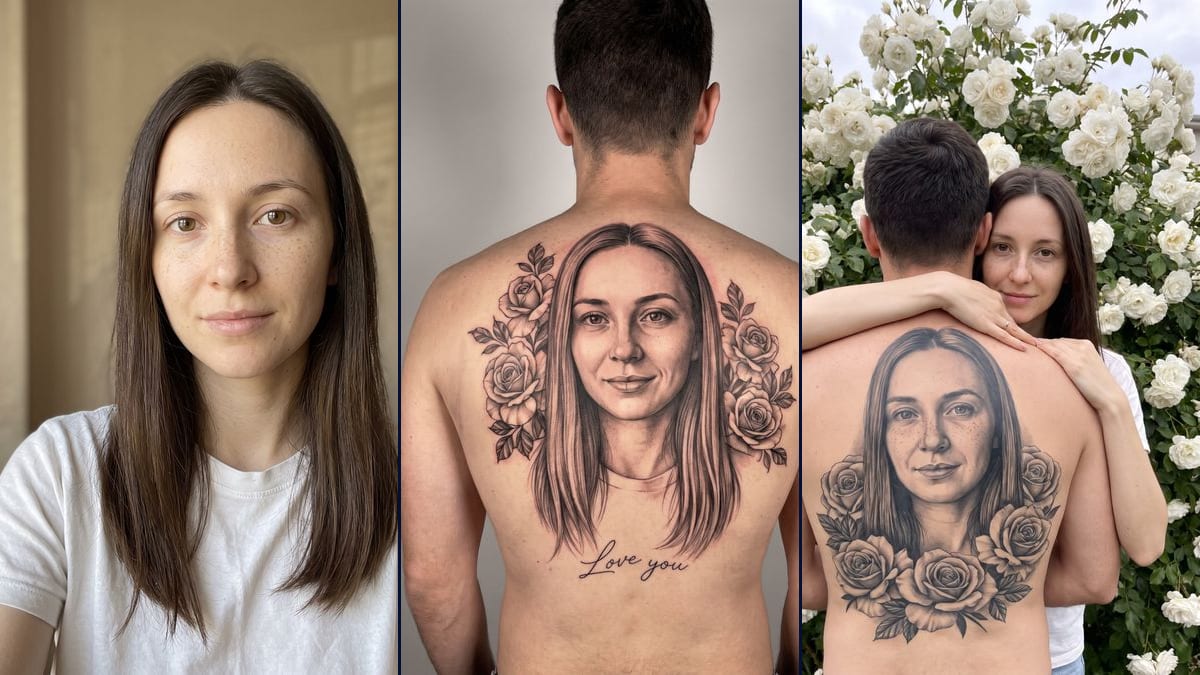
Your girlfriend's or wife's face tattooed in black and grey across a back, framed by roses, with "Love you". An image, not a real tattoo. Workflow visible here.
Real workflow: a woman facing the camera, long dark brown hair, freckles, a white t-shirt against a beige background, then two images: a man's back against a grey wall with her portrait tattooed between roses and "Love you" spelled exactly, and the same kind of tattoo in a couple photo where she hugs him in front of white roses. The tattooed smile is wider than hers, a wedding ring appeared and the tattooed face in the second image looks older.
At a glance
You provide
1 photo · a text or a brief
What the workflow produces
2 images in 3:4
Canvas structure
6 nodes wired by 4 connections
Models wired in
Nano Banana Pro
Cost of one full run
about 38 credits, roughly $0.46
Account
The demo is visible without an account; generating requires a free account, trial credits included
At the end of July 2026, Spanish-language TikTok videos showed a man from behind, shirt off, with his partner's face tattooed large between his shoulder blades: black and grey, roses around it, sometimes "Love you" in thin script. The CapCut templates were called "retrato de pareja tatuado en la espalda". On 23 October the trend took off again in French and English, in a white roses version. Nobody got tattooed: it's an AI image made from a photo. This workflow makes two, the back alone against a studio wall, and the couple photo where she hugs him in front of white roses.
The model invents the man, always seen from behind, and has to find your face again in the ink. That's the hard part: a tattooed portrait magnifies every miss. In the demo, the first back gets the hair, the roses and the "Love you" right, spelled letter for letter. But the tattooed smile is much wider than in the photo and the freckles have nearly gone. In the couple photo, she looks like herself and her freckles are there, in the tattoo too. The tattooed face looks older, though, and a wedding ring appeared on her finger.
These are the files of the workflow above, exactly as the models produced them, unretouched. The starting point is shown when there is one.
Starting point
Your photo
Render
A man with short dark hair seen from behind, bare back against a light grey wall; his whole upper back carries a large black-and-grey portrait of the same woman, from the front, long hair falling on each side, between two clusters of roses and leaves; under the portrait, "Love you" spelled exactly in thin cursive; slight redness around the ink; the tattooed smile is much wider than in the photo, the face a little rounder, the freckles nearly gone, and the neckline of her t-shirt is tattooed tooGenerated with Nano Banana ProA bush of white roses under a white sky; the man from behind, shirt off, and the same woman in a white t-shirt hugging him over his shoulder while looking at the camera, her face faithful with its freckles; on his back, the tattooed portrait of her face from the front, freckles included, with a ring of black-and-grey roses below the portrait, no text; a wedding ring nobody asked for appeared on her finger, the tattooed face looks older and wider than the original, and the tattooed hair stops at the shouldersGenerated with Nano Banana Pro
Who it is for
Couples who want to do the TikTok back tattoo portrait trend without getting tattooed, people preparing a surprise or a joke for their partner, content creators who follow couple trends, people thinking about a real tattoo who want a mock-up to show a tattoo artist.
Which files to provide
A sharp, front-facing portrait in daylight, of you or of someone who agreed to have their face used, and their hairstyle and distinguishing features described in the prompts. The photo is optional.
How it works
1
Ask for the photo, and the OK that goes with it
You need a sharp, front-facing portrait, well lit, no sunglasses, no hair over the eyes. If it isn't your face, ask the person before running anything: it's their face that ends up tattooed on a back.
2
Put her features in the prompt
The prompts describe the demo woman: long straight dark brown hair. Swap in her hairstyle and hair colour. Add what sets her apart, for example "her freckles" or "her barely-there smile": in the demo, that's what the first render lost.
3
Pick the back, the roses or both
The back shows the tattoo alone, large, with "Love you". The roses put the person and her tattooed portrait in the same image, which doubles the face to hold. One node costs 19 credits, both cost 38.
4
Compare the tattooed face with the photo
Put them side by side: smile, face width, age, freckles. Check the hands too, a ring can show up. If something is off, write it into the prompt, "slight smile, mouth almost closed" or "no ring", and rerun that node alone.
Variations and use cases
The same canvas, tuned for different needs: each variation is two or three lines of prompt away.
Another line under the portrait
Replace "Love you" with a name, "Forever" or a short date, still in quotes with "exactly" and "nothing else". Stick to two or three words: the longer the text, the more likely the model invents a letter. Not tested here.
Roles reversed
Use a man's photo and rewrite the prompt: a woman seen from behind, hair tied up, with the portrait of the man in the photo tattooed between her shoulder blades. Keep "we never see her face" for the invented person. Not tested here, and the man has to agree.
A mock-up for a tattoo artist
If you're thinking about a real tattoo, ask for "the design alone, in black and grey, on a white sheet of paper, no skin, no body". It's a starting point to talk with a tattoo artist, who will redraw it by hand at the right size. To try other designs on your skin, see the AI tattoo. Not tested here.
A hug that moves
The roses version makes a good starting frame for a short video: her holding the man a little tighter, the roses moving in the wind. To animate a hug from photos, see the hug video. Check that the tattooed face doesn't warp during the movement. Not tested here.
Another placement or style
The full back is the trend's format, but the prompt can change: one shoulder blade, the inner forearm, a lighter fine-line style, a few touches of colour on the roses. The smaller the area, the less detail the tattooed face gets, so the less it looks like her. Not tested here.
Common mistakes
Posting someone's face without asking
The image shows a real person's face tattooed on a stranger's back. Show it to that person before posting, and ask if they agree. Never a famous person, and never someone who hasn't said yes.
Passing it off as a real tattoo
The render imitates ink a few days old, with slight redness around it. Without a caption, people take it for a real tattoo, and the joke can go wrong with family or with the person whose face it is. Say in the caption that it's an AI image.
A profile shot or a blurry photo
The model has to redraw the face from the front, in black and grey, out of a single image. With a turned, blurry or shadowed face, it fills in with average features, and the tattooed portrait looks like anyone.
Handing the image as is to a tattoo artist
The generated portrait has its misses: in the demo, a wider smile and a rounder face than the original. An artist copying it line for line would tattoo those errors. Bring the real photo too: that's the reference for the face.
No. The man, his back and the ink are invented by the model from your photo. Nobody was tattooed. If you post the image, say it's AI-made: a lot of people believe it at first glance, which is the whole point of the trend.
Do I need a photo to use this template?
No, it's optional. Without one, the model invents a woman and tattoos her face. With a photo, it's that face you find in the ink, and in person in the second image, in the man's arms.
Why does the "Love you" come out right?
Because the prompt asks for exactly two short words and rules out everything else. Nano Banana Pro is good at a short text given word for word: in the demo, "Love you" came out with no mistakes, in thin cursive. A long sentence or an unusual name goes less well, so check every letter.
How much do the two images cost?
38 credits, 19 per render on Nano Banana Pro in 2K. Rerunning a single image costs 19 more credits.
Why Nano Banana Pro?
Because it has to hold a face from a single photo, and redo it in a black-and-grey tattoo style. In the couple photo it's twice: on the woman and in the ink. Pro keeps the hair, the eyes and the short text; it still widened the smile in the demo.
Can I use the image to get a real tattoo?
As a mock-up, yes: it shows the artist the size, placement and mood you want. They'll redraw it themselves from the real photo, because the generated portrait isn't faithful line for line. A realistic portrait this size takes a specialist artist and several sessions.
Can I use my own back?
Not with this template as it is: it invents the man. Add a second Media node with a photo of your back, connect it to the Image node and write "the man in the second photo, seen from behind". Not tested here: the model may change your build or haircut, so compare with your photo.
Can I post it as a carousel with the real photo?
Yes, that's often how the trend travels: the starting photo, then the tattooed back. For another TikTok trend built on an edited image followed by the real photo, see the I'm so sorry trend. Either way, say the image is AI-made.
Can I print the image?
Yes. It's 1792 x 2400 pixels in vertical 3:4, which gives a sharp print of about 15 x 20 cm at 300 dots per inch. For anything bigger, switch the node to 4K, for almost twice the price.
The couple back tattoo portrait trend, made with AI
 Nano Banana Pro
 Flux Kontext
 Seedream 5 Pro