A scrapbook page made from a single photo of you: an autumn kraft page or a travel journal, with instant prints, washi tape and dried leaves. Workflow visible here.
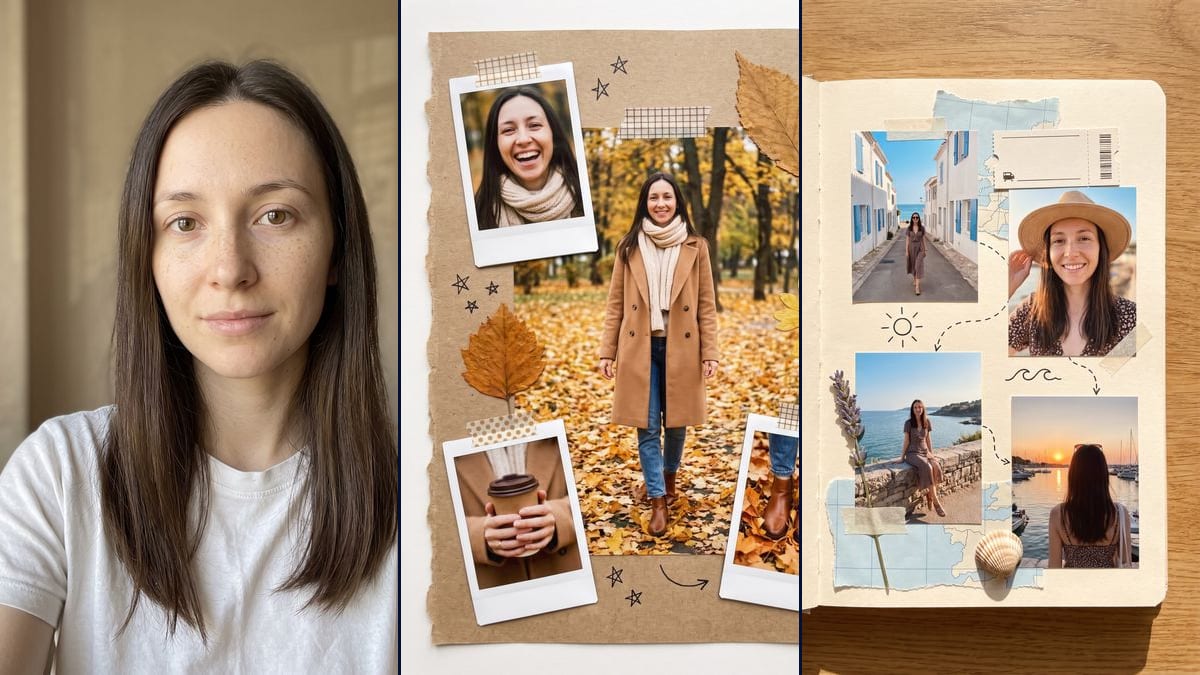
Real workflow: a woman facing the camera, long dark brown hair, freckles, a white t-shirt against a beige background, then two scrapbook pages with her in every picture: an autumn kraft page with four photos in a park, and a travel journal with four photos by the sea. A ring appeared in the coffee cup photo, the journal's left-hand page stayed empty and the travel photos sit straight.
At a glance
You provide
1 photo · a text or a brief
What the workflow produces
2 images in 3:4
Canvas structure
6 nodes wired by 4 connections
Models wired in
Nano Banana Pro
Cost of one full run
about 38 credits, roughly $0.46
Account
The demo is visible without an account; generating requires a free account, trial credits included
A scrapbook collage is the journal page you fill by hand: a kraft paper background, white-bordered instant prints held down with washi tape, a dried leaf, a pressed flower, a few stars in pen. In 2026 the version made from your own photos keeps coming back on Pinterest, Tumblr and TikTok. You still need the photos, though: four shots of yourself in the same park, full length, close up, your hands around a coffee. This workflow starts from one front-facing photo and makes two pages: an autumn page on kraft paper and a seaside travel journal.
The model invents the outfits, the places and the framing, and keeps your face from one picture to the next. So the scenes are fiction: you never walked through that park. The page can be posted as is, printed for a real journal or used as a vertical wallpaper. In the demo, the face holds across all eight photos and no words are written, as asked. Three misses: a ring that appeared in the coffee cup photo, the journal's left-hand page left empty, and travel photos placed straight when the prompt wanted them at angles.
These are the files of the workflow above, exactly as the models produced them, unretouched. The starting point is shown when there is one.
Starting point
Your photo
Render
A kraft paper page with torn edges seen from above: in the centre, the same woman full length walking through an autumn park, camel coat, cream scarf, jeans and brown ankle boots, golden leaves on the ground; around it, three white-bordered instant prints: her laughing, her hands around a coffee cup, her boots in the leaves; gingham and polka dot washi tape, two dried leaves, a pressed yellow flower, a blank stamp with a round postmark and no text, stars, a heart and arrows in black pen, no words; a ring nobody asked for appeared on her finger in the coffee cup photoGenerated with Nano Banana ProAn open journal on a wooden worktop, the left-hand page left empty; on the right-hand page, four photos placed straight rather than at angles of the same woman in a small-flowered dress: in a lane of white houses with blue shutters running down to the sea, wearing sunglasses nobody asked for, smiling in close-up under a straw hat, sitting on a stone wall facing the sea, from behind in front of a sunset over a harbour full of sailboats, sunglasses pushed up on her head; pieces of pale blue map with no names, a blank ticket with a barcode and a small vehicle icon, washi tape, a lavender sprig, a shell, a sun, waves and dotted lines in black penGenerated with Nano Banana Pro
Who it is for
People who want a scrapbook page of themselves without having the photos to fill it, journal lovers looking for a page to print and glue in, content creators posting a seasonal page, people putting together a gift or a wallpaper.
Which files to provide
A sharp, front-facing portrait in daylight, of you or of someone who agreed, and your eyes and hair described in the prompts. The photo is optional.
How it works
1
Use a sharp, front-facing photo
Face straight on, well lit, no sunglasses, no hair over the eyes. The model has to rebuild your face in close-up, from a distance and from other angles: the sharper the starting photo, the more the small pictures look like you.
2
Put your own features in the prompt
Both prompts describe the demo woman: light brown eyes, long straight dark brown hair. Swap in your own eyes and hair, or the model may pull your photos toward that description.
3
Pick autumn, travel or both
Autumn lays four photos on a kraft page with torn edges. Travel puts four in an open journal, with a map, a ticket and a shell. One node costs 19 credits, both cost 38.
4
Look closely at each small photo
Zoom in on the hands, the accessories and the journal's left-hand page. In the demo, a ring and sunglasses showed up without being asked for. If a detail bothers you, add "no ring" or "no sunglasses" to the prompt and rerun that node.
Variations and use cases
The same canvas, tuned for different needs: each variation is two or three lines of prompt away.
A birthday page
Swap the park for a party: you blowing out candles, a raised glass, a bunch of balloons. Keep the kraft paper and washi tape, add some dried confetti on the page. Leave "no words" in the prompt: an age or a name written by the model would come out unreadable. Not tested here.
A couple's page
Add a second Media node with the other person's photo, connect it to the Image node, and describe both in the prompt: "the woman from the first photo and the man from the second". The model holds two faces less well than one, so check every small photo. Not tested here, and the other person has to agree.
A printable version for a real journal
Ask for the page "on a plain white background, with no drop shadow", print it at 15 x 20 cm and glue it into your journal. To decorate around it with stickers made from your photos, see the custom stickers. Not tested here.
A vertical wallpaper
Switch the node to 9:16 and add "leave the top of the page clear, with no photo" so the clock doesn't land on your face. For other wallpapers made from an idea or a photo, see the phone wallpaper. Not tested here.
Another season, another trip
The scenes come from the prompt. Write a Christmas market in the snow with a wool hat, or a mountain trail with a backpack, and change the glued-on objects to match: a pine sprig, a blank ski lift ticket. Change one scene at a time. Not tested here.
Common mistakes
Asking for handwritten text
"Autumn 2026" or "Lisbon" scribbled in a corner is tempting. The model then produces letters that imitate handwriting without forming real words, and the page looks fake at first glance. Keep "no words", and write the date in pen after printing.
A profile shot or a blurry photo
The model has to rebuild your face from several angles out of a single image. With a turned, blurry or shadowed face it has fewer landmarks, and each small photo looks a bit less like you.
Cramming the page
Ten photos, three stamps, tickets, flowers and stickers: the model shrinks the photos and your face becomes tiny. Four photos and five or six objects, as in the demo, keep every face readable.
Posting without saying it's AI
The page looks like a real memory journal, of a holiday that never happened. Say in the caption that the photos are AI-generated. Before using a photo of someone close to you, ask them. Never a famous person.
No, it's optional. Without one, the model invents a woman and fills the page with her. With your portrait, it's your face in every picture on the page, which is why you'd use this template.
Are these real photos of me?
No. The model invents the places, the outfits and the poses from a single portrait. The face is yours, the park and the seaside lane don't exist. If you post the page, say the photos are AI-generated, especially if people could take it for a real memory.
Why does the prompt rule out any text?
A real scrapbook often has a date or a handwritten word on it. Image models are bad at handwriting: they make up letters that look like writing without forming readable words. So the prompt says "no words". In the demo no text appears, though the ticket still got a barcode.
How much do the two pages cost?
38 credits, 19 per render on Nano Banana Pro in 2K. Rerunning a single page costs 19 more credits.
Can I print the page?
Yes. It's 1792 x 2400 pixels in vertical 3:4, which gives a sharp print of about 15 x 20 cm at 300 dots per inch. For A4 or US Letter, switch the node to 4K, for almost twice the price.
Can I put several people on the page?
Yes, with one Media node per person connected to the Image node, and each person described in the prompt. The more faces, the higher the risk of mixing them up: two is reasonable, beyond that check every photo. For a single group shot, the group photo is made for it.
Can I keep my own outfit?
The prompts describe the outfits: a camel coat for autumn, a flowered dress for travel. Replace those lines with a description of your clothes, for example "a dark green jumper and black trousers". The model only sees what's in your photo: if it stops at the shoulders, it invents the rest.
Can I use my real holiday photos?
Not with this template as it is: it invents the scenes from a single photo. To put real photos together, add several Media nodes connected to the Image node, since Nano Banana Pro accepts several input images, and ask for them to be glued onto the page unchanged. Not tested here: the model may still retouch or crop your photos, so compare with the originals.
Why Nano Banana Pro?
Because each page shows the same person four times, close up and from a distance. Pro holds a face from a single photo: in the demo, the eyes, eyebrows and freckles carry over from the close-up under the hat to the full-length shot in the park.
 Nano Banana Pro
 Flux Kontext
 Seedream 5 Pro