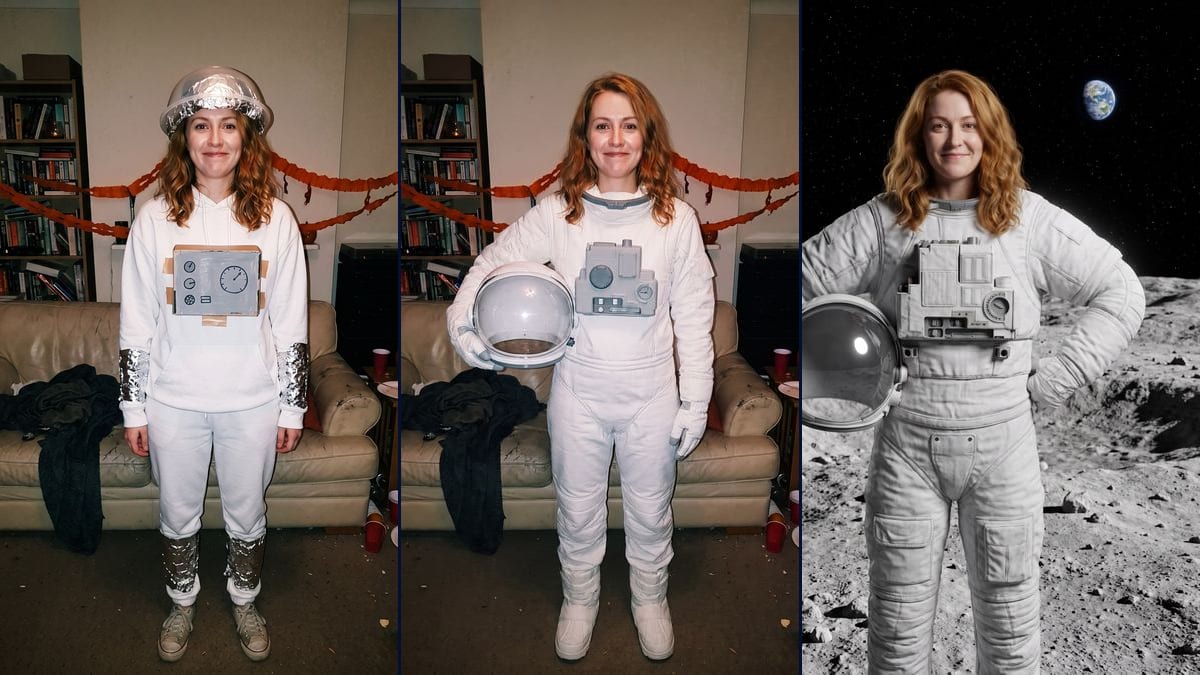
Real workflow: a flash photo of a woman with auburn hair in a homemade astronaut costume (a foil-covered salad bowl, cardboard taped to a white hoodie), then the same woman in a real spacesuit, still in her messy living room, then the same woman on the Moon with the Earth in the distance. Her face is faithful in the living room; on the Moon it's a little more lined and the image stops below the knees.
At a glance
You provide
1 photo · a text or a brief
What the workflow produces
2 images in 3:4
Canvas structure
6 nodes wired by 4 connections
Models wired in
Nano Banana Pro
Cost of one full run
about 38 credits, roughly $0.46
Account
The demo is visible without an account; generating requires a free account, trial credits included
On TikTok, the "I'm so sorry" trend plays out as a carousel. You show a heavily edited version of an old photo first, then take the edits away one by one until the real one, often a homemade Halloween costume or a bad school photo. The caption: "I'm so sorry". This workflow starts from your real photo and makes the two steps that come before it: the costume version, in the same setting, and the polished version, in a studio.
In the demo, the salad-bowl-and-foil astronaut becomes a film astronaut in the same living room, with the same flash and the same pumpkin. The face holds up well. On the Moon it holds up less: features a little more lined, a slightly older look, and the frame stops below the knees when the prompt wanted her full length. The helmet moved under her right arm in both images, the prompt said left.
These are the files of the workflow above, exactly as the models produced them, unretouched. The starting point is shown when there is one.
Starting point
Your original photo
Render
The same woman in the same living room, under the same flash, in a real padded white spacesuit with gloves, boots and a grey chest unit, the visor helmet under her right arm, head bare, the pumpkin and the red cups still behind herGenerated with Nano Banana ProThe same woman in a film-style spacesuit on grey lunar ground, starry sky and the Earth top right, studio light, helmet under one arm, the other hand on her hip, framed down to below the knees, her face a little more lined than in the photoGenerated with Nano Banana Pro
Who it is for
People who want to do the I'm so sorry TikTok trend with an old photo of their own, content creators putting together a before-and-after carousel, Halloween fans who kept the photo of their homemade costume.
Which files to provide
Your real photo, the one that ends the carousel, of you or of someone who agreed, with the face sharp, and the list of costume pieces to remove.
How it works
1
Pick the real photo
The one that gets the laugh as the last image: a homemade costume, a haircut you regret, a school photo. The face has to be visible and sharp, it's all the model has to recognise you.
2
Name what has to go
The costume prompt lists the salad bowl, the cardboard and the foil. Swap them for the pieces of your own costume. Without that list, the model keeps the homemade bits on top of the new outfit.
3
Keep the face paragraph
It's what keeps the joke readable: people need to recognise the same person from one image to the next. Change the hair description to match yours and leave the rest.
4
Post in the right order
The polished version, then the costume version, then your original photo. One caption per image that owns up to the edit, and the sound picked in TikTok when you post.
Variations and use cases
The same canvas, tuned for different needs: each variation is two or three lines of prompt away.
The baby or school photo
The polished version becomes a neat studio portrait, the middle step keeps the original setting with a tidied-up outfit. With your own childhood photo, write "the child from the photo" at the start of each prompt and keep "do not change her age".
Another costume gone wrong
A cardboard pirate, a ghost in a sheet with holes, a princess in a curtain: change the outfit described in both prompts, and above all the list of homemade pieces to remove in the costume prompt.
Three steps instead of two
Add a node between the two, for example the real spacesuit in front of a plain grey studio backdrop. The carousel gains an image and the punchline lands later. This version wasn't tested here.
The polished version at full length
In the demo the image stops below the knees. Write "full length, boots standing in the lunar dust, head to feet in the frame" and rerun the polished node on its own.
The content creator
They download both renders, put them before the original photo in a TikTok carousel, write a short caption on each image and pick the sound in the app. The template doesn't provide any music.
Common mistakes
Not saying what has to go
On the demo's first attempt, the model kept the salad bowl and the cardboard on top of the new spacesuit. You have to spell out that the homemade costume disappears, piece by piece.
Leaving initials on the suit
A space agency name or a logo on the outfit, and the image has a trademark problem. The first generated input photo had "NASA" on the cardboard: it was redone, and the prompts forbid any lettering.
Deleting the face paragraph
Without it, the model beautifies: smooth skin, makeup, a younger or older face. The carousel's punchline falls flat if people no longer recognise the same person in the real photo.
Because the real photo is yours, as it is. It's the input for both nodes and it goes last in the carousel. The template only builds the "lie" steps that come before it.
Does my face stay the same in both steps?
In the costume version, yes: same smile, same hair, same flash. In the polished version the likeness drops a little, the face is more lined and looks older. If that bothers you, rerun that node on its own for nineteen credits.
Can I do it with a photo of a child?
The trend leans a lot on baby photos, and that's where privacy matters. Only your own childhood photo, or one of a child whose parents agreed. And think before posting: a photo of a child online stays online.
How much do the two images cost?
About 38 credits, nineteen per render on Nano Banana Pro in 2K. Rerunning a single step costs nineteen more.
Why Nano Banana Pro?
Because it changes the outfit and the setting while keeping the face from a single photo. In the demo, the costume version even keeps the pumpkin and the cups in place. Flux Kontext, which is cheaper, is built to edit a photo while keeping its setting, which would suit the costume version, and it's quicker to alter the features.
What size is the image?
1792 x 2400 pixels, vertical 3:4. Both steps share the same format, so the framing doesn't jump when you swipe through the carousel.
Is the trend's music included?
No. The template makes the images, the sound is picked in TikTok when you post the carousel.
Why are there markings on the chest unit?
The model likes adding small technical details to that kind of part. In the polished version they stay unreadable, with no recognisable letter or logo. For a plain unit, write "smooth grey chest unit with no markings at all" and rerun.
 Nano Banana Pro
 Flux Kontext
 Seedream 5 Pro