The carpenter and the home page
A portrait at the workbench at the top of the website, instead of the logo alone, because a customer ordering a bespoke kitchen wants to see the person who will build it.
Your selfie becomes a posed portrait at the workbench and a photo at work, same face, real workshop. For the about page and social media. Workflow visible here, no account.
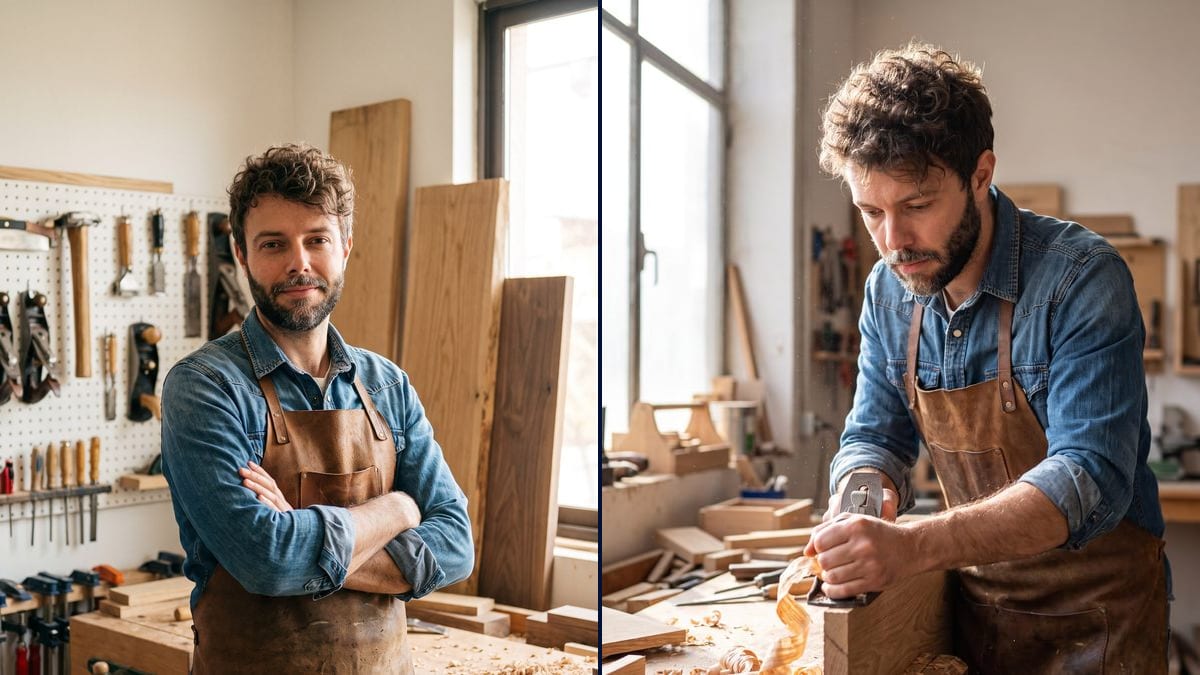
Real workflow: a selfie on a white background becomes a cabinetmaker with arms crossed at his workbench, then the same man planing an oak board in the workshop light. The face is the same on both.
At a glance
A tradesperson's customers want to know who is coming into their home. The about page, the Google profile and social media all call for a photo of you in your trade, and nobody has time to bring a photographer to the workshop. This workflow starts from a simple selfie and makes two photos: a posed portrait and a photo at work.
The hard part is the face. The prompt describes the outfit, the gesture and the workshop, never your features: as soon as you describe a face, the model invents another. Nano Banana Pro takes the one from the selfie on both photos.
For an office portrait on a neutral background, see the professional headshot; for your stationery, the business card. Both photos cost thirty-eight credits.
These are the files of the workflow above, exactly as the models produced them, unretouched. The starting point is shown when there is one.
Starting point
Render
Tradespeople, craft shop owners and small firms who want to show their face on their website, Google profile and social media.
A front-facing selfie in daylight, and the workshop, outfit and gesture of your trade.
Take a selfie
Front-facing, in daylight, face clear, no sunglasses or cap. One is enough.
Describe your workshop
The tools, materials and light of YOUR trade: workbench, bakery, building site, electrical panel, greenhouse.
Describe outfit and gesture
Apron, overalls, chef's jacket. A posed portrait, then a gesture of your trade, hands at work.
Use them in the right place
The portrait on the website and Google profile, the work photo on social media, next to your real jobs.
The same canvas, tuned for different needs: each variation is two or three lines of prompt away.
A portrait at the workbench at the top of the website, instead of the logo alone, because a customer ordering a bespoke kitchen wants to see the person who will build it.
A photo in the bakery shaping loaves, for the shop's profile, alongside the real photos of the window and the bread.
No job photos to show yet, but a profile to fill in on the platforms that connect tradespeople and customers: a serious portrait in work clothes.
The portrait printed on the stand's roll-up banner, so visitors recognise the owner on arrival and put a face to the company.
The three builders of the company, each in work clothes against a consistent site background, for the team page, from three selfies.
A workshop portrait for the local paper's article or a craft label application, when a photo is asked for by tomorrow.
"Dark-haired man, beard" and the model draws another dark-haired bearded man. Only describe the outfit, the gesture and the place.
A workshop that is too clean looks like stock. Ask for sawdust, shavings, worn tools: what makes it real.
A gesture you would never make is quickly spotted by people in the trade. Describe the real gesture, with the real tool.
The portrait introduces you, it proves nothing. Your jobs are shown with their real photos, never with generated images.
Yes: on the demo, the same face, the same hair and the same beard on both photos. The prompt never describes the features.
Yes: baker at the oven, electrician at a panel, builder on site, florist, hairdresser. Change the workshop, the outfit and the gesture.
Yes: wire both selfies into the Image node and describe who does what, one at the bench, the other presenting a finished piece.
Thirty-eight credits, nineteen per photo on Nano Banana Pro. A third photo from the same selfie costs nineteen more credits.
Because it holds a face from a single photo and renders a believable scene: workshop light, shavings, dust in the backlight.
As a profile or cover photo, yes. For photos of your work, Google expects real photos: show your jobs as they are.
3:4 portrait, which crops to a square for a profile picture or to landscape for a website banner.
It is a staged photo made from your face, like heavy retouching. A small "AI-generated image" note next to it is the honest way to publish it.
A craftsperson portrait in the workshop, from a selfie, with AI
Use this workflowFree account, no card required. The workflow opens pre-filled in your canvas.
 Nano Banana Pro
 Seedream 5 Pro
 Flux Kontext
 GPT Image 2.5 Sunburst