The plumber starting out
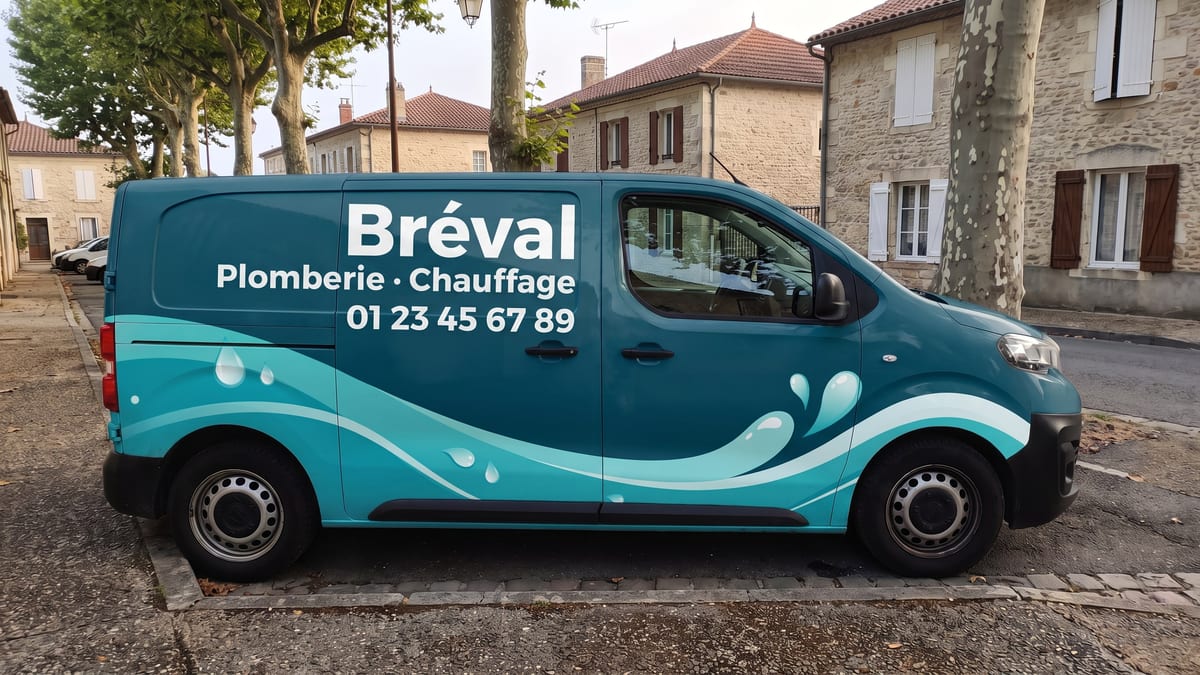
First van, first lettering: two mockups on the photo of the second-hand vehicle, before spending the budget of a full wrap.
The photo of your van with sober lettering and then a full wrap, name, trade and phone number without a mistake. To decide before you see the sign fitter. Workflow visible here, no account.
Real workflow: the photo of a white van parked in a village street, then the same van with sober navy lettering and with a petrol blue wrap with a turquoise wave. Name, trade and phone number written identically.
At a glance
A lettered van is seen every day, on sites, at red lights, outside customers' homes. It is often a tradesperson's first advert, and it gets ordered from a flat mockup that looks nothing like your vehicle. This workflow starts from a photo of YOUR van and shows you two approaches, sober lettering and a full wrap.
The hard part is the text. A phone number with one wrong digit is useless. Each line is given in quotes, and Nano Banana Pro writes it letter for letter on the bodywork, following the sliding door, without touching the street or the vehicle.
For the logo itself, start from the logo generator; for the matching card, from the business card. Both designs cost thirty-eight credits.
These are the files of the workflow above, exactly as the models produced them, unretouched. The starting point is shown when there is one.
Starting point
Render
Tradespeople and small businesses lettering their first van or changing colours, sign fitters presenting a quote.
A side-on photo of the vehicle, and the lines to write in quotes: name, trade, phone number.
Shoot the side
The whole van, straight from the side, in daylight, with no car in front. This is the panel the lettering goes on.
Write your lines
Name, trade, phone number, each in quotes, in order. The fewer the lines, the better the van reads from a distance.
Pick two approaches
Sober lettering on the white paint, cheap to fit, and a full wrap in the colours of your trade.
Show them to the fitter
The fitter takes your colour and layout choices into the print file, at the exact dimensions of the vehicle.
The same canvas, tuned for different needs: each variation is two or three lines of prompt away.
First van, first lettering: two mockups on the photo of the second-hand vehicle, before spending the budget of a full wrap.
The logo has been redone and the vans follow: the new wrap tested on the photo of each vehicle in the fleet, from the small van to the big one.
Name and phone number on the side of the trailer, which stays parked outside sites all day, tested before calling the sign shop.
The vehicle graphics shop shows the customer two proposals on the photo of their own van, instead of a flat template they struggle to picture.
Menu, name and brand colours on the side of the truck, before ordering a wrap that costs more than the kitchen.
Three small vans in the company colours, with one clearly readable number, so local customers call directly.
List of services, website, email, slogan: from a distance, nothing reads. A name, a trade, a number is what people remember at a red light.
Without quotes, the model rewords or invents an extra line, often a website. Each line in quotes, and "nothing else".
A side seen at a sharp angle letters badly, the text stretches towards the back. Shoot the vehicle straight from the side.
It is an image to decide, not a vector file at the vehicle's dimensions. The fitter redoes the layout from your choices.
No: same van, same wheels, same windows, same street. Only the bodywork gets the lettering or the wrap.
Yes: add your logo in a second Media node wired into the Image node, and ask for it to sit to the left of the name.
Yes: large van, small van, pickup or trailer, as long as the whole side is in the photo.
Thirty-eight credits, nineteen per render on Nano Banana Pro. A third try on the same photo costs nineteen more credits.
Because it writes accurately, digits included, and keeps the original photo: you see your van and your street, not a catalogue vehicle.
On the demo, yes: "01 23 45 67 89" is identical on both renders. Always check every digit before ordering.
The format of your photo, here 16:9. A van is shot from the side, in landscape.
Advertising lettering on a company vehicle usually needs no formality, but rules vary by country. Your fitter will know about windows and plates.
Preview your van wrap and lettering with AI
Use this workflowFree account, no card required. The workflow opens pre-filled in your canvas.
 Nano Banana Pro
 GPT Image 2.5 Sunburst
 Flux Kontext