The plumber and the neighbourhood
Two hundred flyers in the streets around the last job, with the photo of the bathroom the neighbours watched come together over two weeks of vans outside.
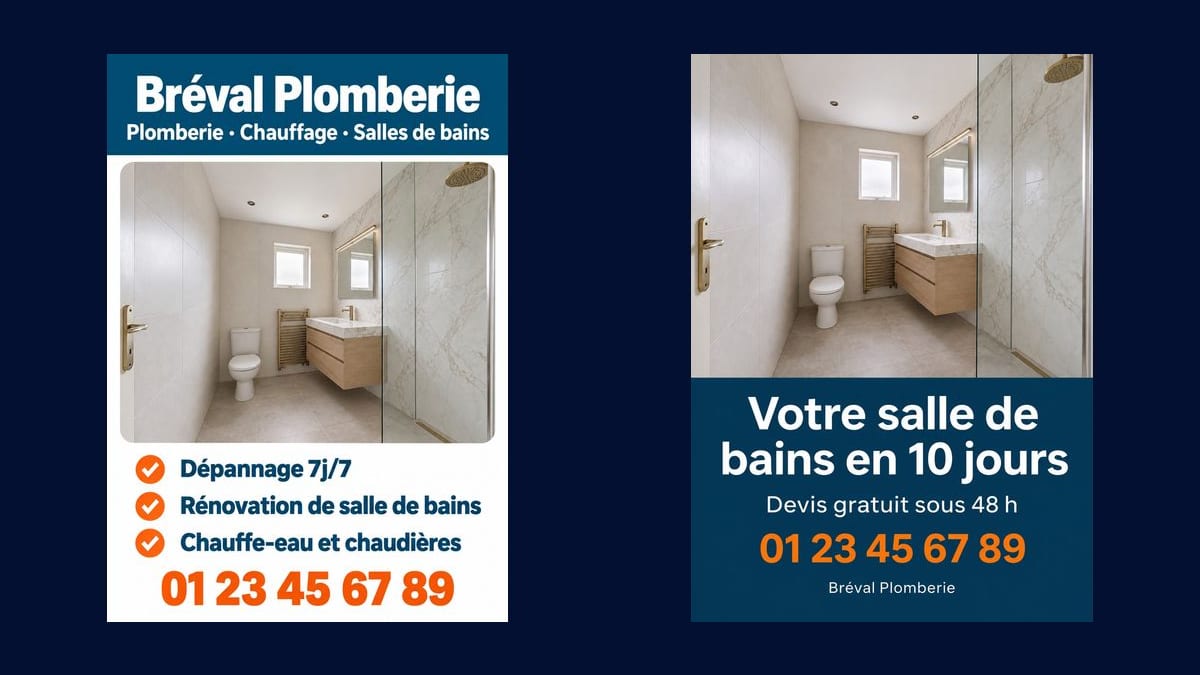
The photo of a finished job becomes two A5 flyers, a list of your services and then a single promise, text and phone number without a mistake. Ready for the printer. Workflow visible here, no account.
Real workflow: the photo of a renovated bathroom becomes a flyer with a blue band and three ticked services, then a single-promise flyer. The bathroom is the same on both. The demo text is in French, write yours in your language.
At a glance
A flyer through letterboxes is still one of the cheapest ways to find jobs close to home. It still has to show your work, not a stock photo the neighbour has already seen from three competitors. This workflow starts from the photo of ONE of your jobs and turns it into two flyers.
The hard part is twofold. The text first: name, services and phone number given in quotes, written without a mistake by Sunburst. The photo next, asked for "reproduced as it is": people recognise your bathroom, kitchen or patio, not a redrawn version.
For the card you leave with the customer, see the business card; for the van, the van wrap. Both flyers cost eighteen credits.
These are the files of the workflow above, exactly as the models produced them, unretouched. The starting point is shown when there is one.
Starting point
Render
Building and service trades canvassing their area: plumbers, electricians, carpenters, landscapers, decorators.
The photo of a finished job, and the lines to write in quotes: name, services, phone number.
Pick your best job
A photo of a finished, tidy job in daylight. It does the convincing for you.
Write your lines
Name, services, phone number, each in quotes and in order. Three services are enough, the rest is said on the phone.
Compare two flyers
A list of services for the neighbourhood, and a single strong promise for a season or a specialty.
Send it to the printer
Download the image in high quality, check every digit, and ask for a proof before the print run.
The same canvas, tuned for different needs: each variation is two or three lines of prompt away.
Two hundred flyers in the streets around the last job, with the photo of the bathroom the neighbours watched come together over two weeks of vans outside.
A seasonal promise, pruning and garden tidy-up, on the photo of a garden taken over last year, delivered early March around the housing estates.
A single-promise flyer, a home charger installed, with the photo of a real install in a garage, for streets where electric cars are multiplying.
The photo of a bespoke oak kitchen, three services listed, left with local shops and on the counter of the builders' merchant.
A before and after of a house front on the photo of the job, for streets of 1970s houses that all reach repainting age at the same time.
The flyer on the stand at a home improvement fair, with a clearly readable number, so the visitor calls back on Monday without hunting for your name.
The customer has seen the same bathroom from three competitors. Your real job, even a simple one, builds more trust.
Twelve services in small print and the flyer says nothing. Three services, or one promise, readable in two seconds.
A lead time or a price written on a flyer is a commitment. Only write what you deliver on every job.
One wrong digit in the phone number and the print run goes in the bin. Check every line, letter by letter, before the printer.
No: it is asked for reproduced as it is. On the demo, the shower, the vanity and the fittings are the same on both flyers.
Yes: wire your logo into a second Media node and ask for it at the top left, in place of the written name.
Yes: builder, electrician, carpenter, landscaper, painter. Change the photo, the colours and the lines, the structure stays.
Eighteen credits, nine per flyer on Sunburst at high quality. A third flyer from the same photo costs nine more credits.
Because it writes accurately on a light background, digits included, and places a reference photo without remaking it: people see your job.
A 3:4 portrait, to crop to A5 or US half-letter at the proof stage. For an exact size, ask the printer for the bleed and leave margin around the text.
Yes: a second Image node for the back, with your detailed services or a map of the area you cover, in the same colours.
Not in the image: it is a render, not a layout file. Change the line in the prompt and run it again, nine credits per flyer.
Make a tradesperson flyer with AI, from a photo of your work
Use this workflowFree account, no card required. The workflow opens pre-filled in your canvas.
 GPT Image 2.5 Sunburst
 Nano Banana Pro
 Flux 3
 Seedream 5 Pro