Before ordering wallpaper
Three panoramic designs tried on the real living room wall one evening at home, before ordering strips that can't be returned once cut.
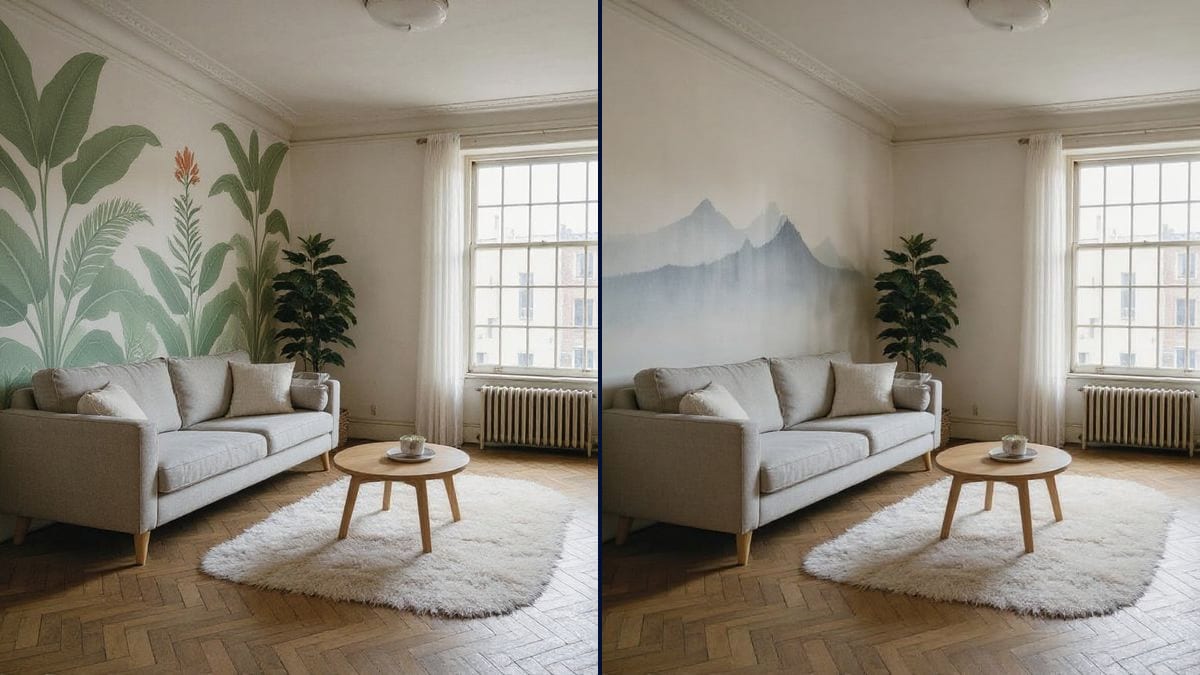
Your room photo with a painted mural and then a panoramic wallpaper on the same wall, furniture and light unchanged. To choose before you order. Workflow visible here, no account needed.
Real workflow: a living room photo, then the left wall as a hand-painted leafy mural and as a misty mountain wallpaper. The sofa and the plant stay in front.
At a glance
Panoramic wallpaper is expensive and gets ordered from a ten-centimetre sample. A painted mural can't be undone. This workflow starts from a photo of your room and shows the same wall with two designs, so you can see the effect before ordering or calling a painter.
The hard part is keeping YOUR room. A model that rebuilds the picture moves the sofa or changes the floor. Flux Kontext only changes the wall you name: the pattern stops at the skirting and cornice, and goes behind the sofa and the plant.
For a plain paint colour, see the paint colour test; to furnish the room, home staging. Both designs cost twelve credits.
These are the files of the workflow above, exactly as the models produced them, unretouched. The starting point is shown when there is one.
Starting point
Render
Homeowners and tenants redecorating, decorative painters, cafés and landlords who want to see a design before putting it up.
A photo of the room with the whole wall visible, and the design wanted with the wall and its edges named.
Photograph the room
Straight on, the whole wall visible from skirting to ceiling, in daylight. The pattern takes the light of the photo.
Name the wall and its edges
The left wall, from skirting to cornice, from the corner to the window. Without edges, the pattern spills onto the ceiling or the next wall.
Say what stays in front
The sofa, cushions and plant sit in front of the design. Take the frames down: nothing hangs on a mural.
Compare the two designs
Painted mural and wallpaper on the same wall, side by side. Add a node for a third idea.
The same canvas, tuned for different needs: each variation is two or three lines of prompt away.
Three panoramic designs tried on the real living room wall one evening at home, before ordering strips that can't be returned once cut.
The painter shows the client the mural on a photo of their room before pricing it, and adjusts colours and motifs before picking up a brush.
A forest, a starry sky or hot air balloons on the wall behind the bed, tried out with the child before choosing together.
A painted green wall or a landscape panorama to change the mood of the dining room, tried on a photo taken while closed.
The owner compares two looks for the main room before renovating, then retakes the photos with listing photos.
A single wallpapered wall in the bedroom, the rest in a plain colour tried with the paint colour test.
"Add a mural" without saying where, and the model paints several walls or the ceiling. One wall and its edges, always.
Without naming them, the pattern can run over the sofa or the plant. Say what stays in front of the wall.
"Green" comes out neon across a whole wall. Describe greyish tones, sage, olive, blue-grey, as in a paint chart.
A wall seen in steep perspective is hard to decorate and the pattern warps. Shoot the wall as straight on as you can.
No: sofa, plant, coffee table, rug, floor and window stay those of the photo. Only the named wall changes.
Yes: add a photo of the wallpaper in a Media node wired into the Image node, and ask for it to be hung on the wall.
Yes: a forest, a starry sky or hot air balloons, with the bed and desk named in front of the wall.
Twelve credits, six per design on Flux Kontext. A third design on the same photo costs six credits more.
Because it changes one surface while keeping the photo pixel for pixel: you decorate YOUR room, as measured on wall colours too.
In the demo, yes: leaves and mountains sit behind the sofa, cushions and plant, which don't move.
The format of your photo, here 4:3. A vertical photo stays vertical.
It's a mood preview, not a print file. The wallpaper maker works from their own designs and your measurements.
Visualize a wall mural or panoramic wallpaper with AI
Use this workflowFree account, no card required. The workflow opens pre-filled in your canvas.
 Flux Kontext
 Nano Banana Pro
 GPT Image 2.5 Sunburst