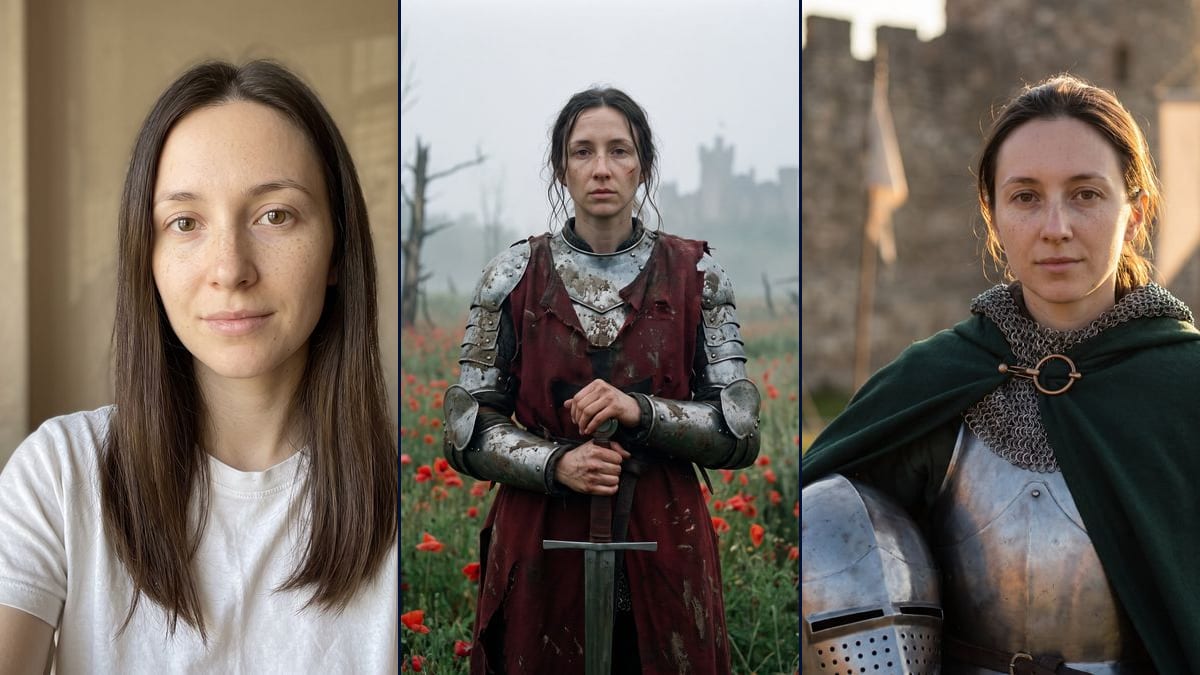
Without the helmet and in armour, side by side
The two renders belong together: the wide scene in the poppies and the close portrait at the castle. Put next to each other, they show before and after the battle without a line of text.
Your photo as a knight, in a field of poppies in the mist, then as a portrait in front of a castle, with your own face. Workflow visible here, no account needed.
Real workflow: a portrait of a woman with long dark brown hair and freckles, in a white t-shirt and no makeup, then the same woman as a knight in a misty poppy field, muddy armour, torn red surcoat and sword point down, and as a sunset portrait with a green cloak, mail around the neck and a helmet under the arm in front of a castle. She is recognisable in both, with a more hollow, older face in the poppies.
At a glance
AI effect apps are currently offering a way to see yourself as a knight after the battle: dirty armour, a field of red poppies, mist, a sad film mood. This workflow does it with your photo. One photo goes in, two images come out: the poppy scene, sword planted in front of you, and a tighter portrait at sunset, green cloak and helmet under the arm, in front of a castle's walls.
Most of the work is in the face. The prompt lists the features to keep one by one and forbids beautifying, ageing or slimming. Nano Banana Pro holds a face from a single photo, and in the demo you recognise the woman from the portrait in both renders. The portrait in armour is almost identical to the photo. In the poppies, the face gained a few years and hollow cheeks, which suits the scene but not the photo.
Same idea as an angel with black wings in the fallen angel, or in costume with the Halloween costume. For a miniature version of yourself, see photo to figurine. Both renders cost thirty-eight credits.
These are the files of the workflow above, exactly as the models produced them, unretouched. The starting point is shown when there is one.
Starting point
Render
People who want to see themselves as a knight with their own photo, fans of medieval settings, LARP or cosplay, content creators looking for a character portrait.
A sharp, well-lit front-facing photo of you or of someone who agreed, and the scene described with the armour, the pose and the setting.
Pick a front-facing photo
Sharp, in soft light, face clear, no sunglasses or cap. A phone selfie is enough. Your photo, or one of someone who said yes.
Describe the armour piece by piece
Plates, surcoat, cloak, brooch, helmet in hand or left out, the sword and where the hands go. If the surcoat should stay plain, write "no cross, no pattern": the demo got one without asking for it.
List the features to keep
Face shape, eyes, eyebrows, nose, lips, hair and hairline, skin without makeup, and the instruction not to beautify or age. To keep your hair loose, say that too, or the scene ties it back.
Compare with the photo
Put the render next to the original portrait. If the face gained a few years or a detail of the armour bothers you, rerun that node on its own: nineteen more credits.
The same canvas, tuned for different needs: each variation is two or three lines of prompt away.
The two renders belong together: the wide scene in the poppies and the close portrait at the castle. Put next to each other, they show before and after the battle without a line of text.
Replace "the woman from the photo" with "the man from the photo" and adapt the list of features to the starting face: short hair, beard or clean-shaven. The armour, the sword and the setting stay the same.
The portrait in armour, with its blurred background and golden light, crops easily to the face. In a square format, the green cloak and the mail still show around the neck.
They recreate the effect on their own photo, then connect a Video node to the poppy image to move the mist or the flowers. This page has no video demo, so the still image stays the starting point.
Keep the armour and the list of features and change only the scene: a snowy field, a castle courtyard, a winter forest. The pose and the light are described the same way.
Before ordering a cloak or a mail shirt, you see on your own face what a colour or a cut looks like. The green from the demo, a midnight blue, a plain surcoat: one image per try.
An actress, a singer, an athlete: no. This workflow is for putting yourself in the armour, or someone who agreed and will see the picture.
Give the model a red surcoat over armour and it likes to add a cross. The demo got one without asking for it. Write "plain surcoat, no cross, no pattern" if you don't want one.
The demo asked for both hands on the pommel and the helmet under the left arm: it got one hand on the handle and the helmet on the right. If a detail matters, check before keeping the image.
The model invents what it can't see, and a face half in shadow comes back older or harder. A front-facing photo in soft light keeps that drift down.
It stays recognisable, more in one image than the other. In the demo, the portrait in armour keeps the freckles and the half smile from the photo. In the poppies, the face is more hollow and looks older, with the hair pulled back and wet strands.
No. In the poppies, the framing stops at mid-thigh instead of the knees, and one hand grips the handle instead of both resting on the pommel. In the portrait, the helmet is under the right arm instead of the left, and the image goes down to the belt.
From the model. The prompt only ruled out a coat of arms with letters, and a red surcoat over armour makes the model think of crusaders. If you want it plain, say so and rerun the image.
Thirty-eight credits, nineteen per render on Nano Banana Pro in 2K. Rerunning a single image costs nineteen more.
Because it holds a face from a single photo. Flux Kontext, which costs less, retouches the features, and the effect loses its point if you don't recognise yourself under the armour.
1792 x 2400 pixels, vertical 3:4. Both renders in the demo came out on the first try, neither was redone.
Yes, if you write it. The poppy prompt mentioned the long dark brown hair, and the render still pulled it back. Add "long hair loose on the shoulders" to the description of the scene.
Connect a Video node to the image you keep and describe the motion, mist drifting past or wind in the poppies. This page has no video demo, so there is no promise on the result.
Turn yourself into a medieval knight from your own photo with AI
Use this workflowFree account, no card required. The workflow opens pre-filled in your canvas.
 Nano Banana Pro
 Seedream 5 Pro
 Flux Kontext