The October profile picture
To switch avatars until the 31st, the forest scene is enough: the moon makes a bright backdrop behind the hat and the face stays in the middle of the vertical frame.
Your photo as a witch on her broom, under the full moon above the pines, then at dusk over a village, with your own face. Workflow visible here, no account needed.
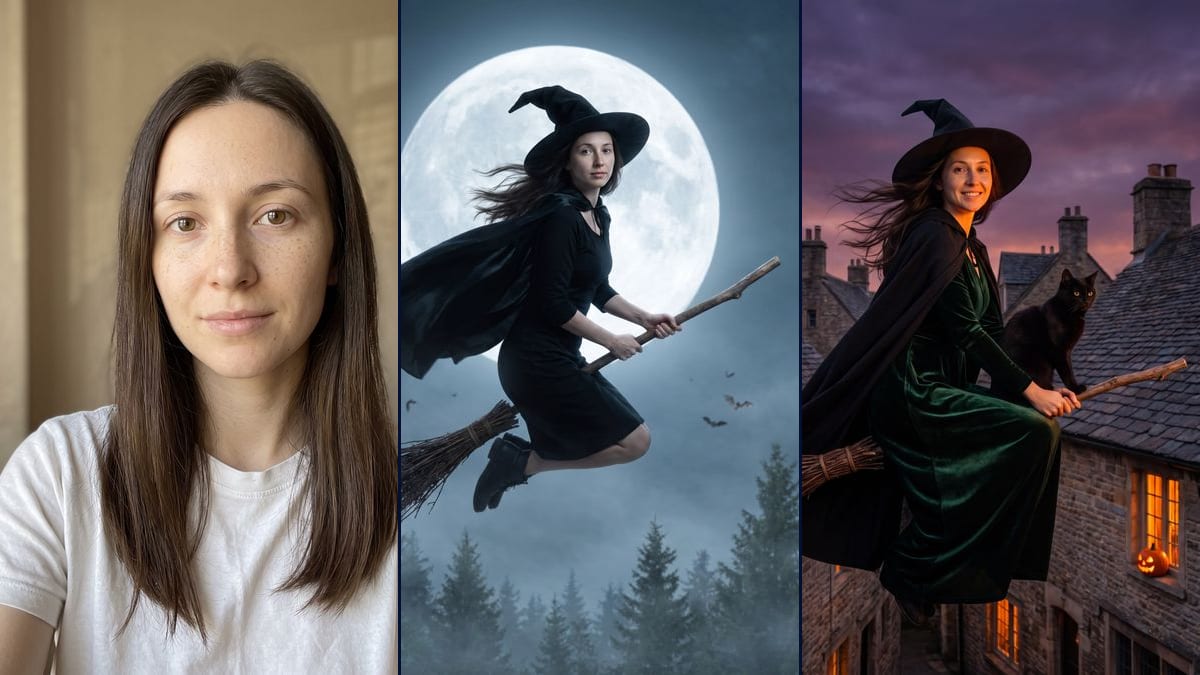
Real workflow: a portrait of a woman with long dark brown hair and freckles, then the same woman on a broom in front of a huge full moon above a pine forest, and smiling over the slate roofs of a village at dusk, a black cat on the handle. Her face is recognisable in both, a little thinner in the forest.
At a glance
This effect turns up every October: someone posts their photo, and there they are as a witch racing across the sky on a broom under the moon. This workflow does it with yours. One photo goes in, two scenes come out: at night above a misty pine forest, then at dusk over the chimneys of an old village, a black cat on the handle.
It all comes down to the face. Outfit, pose, light and setting change, so the prompts list the features to keep one by one and forbid beautifying or ageing. Nano Banana Pro holds a face from a single photo. In the demo, you recognise the woman from the portrait in both renders, freckles included, even if the forest version hollows her cheeks a little.
To try on a costume rather than a flying scene, see the Halloween costume. To put yourself behind the wheel of another scene going around right now, the flying Tesla. Both renders cost thirty-eight credits.
These are the files of the workflow above, exactly as the models produced them, unretouched. The starting point is shown when there is one.
Starting point
Render
People who want to recreate the witch-on-a-broom effect with their own photo in October, friends planning a duo, content creators looking for a Halloween picture.
A sharp, well-lit front-facing photo of you or of someone who agreed, and the flying scene described with the setting below and the outfit.
Pick a front-facing photo
Sharp, in daylight, face clear, no sunglasses or hood. A phone selfie is enough. Your photo, or one of someone who said yes.
Set up the flying scene
The time of day, what she flies over, the moon or the sky, the outfit piece by piece. Say where the cat goes, in front or behind: the model does not always put it where you want.
List the features to keep
Face shape, eyes, eyebrows, freckles, hair, and the instruction not to beautify or age. Without that list, the model smooths the face out.
Compare with the photo
Put the render next to the original portrait. If the face got thinner or a few years older, rerun that node on its own: nineteen more credits.
The same canvas, tuned for different needs: each variation is two or three lines of prompt away.
To switch avatars until the 31st, the forest scene is enough: the moon makes a bright backdrop behind the hat and the face stays in the middle of the vertical frame.
Two friends, each with their photo in their own node, and the same setting in both prompts. You get two pictures that belong together, to post side by side.
The village version, with its pumpkins in the windows, makes an invitation picture for a Halloween party. The card's text goes on separately afterwards, since the prompt asks for an image with no text.
Nothing says it has to be a woman: swap the dress for a long tunic, and keep the beard if it is in the photo. The list of features to keep follows the starting face.
They recreate the October effect on their own photo, then connect a Video node to the image to set it in motion. The still works as the first thumbnail while the video is on its way.
Replace the village with somewhere you know: the roofs of your street, your town's church tower, the harbour. Describe them as you would see them from a high window, the model uses that for the background.
An actress, a singer, an influencer: no. This workflow is for putting yourself in the scene, or someone who agreed and will see the picture.
Without the line that spells out face shape, eyes, freckles and hair, the model returns a pretty witch who is no longer you. Keep that block as it is in every prompt.
The demo asked for a long black dress, it stops at the knee with ankle boots. If the length matters, repeat it and add "down to the ankles", then check before keeping the image.
The model invents what it can't see, and a face half in shadow comes back older or thinner. A front-facing photo in soft light keeps that drift down.
It stays recognisable without being a perfect copy. In the demo, the freckles and features are there in both scenes, but in the forest the face looks a little thinner and a little older than in the photo.
Yes: connect a Video node to the image you keep and describe the motion, the broom speeding along, the cape flapping. This page has no video demo, so there is no promise on the result.
Not quite. In the forest, the long dress that was asked for stops at the knee and ankle boots appear. In the village, the cat is in front of her instead of behind, and the light comes from the sky and the windows rather than from below.
Thirty-eight credits, nineteen per render on Nano Banana Pro in 2K. Rerunning a single scene costs nineteen more.
Because it holds a face from a single photo. Cheaper models, Flux Kontext for instance, retouch the features, and the effect loses its point if you don't recognise yourself.
1792 x 2400 pixels, vertical 3:4. Both demo renders came out on the first try, none was redone.
Yes if that person agrees. No photo of a famous person, and no photo of someone who doesn't know you are putting them on a broom.
Yes: a city at night, a misty graveyard, your own street. The setting fits in the first sentence of the prompt, the rest stays as it is.
See yourself as a witch on a flying broom from your own photo with AI
Use this workflowFree account, no card required. The workflow opens pre-filled in your canvas.
 Nano Banana Pro
 Seedream 5 Pro
 Flux Kontext