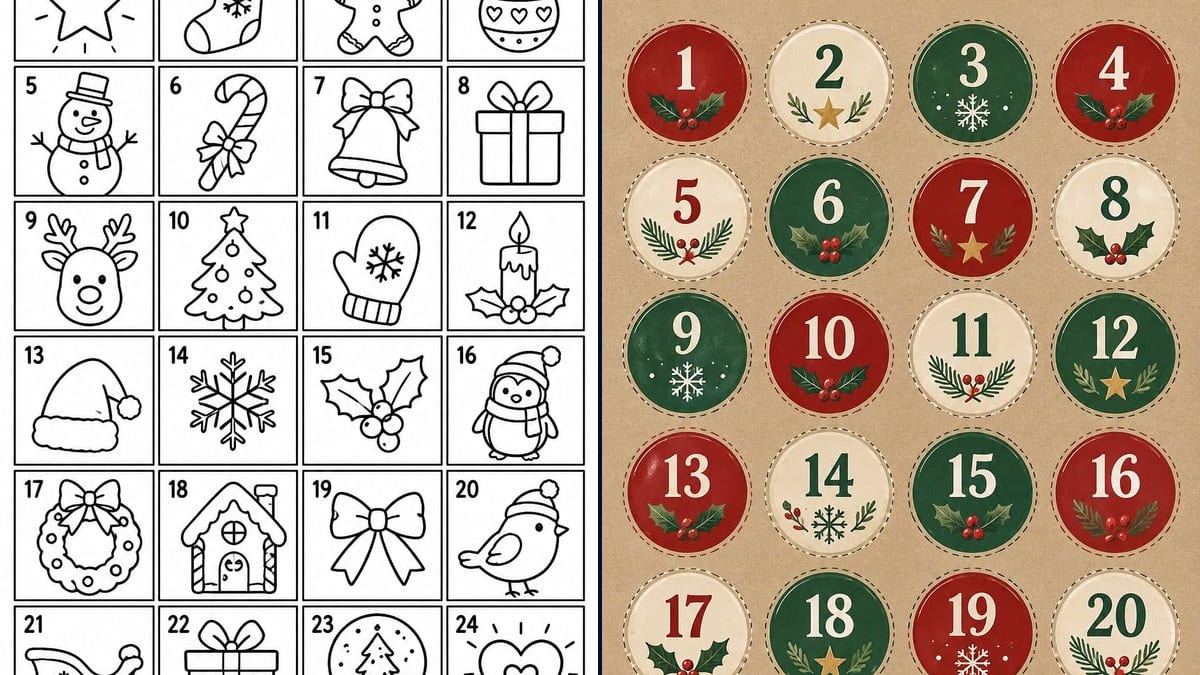
Louise's colouring page
Twenty-four boxes to colour, one each morning, starting with a star on 1 December. The page goes on the fridge, and your child can see at a glance how many days are left.
An advent calendar to colour in with your child's name on it, plus a sheet of 24 round tags for your gift bags. Workflow visible here, no account needed.
Real workflow (demo title in French): a black and white colouring page titled "L'AVENT DE LOUISE" with twenty-four numbered boxes, a star, a sock, a reindeer or a sleigh in each, then a sheet of twenty-four round tags on kraft paper, red, fir green and cream, with holly, a star or a snowflake under every number.
At a glance
A homemade advent calendar means twenty-four bags to fill and twenty-four numbers to write by hand, usually the night before 1 December. This workflow takes care of the paper side. You give it your child's name and it returns two A4 sheets: a calendar to colour in, one box a day with a Christmas drawing, and twenty-four round numbered tags to stick on the bags.
The tricky part is the numbers. You need twenty-four of them, in order, with no gaps and no repeats, and an image model left to itself can skip one or write another twice. The prompt sets the grid, the reading order and each number exactly once, then forbids any other word. In the demo, GPT Image 2.5 Sunburst got both sheets right on the first try.
For the holidays, see the greeting card and the personalised Santa video; for the rest of the year, the printable colouring page and the chore chart. Both sheets cost six credits.
These are the files of the workflow above, exactly as the models produced them, unretouched. The starting point is shown when there is one.
Render
Parents and grandparents putting together a homemade advent calendar, teachers and club leaders who keep a countdown on the classroom wall, and adults making a calendar of small gifts for someone close.
Your child's name for the title of the colouring page and, if you like, the list of twenty-four drawings; the tags need nothing.
Put the name in the banner
Replace "L'AVENT DE LOUISE" with your own title, in capitals, inside the quotation marks, for example "LILY'S ADVENT". A short title fits on one line; with a long name, check it stays inside the banner.
Pick the drawings if you care
The prompt gives a dozen ideas and lets the model fill in the rest. If your child loves reindeer or cats, write out all twenty-four drawings in the list, one per box.
Count the numbers before printing
Go through the grid from 1 to 24, row by row, on both sheets. A repeated or missing number is easy to spot on screen, much less so once the bags are sealed.
Print on A4, fit to page
Plain paper is fine for the colouring page. The tags hold up better on sticker paper or card: cut along the dotted line, then stick them on or tie them with string.
The same canvas, tuned for different needs: each variation is two or three lines of prompt away.
Twenty-four boxes to colour, one each morning, starting with a star on 1 December. The page goes on the fridge, and your child can see at a glance how many days are left.
The red, green and cream tags go on brown paper bags, lined up on a branch or clipped to a string with clothes pegs. The numbers are big enough to read from across the room.
Two children, two colouring pages, each with their own name in the banner and their own drawings. The tags can stay the same, or switch colours so nobody opens the wrong bag.
For a teacher or a club leader: one page on the wall with the class name in the banner, and each day one pupil colours in the box while the others count down.
Print the tags on card, punch a hole in each one and thread it onto the string of small hanging socks. The dotted line helps you cut a clean circle with scissors.
Teas, chocolates, miniature bottles: a calendar for a partner or a friend doesn't need a colouring page. The tag sheet is enough, with quieter colours described in the prompt.
A missing 17 or a 9 that appears twice, and one December morning your child can't find their bag. Count from 1 to 24 on screen before you hit print.
Thin paper wrinkles under glue and tears when the bag is opened. Use sticker paper, or card that you attach with tape or string.
The tags run almost to the edge of the image, and a printer with a margin can cut off the dotted lines at the top and bottom. Pick "fit to page" instead of actual size.
Without that sentence at the end of the prompt, the model happily adds a "Merry Christmas", weekday names or little captions under the drawings. Keep it, and keep the title in quotation marks.
In the demo, yes: both sheets have the numbers 1 to 24, each once, in reading order, and the title is exact. Still check the grid before you print, because one wrong number spoils the whole calendar.
Yes, the list in brackets is yours to edit. In the demo the model filled out the list with a penguin, a sleigh, a bow and a heart, and drew a present twice. For twenty-four different drawings, write them all out.
For the colouring page, yes: the name is in the title, so each child gets their own, at three credits a page. The tags carry no name, so one sheet can be printed as many times as you have calendars.
Six credits, three per render on GPT Image 2.5 Sunburst at medium quality. A colouring page for a second child costs three more credits.
Because it writes numbers and letters without mistakes, and it is the cheapest model in the catalogue. In the demo it got forty-eight numbers and the title right on the first try.
The prompt asked for 3:4, but Sunburst doesn't follow the shape: the renders come out at 1024 x 1536 pixels, which is 2:3. On A4 the image fills the height and leaves about 6 mm on each side, so the tags come out roughly 4 cm across. For a sharper print, run the image through the photo upscaler first.
The prompt lists twelve drawings and lets the model come up with the rest: it put a second present in box 22, with polka dots this time. If you want twenty-four different drawings, list them all in the prompt.
1 December 2026 is a Tuesday. Generate and print the sheets in late November: that leaves time to cut, fill the bags and redo a sheet if a number looks off.
Make a printable advent calendar with AI
Use this workflowFree account, no card required. The workflow opens pre-filled in your canvas.
 GPT Image 2.5 Sunburst
 Nano Banana 2.1
 Recraft V4.1