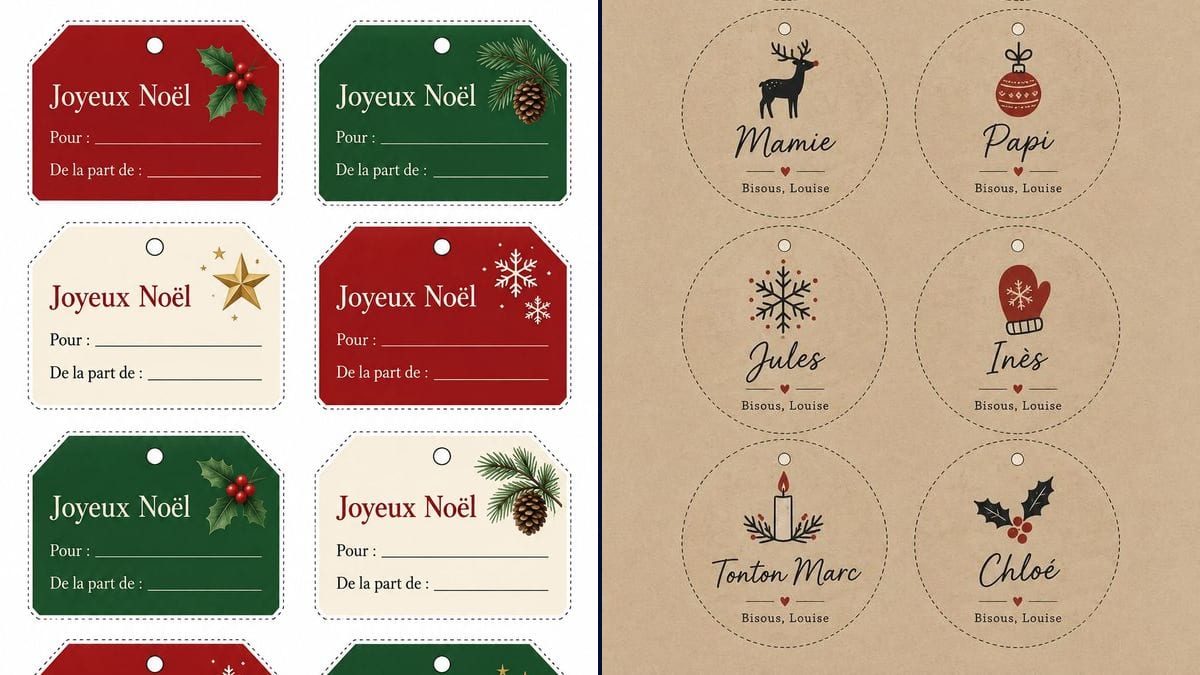
Louise's family table
Eight names, from Léa to Tonton Marc, each with its own little drawing and the same signature. The presents get sorted under the tree in two minutes, even by a child who is just learning to read.
A sheet of eight To and From tags and a sheet with the whole family's names, ready to cut out. Workflow visible here, no account needed.
Real workflow (demo text in French): eight red, fir green and cream tags reading "Joyeux Noël", with holly, a pine cone, a gold star or snowflakes, then eight round tags on kraft paper, from Léa to Tonton Marc, each with its own little drawing and "Bisous, Louise" underneath.
At a glance
The night you wrap the presents, there are never any tags, and a name written in marker on brown paper bleeds. This workflow gives you two A4 sheets of eight tags each. The first is blank: a title, then a To line and a From line to fill in with a pen. The second already has the names on it, one per tag, with your signature underneath.
What matters here is spelling. An image model left to itself drops accents and mangles names. The prompts give every word in quotation marks, letter for letter, and forbid everything else. In the demo, GPT Image 2.5 Sunburst got all the French text right on the first try, but the sheets come out in 2:3, and the circles on the name sheet are packed tight.
For the same season, see the printable advent calendar, which has its own sheet of numbered tags, and the greeting card to tuck in with the present. If the gift is an outing or a favour, the printable gift voucher covers the rest. Both sheets cost six credits.
These are the files of the workflow above, exactly as the models produced them, unretouched. The starting point is shown when there is one.
Render
Parents and grandparents wrapping presents for the whole family, people giving homemade gifts, and teachers and club leaders getting a class's or a group's presents ready.
For the personalised sheet, eight names and the signature to put under them; the blank sheet needs nothing.
Put your names in the quotation marks
Replace Léa, Hugo, Mamie and the rest with your own, and "Bisous, Louise" with your signature, for example "Love, Emma". The prompt asks for eight tags: with six names, change the count and the grid too, say 2 columns and 3 rows.
Use the blank sheet for everyone else
Colleagues, neighbours, last-minute presents: the blank sheet prints as many times as you need and you fill it in by hand. Swap the French words for "Merry Christmas", "To:" and "From:". On the red and green tags, use a white or gold pen.
Check every name letter by letter
Zoom in on the image before printing. Accents, capitals, double letters: a "Katherine" that should be "Catherine" slips by on screen and jumps out on the present.
Print on A4, fit to page
Use thick paper or card, around 200 gsm, so the tag doesn't crumple. Cut along the dotted line, punch the little circle and thread through string or ribbon.
The same canvas, tuned for different needs: each variation is two or three lines of prompt away.
Eight names, from Léa to Tonton Marc, each with its own little drawing and the same signature. The presents get sorted under the tree in two minutes, even by a child who is just learning to read.
The To and From version works for colleagues, the childminder, the building caretaker or the present bought at the last minute. Print two or three ahead of time and keep them with the roll of wrapping paper.
The round tags on kraft paper suit brown wrapping paper and jute string. For red or gold wrapping, ask the prompt for a white or cream background instead of kraft.
The same round tags, set on a plate or tied around a napkin, show everyone where to sit. Replace the signature line with "Christmas 2026" or leave it out altogether.
For a class gift: one tag with the teacher's name and, underneath, "From Year 2". For a sheet of eight teachers or club leaders, list their names the way the demo lists the family.
Biscuits, homemade chocolates or herb salt given in a jar: the blank sheet goes on the lid or ties around the neck. For a proper label with ingredients and a date, use a product label template instead.
Everything is right in the demo, but an unusual name or a nickname can come out with a wrong letter. Read it letter by letter on screen: redoing a sheet costs three credits, rewrapping the presents takes an evening.
On the red and green tags of the blank sheet, the lines are white and black ink barely shows. Have a white or gold pen ready, or ask the prompt for all-cream tags.
On the name sheet, the top row of circles sits about 5 mm from the edge of the page. At actual size, a printer with a margin can clip the dotted line. Pick "fit to page".
A tag on printer paper crumples in the bag and tears at the string hole. Thick paper or card holds up until 25 December, and after that for anyone who keeps their tags.
In the demo, yes: "Noël" keeps its diaeresis on all eight tags, and Léa, Inès and Chloé keep their accents. No render was redone. Still read each name before printing, because a model can slip on an unusual one.
Not with a black pen: in the demo, the text and lines on the dark tags are printed in white. A white gel pen or a gold marker reads well. The two cream tags take any pen.
Eight, in a grid of two columns and four rows. For a family of twelve, run a second sheet with the four remaining names and set the prompt to four tags, for three more credits.
Six credits, three per render on GPT Image 2.5 Sunburst at medium quality. Each extra sheet of eight names costs three more credits; the blank sheet just prints again without a new render.
Because it spells correctly, accents included. In the demo it copied eight titles, sixteen lines, eight names and eight signatures without a mistake, on the first try.
The model made the round tags as big as it could: barely 3 mm is left between two rows. Cut with scissors along each dotted line, or ask the prompt for smaller circles with more space around them.
The sheets come out at 1024 x 1536 pixels, which is 2:3 and not 3:4: Sunburst doesn't follow the shape you ask for. On A4, fit to page, there is about 6 mm of margin on each side; the rectangular tags measure about 8.5 by 6 cm and the round ones about 7 cm across. For a sharper print, run the image through the photo upscaler first.
The model added them on its own: the prompt asked for a reindeer, with no colour, and a line under the name, with no decoration. In the demo, a small red heart between two strokes separates each name from "Bisous, Louise". If you don't want them, say so in the prompt.
Make printable Christmas gift tags with AI
Use this workflowFree account, no card required. The workflow opens pre-filled in your canvas.
 GPT Image 2.5 Sunburst
 Nano Banana 2.1
 Recraft V4.1