A version for a man
Replace "The woman in this photo" with "The man in this photo" in both prompts, change the pronouns, describe your hair and beard, and take out the eyeliner, long lashes and glossy lips if you don't want them. Not tested.
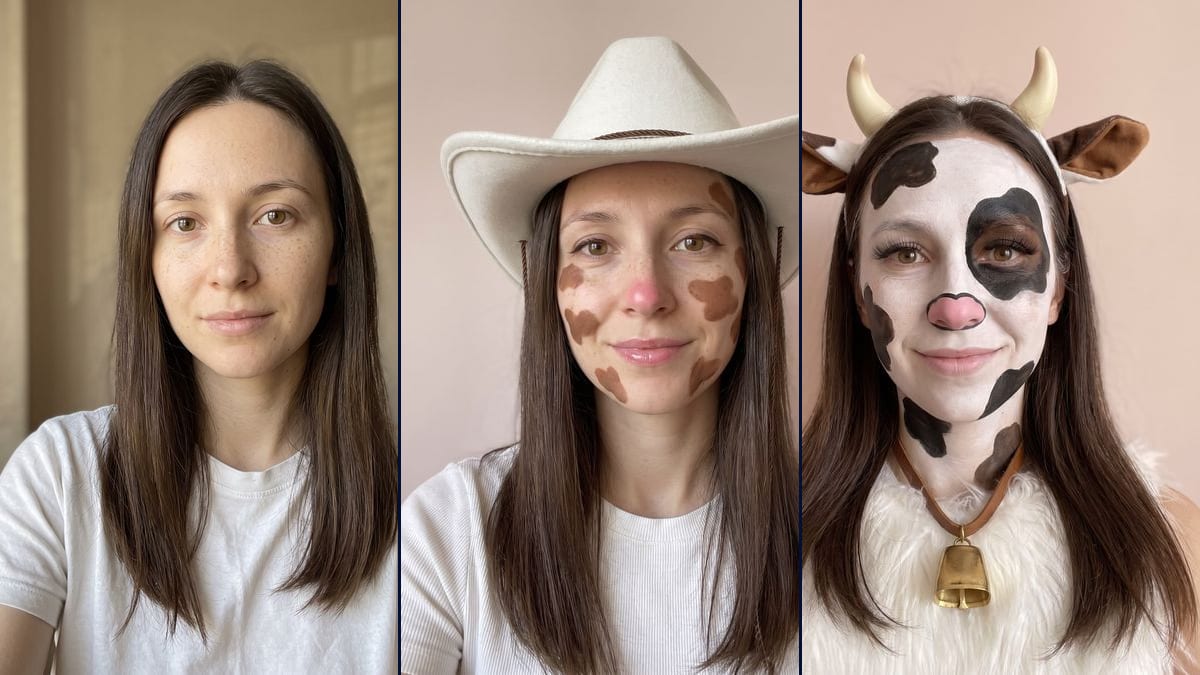
The Cow Makeup trend on your selfie: a few brown patches and a cowboy hat, then the full cow with horns and a bell. 38 credits for both, demo flaws shown.
Real workflow: a selfie of a woman with long brown hair in a white T-shirt against a beige wall, then the same woman with eight brown patches under a cowboy hat, and as a full cow with horns, ears, a pink nose and a bell. In the first picture, the hat cord hangs on each side. In the second, her ears and the top of her forehead were left unpainted.
At a glance
Cow Makeup is a transition video of about fifteen seconds: a few brown patches on the cheeks, a hard cut, then a full cow makeup with horns, ears, a pink nose and a bell. According to makeviral.ai, it started on TikTok in Indonesia on 3 November 2026. The site put #cowmakeup at 28,205 videos and 450.7 million views on 21 November 2026, figures we have not checked. videosi.io/trending places the origin on 17 November and gives it the status "Spreading".
This template makes both steps of the video as still images, on your selfie. The first adds brown patches, a pink nose and a white cowboy hat. The second paints the face and neck white with black patches, plus the headband and the bell. You have nothing to paint and no props to buy. Both demo renders were kept on the first try, flaws included: too many patches and a dangling cord on the first, unpainted ears, a flared bell and a cartoon outline around the nose on the second.
For a more elaborate painted face, see the Catrina makeup. You can test a lipstick or an everyday look with the makeup try-on, and a whole outfit with the Halloween costume. Both renders cost 38 credits, see pricing.
These are the files of the workflow above, exactly as the models produced them, unretouched. The starting point is shown when there is one.
Starting point
Render
People who want to follow the Cow Makeup trend without painting their face, or see the makeup on themselves before a party, a carnival or a TikTok video.
A sharp selfie of you or of someone who agrees, front-facing and taken in daylight, plus the right person, their eyes, their hair and the props you want in the prompts. The photo is optional.
Upload a front-facing selfie
In daylight, face straight on, nothing over the cheeks or forehead. That is where the patches go, and the model needs to see those areas to place them. The demo starts from a head-and-shoulders selfie against a beige wall.
Put your own features in the prompts
Both prompts mention "the woman in this photo", her brown eyes and her "long straight dark brown hair with a centre parting". Write the right person, your eyes and your hair instead, and change the pronouns if needed.
Choose the props
The cowboy hat, the bell and the horned headband are all spelled out. Keep the ones you own or plan to buy and take out the others. The sentence asking for real skin texture and the one ruling out a mask can stay.
Zoom in on the edges, then rerun one render
Look at the nose outline, the hairline and the ears: on the demo, that is where paint is missing or looks wrong. Count the patches too if the number matters to you. Rerunning a single render costs 19 credits.
The same canvas, tuned for different needs: each variation is two or three lines of prompt away.
Replace "The woman in this photo" with "The man in this photo" in both prompts, change the pronouns, describe your hair and beard, and take out the eyeliner, long lashes and glossy lips if you don't want them. Not tested.
In the second prompt, replace "black and dark brown" with "caramel and light brown". On the demo, several patches already came out a see-through brown, so ask for opaque paint as well to avoid that effect. Not tested.
Take the hat out of the outfit sentence in the first prompt. The dangling cord goes with it, the parting shows again and the forehead has room for one more patch. The render gets closer to a selfie taken at home. Not tested.
Place the two renders one after the other in the editing app you already use, or in the Montage node, with a hard cut between them. A Video node with the first and last frame could also make the change inside the canvas. Not tested.
The first picture is enough if you want a light look for a party or a concert: patches and a little pink on the nose. Replace "Five or six" with "Three" and name where each one goes, right cheek, left cheek and temple. Not tested.
Upload a photo of the two of you, write "the two people in this photo" and describe each in one sentence, including where their patches go. Both people must agree to it, and each face will be smaller, so less faithful. Not tested.
The brown eyes and the long dark brown hair with a centre parting belong to the example portrait. With your photo, the model gets two descriptions that contradict each other and may pull you toward hers. Rewrite the "Keep her face exactly as in the photo" sentence with your own features.
The prompt asks for the whole face and neck in white. On the demo, the top of the forehead, the edge of the hair, the base of the neck and the ears stayed skin-coloured. Add "the ears and the hairline also painted white" if you want full coverage. Not tested.
The round bell came out as a flared cowbell, the fluffy collar as a sleeveless faux fur top, and the hat gained two dangling cords. If you already own the props, describe their shape and size rather than just naming them.
The patches in the first render pass for real finger painting, and that can mislead people. Say in the caption that the image is generated. Before using a photo of a friend or your sister, ask them, and leave out singers and well-known creators.
In the first picture, yes: the demo's face shape, hazel eyes, eyebrows and freckles are the ones from the photo. Under the white of the full cow, the eyes and smile are enough to recognise her, but the freckles have almost gone and one eyebrow is faded by the paint.
From a distance, yes. Skin texture and brush strokes show through the white, and the brown patches in the first render have a real texture. Up close, the even black line around the nose looks like a cartoon, and the white stops before the hairline and never reaches the ears.
The model is bad at counting this kind of detail. The prompt asked for five or six patches on the cheeks, the temple and one side of the jaw. It painted eight, two of them cut off by the hair, and marked both sides of the jaw. We kept the picture as it came out.
38 credits, 19 per render on Nano Banana Pro at 2K. Both demo renders were kept on the first try. If one of yours does not work, rerun just that one for 19 credits.
Yes, by switching the node to Nano Banana 2.1 at 1K, which costs less per render and gives smaller pictures. We did not test it on this template, and the face under the paint is the part most likely to suffer. The demo runs on Nano Banana Pro.
1792 x 2400 pixels, portrait, in a 3:4 ratio. Enough for a story, a profile picture or a print of about 15 x 20 cm. For a TikTok video, switch the node to 9:16 before you run it, a setting we have not tested.
No, you get two still images: before and after the cut. The video, the song and the lip-sync are up to you. You can edit the two images together by hand, or plug in a Video node with the first and last frame. We tested neither on this template.
From TikTok in Indonesia, on 3 November 2026, according to makeviral.ai, which put #cowmakeup at 28,205 videos and 450.7 million views on 21 November 2026 (figures we have not checked). viralvideoai.app gives the same date. videosi.io/trending gives an origin of 17 November. Imaginode has no link with these sites.
It is optional in the canvas. Without one, the model invents a woman in cow makeup from the prompt. To see the makeup on you, it needs your selfie.
Yes, to decide where the patches go and see whether you like the white before you open the paint. Keep the picture in front of you while you work. Two things not to copy: the even line around the nose, hard to draw freehand, and the white that stops before the ears. Use products made for the face.
Cow makeup AI photo: the Cow Makeup trend on your selfie
Use this workflowFree account, no card required. The workflow opens pre-filled in your canvas.
 Nano Banana Pro
 Flux Kontext
 Seedream 5 Pro