Turn yourself into a fairy with your photo and AI

Your photo as a fairy, in two images: dragonfly wings in a clearing at night, then the laughing fairy on a mossy branch. Workflow visible, no account.

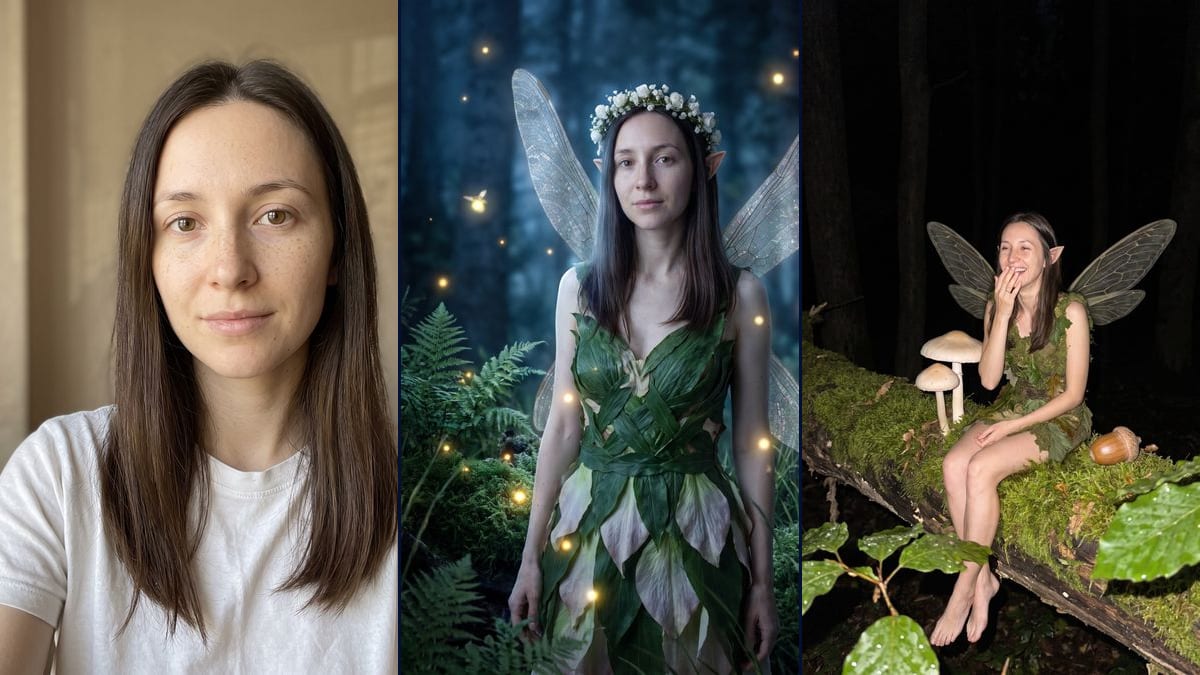
The starting photo: a woman with long straight dark brown hair, freckles and light brown eyes, no makeup, in a white t-shirt against a beige wallInteractive demo

Real workflow, real results. Pan and zoom freely.

Use this workflow

Real workflow: a portrait of a woman with long dark brown hair, freckles and light brown eyes, in a white t-shirt and no makeup, then the same woman as a fairy standing in a clearing at night with dragonfly wings and a dress of leaves, and sitting on a mossy branch, lit by a flash, laughing. The face is hers in both; on the branch the scale is unclear and it looks more like giant mushrooms than a tiny fairy.

At a glance

You provide
1 photo · a text or a brief
What the workflow produces
2 images in 3:4
Canvas structure
6 nodes wired by 4 connections
Models wired in
Nano Banana Pro
Cost of one full run
about 38 credits, roughly $0.46
Account
The demo is visible without an account; generating requires a free account, trial credits included

In early October 2026, fairies came back on TikTok in two forms. The storybook version: a person with wings, a flower crown and a forest at night behind them. And the laughing fairy, short flash-lit clips of little fairies bursting out laughing on a moss-covered branch. This workflow starts from a photo of you and makes one image of each: a forest fairy in a clearing, and a fairy sitting on a branch with a hand over her mouth.

The model keeps your face. In the demo, the freckles, the light brown eyes and the long hair are there in both images, with no makeup added. Size is what it handled less well. The branch prompt wanted a hand-sized fairy next to mushrooms as tall as she is; on screen it reads more like a normal-sized woman sitting by a giant acorn. The wings in that version are also more grey than see-through.

Along the same lines there's the fallen angel, the witch on a flying broom and the werewolf transformation. For a costume rather than a creature, try the Halloween costume. Both renders cost about 38 credits.

Actual renders from the demo

These are the files of the workflow above, exactly as the models produced them, unretouched. The starting point is shown when there is one.

Starting point

Your photo

Render

The same woman as a fairy in a forest clearing at night, large see-through iridescent dragonfly wings, a dress of green leaves and pale petals, a crown of small white flowers, pointed ears, fireflies around her, framed down to the thighsGenerated with Nano Banana Pro
The same woman as a fairy, shot with a flash at night, sitting barefoot on a mossy branch next to two pale mushrooms and an acorn, greyish cicada-like wings, a moss tunic, laughing with her hand over her mouth, wet leaves in the foregroundGenerated with Nano Banana Pro

Who it is for

People who want to do the fairy transformation or laughing fairy trend with their own face, fantasy fans looking for a profile portrait, content creators who want a starting image to animate.

Which files to provide

A sharp, well-lit front-facing photo of you or of someone who agreed, and the fairy described: wings, outfit, setting.

How it works

  1. 1

    Pick a front-facing photo

    A sharp, well-lit portrait with the whole face visible. That one image is all the model has to copy your features from: sunglasses or a shadow over the eyes, and it guesses.

  2. 2

    Adjust the first line

    The prompts say "the woman from the photo". For a man or a child, change those words in both prompts and describe the hair in place of the long dark brown hair.

  3. 3

    Keep the face paragraph

    That's the part listing the face shape, the eyes, the freckles, the skin without makeup. Copy it with your own features. Without it, the fairy gets the smooth face of an advert.

  4. 4

    Check the scale and the wings

    In the branch version, look at whether the fairy seems tiny or the mushrooms seem huge. If the scale isn't right for you, rerun that node on its own: nineteen more credits.

Variations and use cases

The same canvas, tuned for different needs: each variation is two or three lines of prompt away.

Forest fairy or laughing fairy

The clearing gives you a posed fantasy-film portrait, good for a profile picture. The branch shot looks like a picture snatched in the woods at night, closer to what's going round on TikTok. The face paragraph is the same in both.

A fairy for each season

Swap the green leaf dress for russet leaves and berries in autumn, or frost and whitened wings in winter. Change the forest around her too, otherwise the model keeps the summer moss.

Different wings

The clearing prompt describes dragonfly wings. Write brown, furry moth wings or colourful butterfly wings instead. The rest of the prompt stays as it is, only the wings line changes.

The two-fairy version

The laughing fairy clips often show two fairies whispering. With two photos connected to the node, describe both people side by side on the branch, each with their own face. This version wasn't tested here. Only with someone who agreed.

The content creator

They keep the branch image, connect a Video node to it to move the wings or the leaves, then add the sound themselves in the edit. A laugh on video isn't guaranteed, and this page has no video demo.

Common mistakes

Deleting the face paragraph

Without "keep her face exactly as in the photo" and the list of features, the model beautifies: smooth skin, bigger eyes, makeup. You get a pretty fairy, but not you.

Thinking "tiny" is enough

The word alone doesn't set the scale. In the demo the prompt said hand-sized, and the mushrooms grew instead of the fairy shrinking. Add a familiar object and a tighter frame.

A dark photo or a side profile

The model copies the features it can see. In profile or in shadow, it makes up the other half of the face, and the likeness drops in the flash version, which already flattens detail.

Frequently asked questions

Do I keep my own face?

Yes, that's why Nano Banana Pro is used here. In the demo, the freckles, the light brown eyes and the hair match the photo, with no makeup added. The flash in the branch version flattens the skin a little, so the freckles show less there.

Is the fairy on the branch really tiny?

Not really. The prompt asks for a hand-sized fairy with an acorn for scale, but the woman looks normal-sized next to a giant acorn and giant mushrooms. For the small size to come across, you need a familiar object beside her, a whole oak leaf for instance, and a rerun.

Is it the same fairy as in the viral videos?

No. The original videos show a small pale creature with long ears. Here it's you as a fairy: your face, your hair, ears only slightly pointed. The setting borrows from the trend: the mossy branch, the night flash, the laugh.

How much do the two images cost?

About 38 credits, nineteen per render on Nano Banana Pro in 2K. Rerunning a single image costs nineteen more.

Why Nano Banana Pro?

Because it carries a face over from a single photo and keeps details like freckles, while the whole scene around it changes. Flux Kontext, which is cheaper, is built to edit a photo while keeping its setting, and it's quicker to alter the features.

What size is the image?

1792 x 2400 pixels, vertical 3:4. That's enough for a post, a story or a standard photo print.

How do I get properly see-through wings?

In the clearing they already are. On the branch, the flash turned them grey and dull. Write "wings clear as glass, the leaves visible through them" and rerun that node on its own.

Can I do it with a photo of a child?

Yes, if you're the parent or the parents agreed. Replace "the woman from the photo" with "the child from the photo" and keep "do not change her age" in both prompts.
Turn yourself into a fairy with your photo and AI

Use this workflow

Free account, no card required. The workflow opens pre-filled in your canvas.