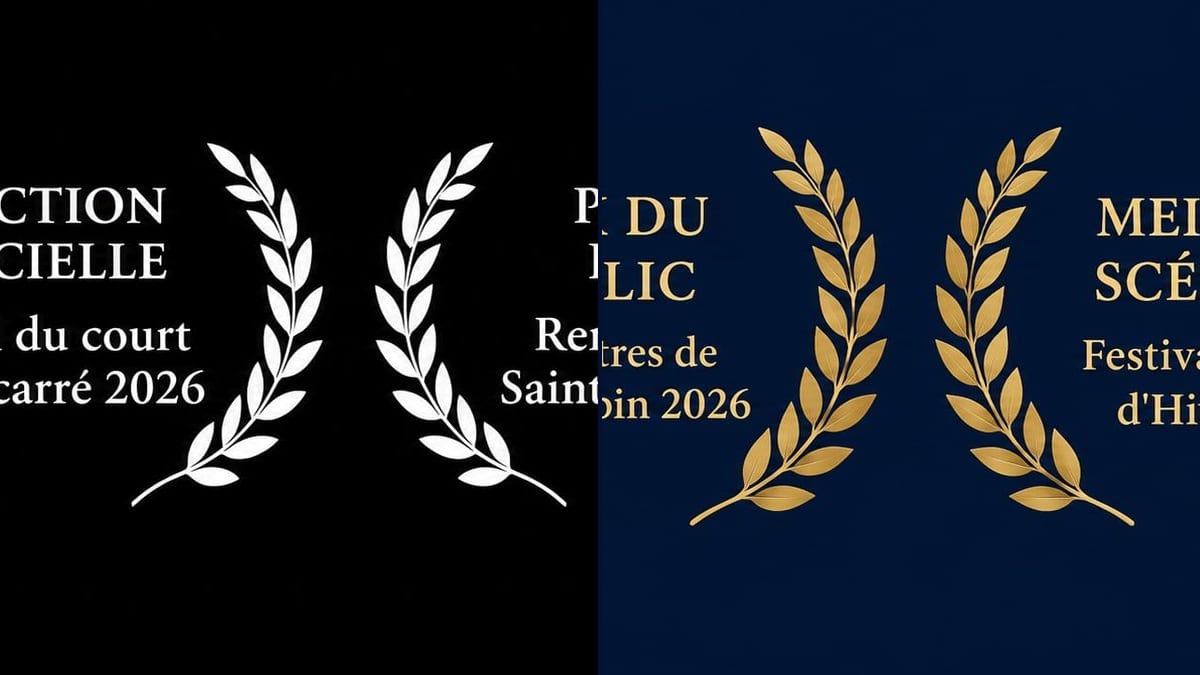
The poster after the circuit
A director has three selections after six months of festivals. He redoes the short's poster with the white laurels across the top, set in Screen mode over the night sky.
Three festival laurels for the poster or the film's page, white on black or gold on navy, with the selection and festival name written letter for letter. Workflow visible here, no account needed.
Real workflow: three French laurels side by side, official selection, audience award and best screenplay, with the names of three made-up festivals, first white on black, then gold on navy.
At a glance
The film got selected, and now it has to show: on the poster, the Vimeo page, the end of the trailer. Some festivals send official laurels, many don't, and you end up tweaking a wreath found online with text that spills over the leaves. This workflow gives you three matching laurels, white on black for the poster and gold on navy for social media.
The hard part is the text. A misspelled festival name on the poster and the whole film looks amateur. The prompt gives the six lines in quotes and puts each one in its laurel. Sunburst writes them letter for letter, even on a dark background.
For the poster that carries them, see the film poster; for the end of the trailer, the film trailer. Both versions cost six credits.
These are the files of the workflow above, exactly as the models produced them, unretouched. The starting point is shown when there is one.
Render
Short film directors and writers, AI filmmakers and producers announcing a film's festival selections.
The exact wording of each selection or award, the festival's name as it writes it and the year, three at most.
Copy the exact wording
"Official Selection", "National Competition", "Special Jury Mention": the words the festival uses in its letter, not a more flattering version.
Give the name and year
The festival's name as the festival writes it, and the year of the edition. A very long name breaks over two lines: say where.
Pick three at most
Past three or four, laurels turn into an unreadable wall. Keep the best-known festivals and the awards, and put the rest in the press kit.
Place them on the poster
The white-on-black version sits on a dark key art in Screen or Lighten blend mode, which makes the black disappear.
The same canvas, tuned for different needs: each variation is two or three lines of prompt away.
A director has three selections after six months of festivals. He redoes the short's poster with the white laurels across the top, set in Screen mode over the night sky.
A screenwriter finds out her short is in competition. She posts the gold-on-navy version with a single laurel the same day, and the same image becomes the banner on the film's page.
The editor adds a three-second card before the title, white laurels on black. The black of the render matches the black of the cut with no masking needed.
An AI filmmaker puts his short online after two selections at AI film festivals. The laurels go on the thumbnail and at the top of the description, next to the link to the film.
A producer sends the film to short film distributors. The first page of the pack shows the gold laurels above the synopsis, which is what gets read before anything else.
For the campaign backers, the director has fifty DVDs pressed. The white laurels go at the top of the sleeve, above the title, as on a theatrical release.
"Official Selection" for a sidebar screening, or "Winner" for a mention: programmers check. Keep the festival's exact words.
A laurel for a festival that didn't take the film is easy to spot, since line-ups are public. The film's credibility and the director's go with it.
Some festivals have a registered emblem, a palm or a shape of their own. This workflow draws generic laurels; for a festival's official artwork, ask the festival.
Twelve wreaths on a poster and nobody reads any of them. Three or four well chosen ones carry more weight. The rest go on the film's page and in the press kit.
In the demo, yes: all six lines are exact on both versions, accented capitals included, and "Pontcarré" keeps its accent.
Use theirs. Many festivals send an official file with the acceptance and ask you to use it as is. This workflow is for when there isn't one.
Yes: keep one pair of lines in the prompt and replace "three laurel badges side by side" with "one centred laurel badge".
Six credits, three per render on GPT Image 2.5 Sunburst at medium quality. One more version with a new selection added costs three credits.
Because it spells correctly, accented capitals included, and it's the cheapest model in the catalogue. It is safer on light backgrounds, but in the demo the black and navy versions came out with no mistakes.
In your layout or editing software, set the image to Screen blend mode: the black drops out and the white stays. For the gold version, cut it out or use it as a standalone visual.
Not reliably: a transparent background asked of the model can come back black without warning. A pure black background is easy to drop in the edit, which is simpler.
16:9 landscape, around 1536 x 1024 pixels, with the three laurels in a row. Crop each one if it has to stand alone on a thumbnail or a post.
Make film festival laurels for your film with AI
Use this workflowFree account, no card required. The workflow opens pre-filled in your canvas.
 GPT Image 2.5 Sunburst
 Nano Banana 2.1
 Recraft V4.1