The hometown screening
A director gets a Thursday night screening at the cinema in his hometown. He puts the night-time poster up in shops and at the library, and posts the same image the day before.
An A4 poster for your short film's screening, night-time or minimal, with the date, time, venue and Q&A written letter for letter. Workflow visible here, no account needed.
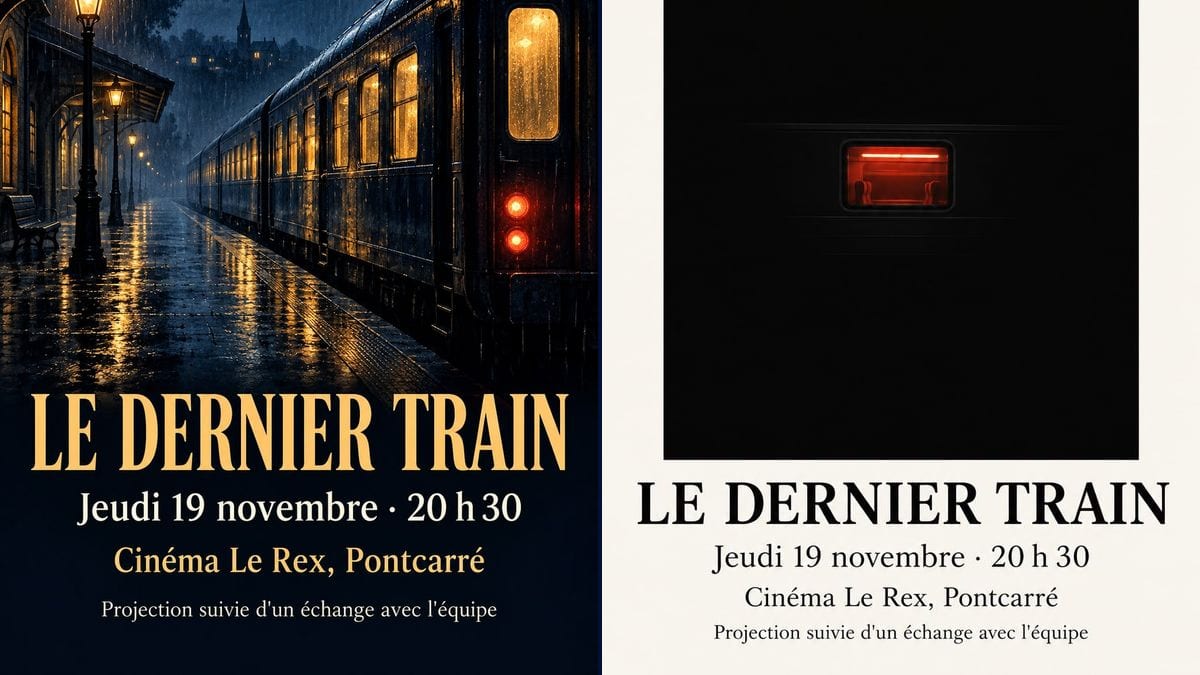
Real workflow: two French premiere posters for "LE DERNIER TRAIN" at the Rex cinema, one navy with a train at a rainy platform and an amber title, the other off-white with a red window in a large black block.
At a glance
The short is finished, the local cinema agrees to a Thursday night slot, and there are three weeks to fill the room. The film's poster isn't enough: it gives the title, not where or when. This workflow gives you two A4 screening posters, a night-time navy and amber one and a minimal off-white one, with the date, time, venue and Q&A up front.
The hard part is that the practical details come before the picture. A wrong date or a missing time, and the room stays half empty. The prompt gives the five lines in quotes, in order, and forbids adding any. Sunburst writes them letter for letter, accents and middle dot included.
For the film's own poster, see the poster; for its selections, festival laurels. Both posters cost six credits.
These are the files of the workflow above, exactly as the models produced them, unretouched. The starting point is shown when there is one.
Render
Short film directors, film clubs, film schools, AI filmmakers and documentary makers organising a screening.
The five lines to write in quotes: "PREMIERE", the title, the day and time, the venue, one practical line, plus the style you want.
Write the five lines
"PREMIERE", the title, the day and time, the venue and town, one line at the bottom: Q&A, free entry, booking. Each one in quotes.
Check the weekday
Weekday and date have to match on that year's calendar. The model copies; it doesn't check.
Borrow the film's look
Describe a shot from the film, the same palette as the official poster, or go minimal if the key art is already busy.
Add logos afterwards
Partners, funders, the cinema: their logos go at the bottom afterwards, in your layout software, from the official files.
The same canvas, tuned for different needs: each variation is two or three lines of prompt away.
A director gets a Thursday night screening at the cinema in his hometown. He puts the night-time poster up in shops and at the library, and posts the same image the day before.
The local film society programmes three shorts by young filmmakers from the region. The minimal version, one per film, fits the board in the foyer and the newsletter.
A film school shows its graduation films to families and invited industry guests. Each crew gets its poster, same layout, same bottom line with the time of the Q&A.
After a crowdfunding campaign, the team invites backers to a private screening. The poster goes out by email, with "Screening for backers only" as the bottom line.
An AI filmmaker rents a small cinema to show his short on a big screen. The poster announces the Q&A after the film, where he'll explain how it was made.
A documentary maker presents her short in five libraries across the county. She keeps the visual and changes the date and venue in the prompt, three credits a poster.
A huge title, a tagline and the date in tiny type: a lovely poster and nobody knows when to come. Day, time and venue should read from across the street.
"Thursday 19 November" is right in 2026 and wrong in 2027. Check the calendar before you render, then read it again on the image.
Free, paid, booking required? Without that line, people phone the cinema or don't come. Keep it at the bottom, even if it's short.
A funder's or council's logo redrawn by an image model comes out warped. Get the official files and place them yourself.
In the demo, yes: all five lines are exact on both posters, the accent in "AVANT-PREMIÈRE", the middle dot and the spacing of the time included.
Add a short line in quotes, such as "Book on the cinema's website". For a QR code, place it afterwards in your software: the model doesn't draw a scannable one.
Yes: one node per screening, changing the day, time and venue. For a tour, one line per date, five at most, or the poster becomes a programme.
Six credits, three per poster on GPT Image 2.5 Sunburst at medium quality. A version for another screening, with a different date, costs three more.
Because it spells correctly on a light background, accents and punctuation included, and it's the cheapest model in the catalogue. In the demo it also holds the amber and white lines on the navy background.
The render comes out at 2:3, 1024 x 1536 pixels, close to A4. Print on A4 with thin margins; for an A3 in the cinema foyer, run it through the Enhance node first.
Often, yes. Many venues have their own guidelines or want their logo and prices on it. Show them the poster before you print.
Yes: run the same prompt in 9:16 and keep the five lines. The minimal version works best vertically.
Make a film premiere poster with AI
Use this workflowFree account, no card required. The workflow opens pre-filled in your canvas.
 GPT Image 2.5 Sunburst
 Nano Banana 2.1
 Recraft V4.1