The campaign backers
A director promised a Blu-ray to backers from the 40-euro tier. She has sixty discs pressed with the dark cover, and the same image illustrates the update announcing they've shipped.
The front cover of your film, as a dark Blu-ray case or a retro 80s VHS box, with the title and credits written letter for letter. Workflow visible here, no account needed.
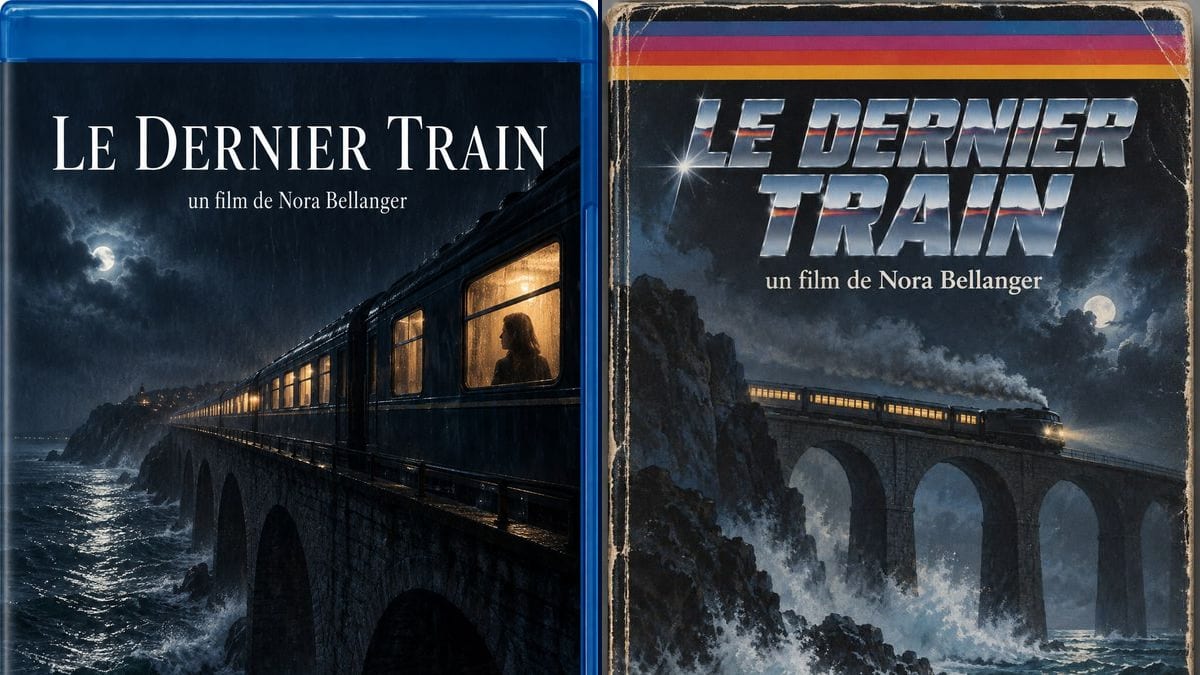
Real workflow: a French short titled "LE DERNIER TRAIN" as a blue Blu-ray case, a lit train on a viaduct in the rain with a woman at the window, then as a worn VHS box with a colour stripe, a chrome title and a stormy sea.
At a glance
Few short films end up on disc, yet people keep asking: crowdfunding backers want something to hold, so does the crew, and a case on a festival table gets noticed. The trouble is that a rushed cover looks like a home-burned disc. This workflow gives you two front covers: a dark, polished Blu-ray case, and an 80s VHS box for the nod to the video store years.
The hard part is looking like a release without copying the brands' badges. An image model left to itself adds the Blu-ray Disc logo or a fake barcode. The prompt keeps three lines only, title, director, studio, and bans any real brand logo. Sunburst writes them letter for letter.
For a book cover, see the book cover workflow; for the film's poster, the poster. Both covers cost six credits.
These are the files of the workflow above, exactly as the models produced them, unretouched. The starting point is shown when there is one.
Render
Short film directors, independent producers, AI filmmakers and prop makers who need a film cover.
The title, the "a film by" line, the studio name, one key scene to illustrate and the format: Blu-ray, DVD or VHS.
Three lines, no more
The title, "a film by", the studio name. The full billing block is set afterwards as real text, on the back or at the bottom, in your layout software.
Describe the key image
One strong scene, the poster's if you have one: the train on the viaduct, a silhouette, a light. A cover is read from across the room.
Pick the era
Current Blu-ray case, 2000s DVD, 80s VHS: say the format in the prompt, with the material, plastic or worn cardboard.
Lay it on the template
The replicator supplies a template with front, back, spine and bleed. Place the render on the front, then add the back and spine.
The same canvas, tuned for different needs: each variation is two or three lines of prompt away.
A director promised a Blu-ray to backers from the 40-euro tier. She has sixty discs pressed with the dark cover, and the same image illustrates the update announcing they've shipped.
The producer gives every crew member a copy of the film at the cast and crew screening. The Blu-ray cover with the studio name at the bottom makes it a real object, not a burned disc.
An AI filmmaker releases a retro horror short. The VHS version, worn cardboard and chrome title, becomes the thumbnail on his channel and the visual for the release announcement.
At a festival's film market, a young producer puts three cases on his table with a USB key of the film inside. Visitors pick them up, which they never do with a flyer.
A series takes place in a 1987 video store. The props team makes VHS boxes of made-up films to fill the shelves, one prompt per title, without a single real film in shot.
The short goes online and the platform wants a vertical poster. The Blu-ray cover, cropped inside the case edge, makes a portrait thumbnail that still reads small.
Blu-ray Disc, Dolby, DTS, channel logos: these are trademarks you don't use without permission. Keep "no logos of real brands" in the prompt.
Ten names in tiny type and an image model gets every other one wrong. Set the billing block as real text on the template, after the render.
An image placed edge to edge gets trimmed at the cut, and the title ends up touching the edge. Leave margin around the text and extend the image into the bleed.
A printed sleeve is front, spine and back in one piece. The render gives you the front; get the template from the replicator before ordering.
In the demo, yes: the title, the director line and "Studio Fenêtre" are exact on both covers, circumflex accent included.
Not in this workflow, which makes the front. The back needs a synopsis, stills and small print that work better as real text on the template.
The Blu-ray Disc logo is a licensed trademark, like Dolby. The prompt bans it; the blue case is enough to say the format.
Six credits, three per cover on GPT Image 2.5 Sunburst at medium quality. A third version, a black 2000s DVD case for instance, costs three more.
Because it spells correctly, accents included, and it's the cheapest model in the catalogue. It's safer on light backgrounds, but in the demo the white title on a night scene came out clean.
The render comes out at 2:3, 1024 x 1536 pixels. For a printed sleeve, run it through the Enhance node, then fit it to the replicator's template. See enlarging an image for print.
Yes: describe the same scene, colours and title as the poster. For an identical image, the safest route is still to place the poster itself on the template.
The cover is yours. To sell the film, check the rights to the music and footage used in the film itself: that's where most problems come from.
Make a DVD or Blu-ray cover for your film with AI
Use this workflowFree account, no card required. The workflow opens pre-filled in your canvas.
 GPT Image 2.5 Sunburst
 Nano Banana 2.1
 Recraft V4.1