The short film
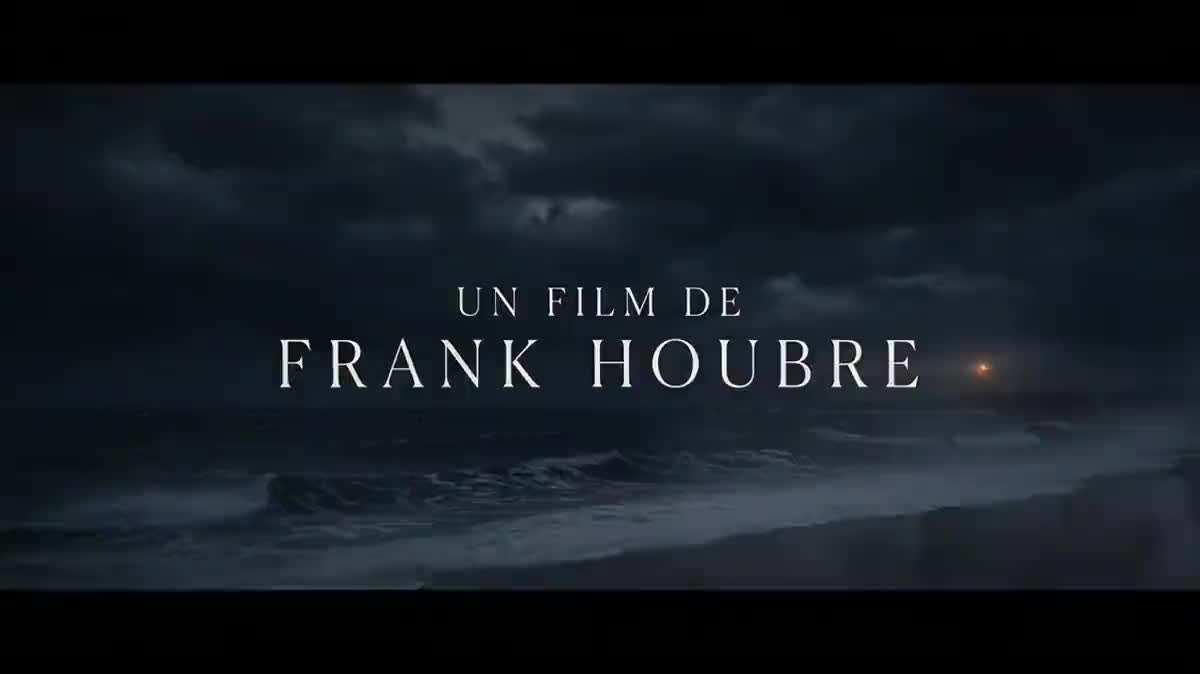
Two or three cards before the first scene give a short film the look of a festival film, for a hundred and fifty eight credits and with no motion design software.
Two title cards in the same typography, animated by Wan 3.0 without a single letter moving, faded together. Workflow visible here, no account needed.
Real workflow: the card "un film de Frank Houbre" then the title "La nuit du phare", over a night sea, each animated for five seconds, fog and beam moving, letters still, faded together.
At a glance
The opening title sequence sets up a film before its first image: a typography, a background, a rhythm. It is usually built card by card in motion design software. This workflow makes two, "a film by" then the title, in the same typography, with a background that lives and letters that do not move.
The hard part is the letters. A video model warps text from one frame to the next, as measured on the film trailer. The cards are therefore written by an image model, and the video prompt locks the letters and only lets the background live: on the demo, no letter moves.
The title card starts from the first card, to keep typeface and background: a title sequence whose typography changes between cards looks like an accident. Same logic as the animated logo. The two cards and their animations cost a hundred and fifty eight credits.
These are the files of the workflow above, exactly as the models produced them, unretouched. The starting point is shown when there is one.
Render
Directors, video makers, channel and podcast creators who want a film title sequence without motion design software.
The film's setting or mood in one sentence, a described typeface, and the exact words of each card.
Describe the background and the typography
The film's setting in a few words, a described typeface, a text colour. The first card sets the identity, the following ones take it on.
Write the words between quotes
"A FILM BY", your name, the title: exactly, letter for letter, and nothing else. Without a ban, the model adds a date, a logo or an invented credit line.
Wire the first card back in
The title card receives the first one on its image port and keeps its typeface, colour and background. Every following card is wired the same way.
Lock the letters in the video
The animation prompt first says the letters do not move, then describes what lives: fog, waves, light. The Montage then fades the cards together.
The same canvas, tuned for different needs: each variation is two or three lines of prompt away.
Two or three cards before the first scene give a short film the look of a festival film, for a hundred and fifty eight credits and with no motion design software.
A series opening, same typography every episode, with the title changing: subscribers recognise the show in the first three seconds.
"A film by" the family, then the couple's names as the title, over a background that recalls the venue: the keepsake film starts like a movie.
An animated title card opens every filmed episode, and a second card announces the guest, in the same typeface as the show's cover art.
A ten second title sequence opens a fundraising or launch video, and gives a film tone to a project that is not one.
The title cards close your game teaser with the studio name then the title, in a typography that will become the game's own.
A video model that writes letters makes them tremble and change from frame to frame. The words are written in the start image, the video only keeps them.
Two cards generated separately have two typographies. The second must start from the first, or the sequence loses its identity.
A title card carries a line or two. A list of credits in small print is unreadable on a phone and multiplies the risk of typos.
A racing camera or exploding waves steal the show from the title. A very slow push in and drifting fog are enough to bring the card to life.
Yes: an Image node wired to the first card, a Video node to animate it, and one more clip in the Montage. Each animated card costs seventy nine credits.
Wire a Music node into the Montage audio track. The demo has none, to keep the cost tight; a silent title sequence also loops well on social media.
Yes: drop your filmed shots into the Montage between the cards, or after the title. The title sequence becomes the opening of your film.
A hundred and fifty eight credits: nineteen per card on Nano Banana Pro, sixty per five second animation on Wan 3.0. The Montage costs nothing.
On the demo, no letter moves or warps on either card. Still check each animation before publishing, a long word can tremble.
Because the background is dark: Sunburst, which writes perfectly on light backgrounds, leaves black smears on dark flat areas. Nano Banana Pro holds both.
16:9 at 720p, the format of a film title sequence. For vertical social media, switch the cards, videos and Montage to 9:16.
Describe a type family, not a film: "thin widely spaced serif" rather than a famous title. A film identity remains a trademark.
Make a film's opening title sequence with AI
Use this workflowFree account, no card required. The workflow opens pre-filled in your canvas.
 Nano Banana Pro
 Wan 3.0
 Kling V3
 GPT Image 2.5 Sunburst