The up-and-over that sticks
The old door squeaks and jams halfway. Before getting quotes, the owner checks whether an anthracite sectional door would work with the brown shutters, or whether a coat of paint buys a few more years.
A photo of your house with an anthracite sectional garage door, then with the old door repainted blue. To decide before the quote. Workflow visible here, no account needed.
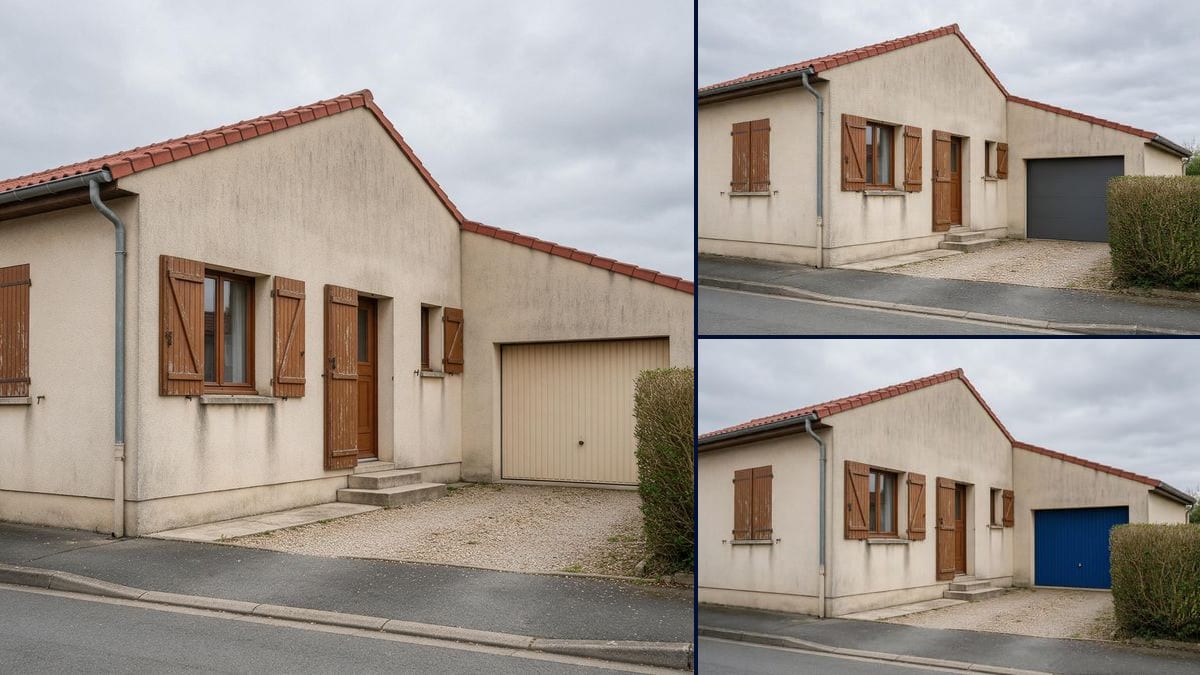
Real workflow: a beige rendered bungalow with a ribbed beige up-and-over garage door, then the same house with an anthracite sectional door with wide panels, and with the original door repainted blue.
At a glance
The beige up-and-over garage door went in with the house. Years later it squeaks, it has faded, and it clashes with everything else. So: replace it or repaint it? Before you ask for quotes or buy three tins of paint, this workflow takes a photo of YOUR house and shows you both: a new sectional door in the same opening, then the same old door repainted.
The hard part is the colour. Ask for a blue garage door and Flux Kontext may paint the front door and the window frames too: that's what our first try gave us. So the prompt names every nearby door and frame with the colour it keeps. The demo shows the second try as it came out, slightly-too-bright blue included.
For the rest of the house front, see the front door, shutter colours and the whole facade; out front, the gate and the carport. Both renders cost twelve credits.
These are the files of the workflow above, exactly as the models produced them, unretouched. The starting point is shown when there is one.
Starting point
Render
Homeowners torn between replacing and repainting their garage door, garage door installers and painters showing the result on site.
A photo of the house taken from the street with the whole garage door in frame, the door type or colour you want, and the colour of every door and frame that must not change.
Get the whole door in frame
From the street, the full garage door with a bit of wall around it. If the hedge or the edge of the picture cuts it off, the model makes up the hidden part.
Pick: replace or repaint
For a new door, give the type, sectional, roller or side-sliding, and the colour. For paint, say the door, its ribs and its handle all stay.
Name what keeps its colour
Front door, window frames, shutters: each one with its current colour. Without that, the new colour can spread to the joinery next to it.
Check it against the photo
Look at the front door, the frames and the colour you got. If something changed colour or the blue is too bright, fix the prompt and run it again.
The same canvas, tuned for different needs: each variation is two or three lines of prompt away.
The old door squeaks and jams halfway. Before getting quotes, the owner checks whether an anthracite sectional door would work with the brown shutters, or whether a coat of paint buys a few more years.
At the site visit, the installer photographs the house and comes back with the proposed door fitted on the client's own home. That says more than a brochure showing the door on a showroom villa.
One wants to keep the door and repaint it, the other wants a new one. Two pictures taken from the same spot on the pavement show what each option really changes on the house.
The house is fine, the faded beige garage door less so. Before making an offer, the buyer photographs the front from the street and looks at what a new or repainted door would do.
Every garage door on the street is beige and the owner wants grey or blue. They look at the render first, then check with the council what the estate rules and local plan allow.
The varnished front door and the brown shutters are staying. On the picture you can see straight away whether anthracite or blue goes with them, or whether the front starts to clash.
On the first try, "only the colour of the garage door changes" was enough for the front door and the window frames to turn blue too. Name every nearby door and frame with its colour.
In the demo, the deep navy asked for came out bright, close to royal blue. The render gives a direction; choose the colour from a RAL chart and a real sample, in daylight.
If the hedge or the edge of the photo hides half the door, the model makes up the rest. Shoot the whole door, with the front door in the picture so you can compare.
On a housing estate or in a conservation area, estate rules or the local plan can set the colour, and changing how the front looks may need permission. The picture helps you choose; check the rules with your council.
Barely, in the demo: shutters, front door, hedge and gravel are the same. In the sectional render, the framing slipped a little and the streaks on the gable are paler.
Yes: swap the type in the prompt, "white roller garage door", "pair of side-hinged timber doors". The end of the prompt stays the same.
Write "golden oak finish" or "with a row of small windows along the top". The render shows the look; pick the actual finish from the maker's sample.
Twelve credits, six per render on Flux Kontext. A third version, a white roller door for instance, costs six more.
Because the first prompt only said the garage door's colour changed. Flux Kontext spread the blue to the doors and frames next to it. Since the prompt names the front door, the frames and the shutters with their colours, they stay brown.
Because it edits part of the photo and keeps the rest: in the demo, the shutters, front door, hedge and gravel didn't move. Still compare it with the original, as it sometimes takes liberties with the framing.
No: the deep navy asked for came out brighter, close to royal blue. For a darker tone, write "very dark midnight blue, almost black" or give the RAL reference you want, then check it on a sample.
The format of your photo, here 4:3, 1184 x 880 in the demo. A house front is best shot in landscape, from the street.
Garage door visualizer with AI
Use this workflowFree account, no card required. The workflow opens pre-filled in your canvas.
 Flux Kontext
 Nano Banana 2.1
 GPT Image 2.5 Sunburst