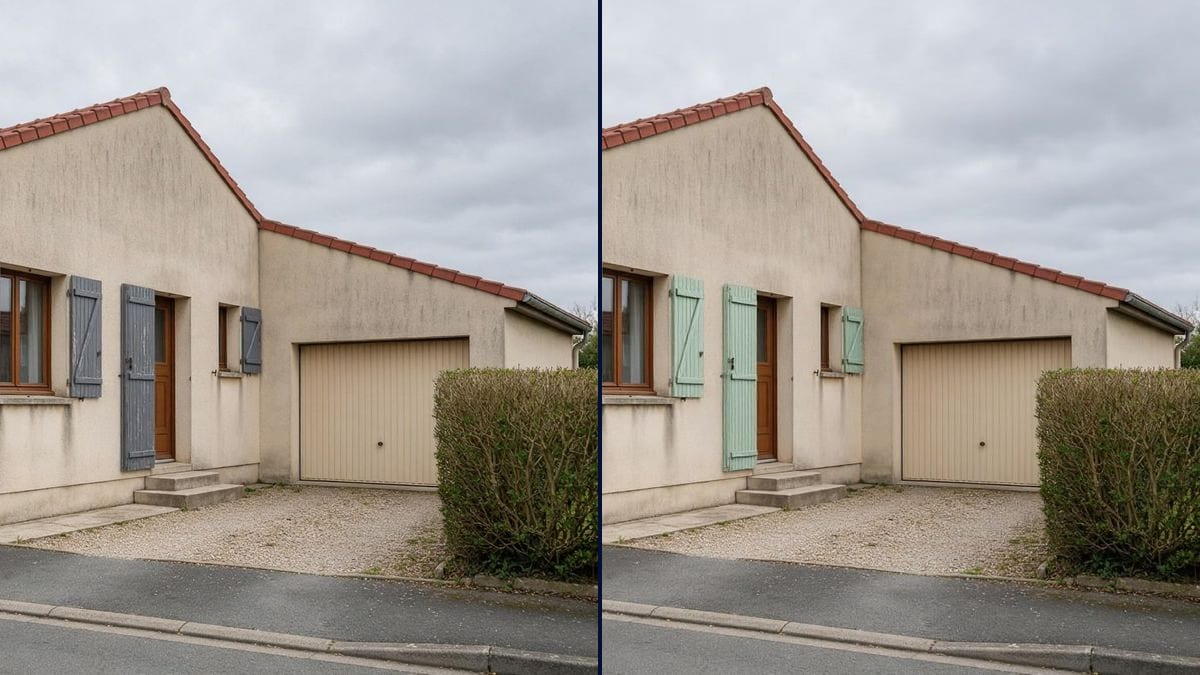
The 1980s bungalow
Original brown shutters, beige render, and every house on the estate looks the same. The owners want a refresh without a full makeover and compare anthracite and sage on their own facade before buying ten litres of paint.
A photo of your facade with anthracite shutters, then sage green ones, without touching the front door or the garage. To choose before buying paint. Workflow visible here, no account needed.
Real workflow: the front of a beige rendered bungalow with worn brown wooden shutters, then the same house with anthracite grey shutters and with sage green shutters. The varnished front door and the beige garage door stay the same.
At a glance
Repainting shutters means a weekend of sanding per pair, and the colour usually gets picked from a two-inch chip under the strip lights of a DIY store. Once the shutters are back on the wall, the grey looks bluer, the green looks lighter, and it's too late. This workflow starts from a photo of YOUR house and shows two colours in place: anthracite and sage green.
The hard part is changing only the shutters. A model asked to repaint the woodwork often takes the front door and the garage door along with it. The prompt spells out what changes and what stays, and keeps the shape of the shutters, Z bars and hinges included. Flux Kontext edits the area you ask for and leaves the render, the roof and the hedge alone.
For the whole facade, chain it with the facade makeover; for the entrance, with the front door visualizer. Both colours cost twelve credits.
These are the files of the workflow above, exactly as the models produced them, unretouched. The starting point is shown when there is one.
Starting point
Render
Homeowners refreshing their shutters, painters showing a colour before the job, sellers getting a house ready to list.
A straight-on photo of the facade with every shutter visible, the shade you want and what must keep its colour.
Photograph the facade
Straight on, from the street or the garden, with every shutter open and visible. An overcast sky gives truer colours than full sun.
Name the shade
Anthracite grey, lavender blue, sage green, off-white: the more precise the name, the closer the render. A RAL code helps too.
Say what doesn't change
Front door, garage door, gate: list them with their current colour, or the model may repaint them along with the shutters.
Compare, then buy a sample
Look at both renders side by side, then buy a sample pot of the winner and try it on one shutter before you paint the lot.
The same canvas, tuned for different needs: each variation is two or three lines of prompt away.
Original brown shutters, beige render, and every house on the estate looks the same. The owners want a refresh without a full makeover and compare anthracite and sage on their own facade before buying ten litres of paint.
The decorator photographs the facade on the first visit and shows the client two or three colours in place. The choice gets made on the house, not on a colour card held at arm's length on the drive.
The estate covenant limits the colours allowed for joinery. The owners render each approved shade to see which one suits the render best, then file the paperwork with the reference they picked.
Solid wooden shutters, exposed stone, and a hankering for duck-egg or a deep cart blue. Two renders on a photo of the house show whether the colour sits well with the stone and the roof tiles.
The seller is wondering whether to repaint faded shutters before putting the house on the market. The render shows whether a lick of paint is enough to change how the facade looks in the photos.
One wants grey, the other wants green. Instead of painting one shutter in each colour and living with it for a month, two pictures of the whole facade, and the argument gets settled over dinner.
On our first try, the front door and the garage door came out grey with the shutters. Write that only the shutters change and name what keeps its colour.
Grey can mean pearl or slate. In the demo, even anthracite leans slightly towards slate. Give the exact shade, the finish and a reference if you have one.
Direct sunlight flattens colours and throws hard shadows across the shutters, so the render looks lighter than real life. Shoot on an overcast day or with the facade in shade.
In some towns and conservation areas, shutter colours are regulated. Check before you paint: the picture says nothing about what is allowed.
No: in the demo, the front door stays varnished wood and the garage door stays beige. Only the shutters take the new colour.
Yes: describe them as they are, white roller shutters or PVC hinged shutters, and the colour you want. The shape stays the same.
Not exactly. Your screen, daylight and the finish all change how a colour reads. The picture helps you pick a family of shades; a sample on the shutter settles it.
Twelve credits, six per render on Flux Kontext. A third shade on the same photo costs six more.
Because it edits one precise area of the photo and keeps the rest: the render and its stains, the roof, the hedge and the sky are still your house. Only the shutters change colour.
Yes: the prompt asks for the same Z bars, the same hinges and the same size. In the demo, every shutter stays in place with its bracing.
Yes, in another node: ask for the render in a new colour and keep the shutters. Or use the facade makeover, which handles both.
The format of your photo, here 4:3. A facade is best shot in landscape, straight on.
Change your shutter colour with AI
Use this workflowFree account, no card required. The workflow opens pre-filled in your canvas.
 Flux Kontext
 Nano Banana 2.1
 GPT Image 2.5 Sunburst