The first fedora
He has wanted one for years but worries he'll look like he's in costume. A grey fedora on his own portrait tells him whether he'll wear it to work or only on Sundays.
Your portrait with a grey felt fedora, then a cotton bucket hat, at the right size on the same face. To pick one before you buy. Workflow visible here, no account needed.
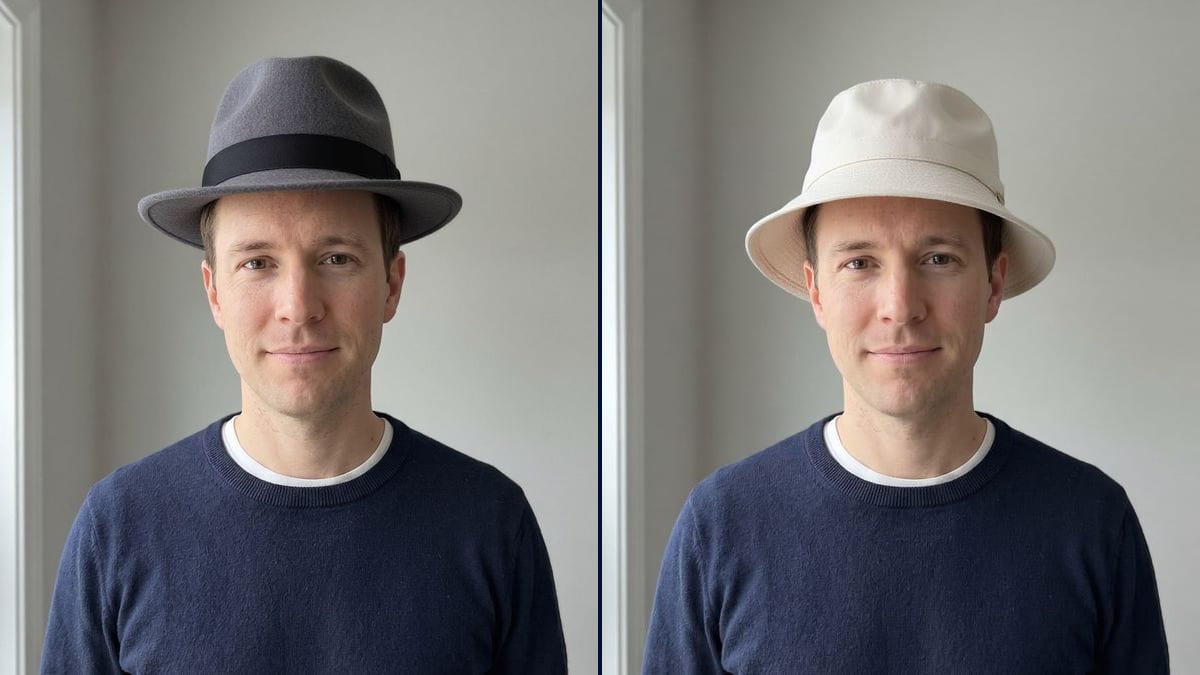
Real workflow: a portrait of a dark-haired man in a navy sweater, then the same man in a dark grey felt fedora with a black band and in a light cotton bucket hat. Face, hair and framing stay the same.
At a glance
Hats are hard to buy online. The product shot shows it on a model's head, and the only question that matters goes unanswered: does it suit me, my face, my hair? This workflow starts from YOUR portrait and shows two shapes, a classic fedora and a bucket hat.
The hard part is size and how the hat sits. Left alone, a model glues it to the top of the skull or pulls it down to the eyes. The prompt asks for the right size and a natural fit, and Flux Kontext adds the hat without touching the face.
To finish the look, try a pair of glasses or a beard as well. Both hats cost twelve credits.
These are the files of the workflow above, exactly as the models produced them, unretouched. The starting point is shown when there is one.
Starting point
Render
People unsure about a hat shape, online hat shops, costume designers and guests at themed weddings.
A front-facing portrait with room above the head, and the hat described: shape, material, colour, how it's worn.
Take a front-facing portrait
Head straight, forehead visible, hair styled as usual, some room above your head. Face shape decides almost everything.
Describe the hat
Shape, material, colour, band: grey felt fedora, straw panama, cotton bucket hat, wool cap. One node per hat.
Say how it's worn
Straight, tilted to one side, pushed back, pulled low: write it down, or the model picks for you.
Compare before you buy
Put the renders side by side, keep the shape that balances your face, then check your head size in the shop.
The same canvas, tuned for different needs: each variation is two or three lines of prompt away.
He has wanted one for years but worries he'll look like he's in costume. A grey fedora on his own portrait tells him whether he'll wear it to work or only on Sundays.
A hat store lets customers try each style on their own photo before ordering. Fewer returns, and people end up buying the shape that actually suits them.
The dress code says 1930s. The groomsmen compare a fedora, a boater and a flat cap on their own faces before settling on one together in the group chat.
He needs a sun hat and hates every one he tries on in shops. Bucket hat, panama, fisherman's hat: three renders and the choice is made before the trip.
His bare crown burns every summer. He wants a shape he likes enough to wear every day, and compares a few hats on his own head before buying one at the market.
The costume designer is looking for the detective's hat. Three shapes on the actor's photo, and the fitting starts with a clear idea of what to bring.
With no instruction, the hat can come out straight and high on the head, like the fedora in the demo. Write "tilted slightly to one side, sitting just above the eyebrows".
"Beige" gave an almost cream bucket hat in the demo. For an exact shade, name it: sand, camel, light khaki.
A hat is judged against the width of the face. From the side, you lose the balance between brim and cheeks.
They hide the eyes, and the line between eyes and brim is often what makes a hat work or not. Take them off for the photo.
No: same face, same expression, same hair showing under the brim, same sweater. Only the hat is added.
Yes, if you describe it closely: crown shape, brim width, material, band colour. The model won't copy an exact product.
The picture shows proportion, not a size. Measure your head just above the ears before ordering.
Twelve credits, six per render on Flux Kontext. A third hat on the same photo costs six more.
Because it adds an object without redrawing the rest: in the demo, the face, the hair at the sides and the sweater are exactly those of the photo.
Yes: describe the cap (wool, short peak, colour) or the beanie (rib knit, cuff). The prompt stays the same.
The same prompt works on any front-facing portrait: wide-brim hat, beret, cloche. Swap "man" for "woman".
The format of your photo, here 3:4. Leave room above the head so the hat isn't cropped.
Try on hats on your photo with AI
Use this workflowFree account, no card required. The workflow opens pre-filled in your canvas.
 Flux Kontext
 Nano Banana 2.1
 GPT Image 2.5 Sunburst