One full length photo becomes a lookbook sheet: seven poses on white in the same outfit, or six seen from above, selfie style. Face kept, with the flaws shown.
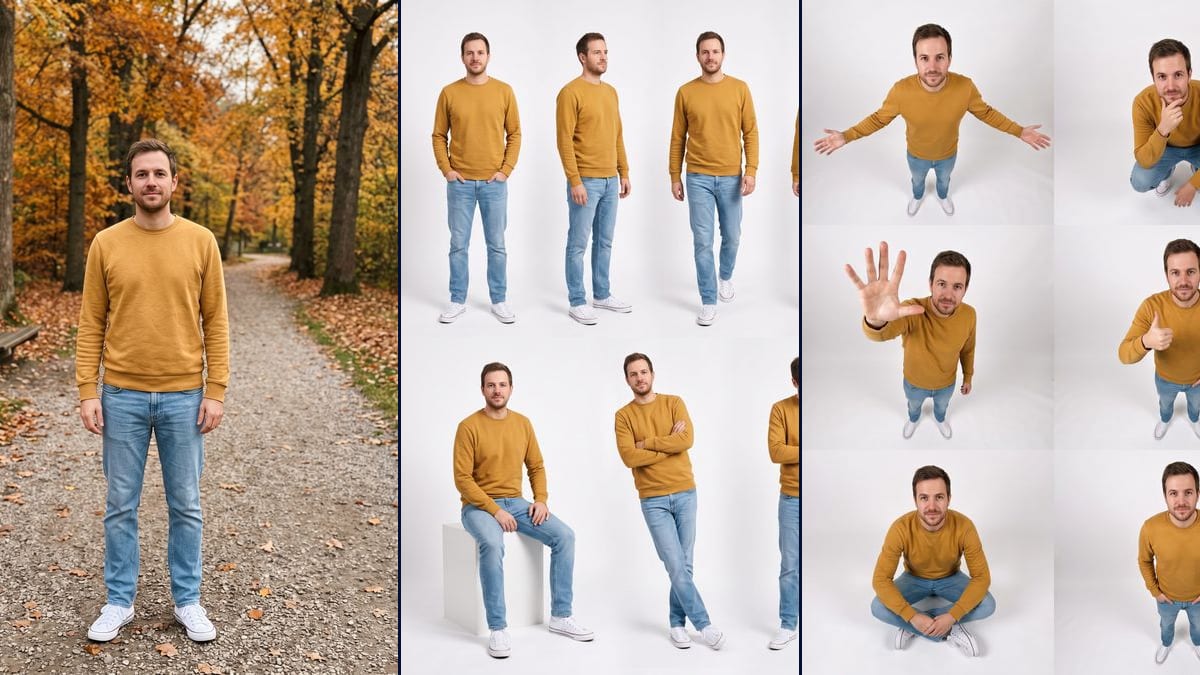
Real workflow: a man in a mustard sweater on an autumn park path, then the same man seven times on white, standing, from behind, sitting on a cube, and six times from above, arms open, thumbs up, cross-legged. The top view took three tries and shows thin seams between the panels.
At a glance
You provide
1 photo · a text or a brief
What the workflow produces
2 images in 3:4
Canvas structure
6 nodes wired by 4 connections
Models wired in
Nano Banana Pro
Cost of one full run
about 38 credits, roughly $0.46
Account
The demo is visible without an account; generating requires a free account, trial credits included
Since mid October 2026, one kind of image keeps turning up on Instagram and TikTok: the same person in the same outfit, seven or eight times on white, in a different pose each time. It's called the lookbook, and according to oakgen.ai a tutorial from 16 October shows the effect in Instagram's Restyle menu. We found no official documentation, and the effect doesn't show up for everyone. This workflow gets the same kind of result from one full length photo, without that menu.
The white sheet came out right first time: the park in the photo is gone, the sweater, jeans and sneakers stay put, and you recognise the same man in all seven poses. The top view was harder. It took three tries to lose the gravel from the photo, and it ends up with six poses and thin seams between the panels.
To sell a specific garment across several poses, the AI photoshoot fits better, since it starts from the product sheet. For a notebook page with your photos, the scrapbook collage, and to place yourself in a real setting, put yourself in a scene. Both renders cost 38 credits, see pricing.
Actual renders from the demo
These are the files of the workflow above, exactly as the models produced them, unretouched. The starting point is shown when there is one.
Starting point
Your full length photo
Render
The same man seven times on white in the same outfit: facing the camera with hands in pockets, three quarter view, walking, from behind, sitting on a cube, leaning with arms crossed, adjusting his sleeve; park gone and face steady, but the bottom figures are a little bigger, the background leans grey and one forearm comes out crookedGenerated with Nano Banana ProThe same man six times from above, big head and small sneakers: arms open, hand reaching towards the lens, crouching with his chin on his hand, thumbs up, cross-legged, hands in pockets; face and outfit kept, but six poses instead of seven, thin seams between the panels, a light grey floor and a mild high angleGenerated with Nano Banana Pro
Who it is for
People who want to do the lookbook trend for Instagram or TikTok without relying on the in-app effect, fashion creators showing an outfit from every side, friends trying out poses before a photo shoot.
Which files to provide
A sharp full length photo, head to shoes, of you or of someone who agreed, and a description of their clothes in the prompt. The photo is optional.
How it works
1
Take a sharp full length photo
Head to shoes, straight on, with no bag or object in front of the body. The model copies the outfit as it sees it, and invents whatever it can't see.
2
Describe your outfit
The prompts name the demo's mustard sweater, light jeans and white sneakers. Put your own clothes in, and change "man" if you need to. Otherwise your outfit drifts towards the demo's.
3
Pick your poses
All seven poses are spelled out in the prompt. Swap one or two if they aren't you, and keep the count: past eight, the figures shrink and the faces blur.
4
Check the hands and the bottom edge
On the demo, one forearm comes out crooked, and the early top view tries kept the ground from the photo. Zoom in before you post, and run the node again for 19 credits.
Variations and use cases
The same canvas, tuned for different needs: each variation is two or three lines of prompt away.
White sheet or top view
The white sheet looks like a catalogue page: seven whole figures, clean, at eye level. The top view is funnier, with a big head and tiny shoes. It's also more fragile: on the demo it took three tries and left thin seams between the panels.
A woman or a child in the photo
The prompts talk about "this man" and his beard. Change that to the right person and describe their hair and clothes. For a child, the parents have to agree, and you're better off not posting the image. Not tested on the demo.
An evening or sports outfit
A long dress or sportswear works too, as long as you name them in the prompt with their colour and fabric. On a patterned dress, the pattern can change from one pose to the next, so look closely.
A coloured background
Replace "white studio background" with a plain colour, sand or sage green, and change nothing else. The sheet stands out more in a feed full of white images. We haven't tested this version on the demo.
A magazine page layout
Some guides show the sheet as a magazine page with headlines. Add a layout to the prompt and write out the exact words to display. Nano Banana Pro can get text wrong, so proofread, or add the headlines later in another tool.
Animate one of the poses
Connect a Video node to a cropped pose and describe a simple move: he turns around, he walks towards the camera. The demo stops at the two still images, and video costs extra credits.
Common mistakes
A photo cut off at the knees
The model then invents the lower half, and the trousers or shoes change from pose to pose. A head to toe photo gives a much more consistent sheet.
Asking for too many poses
The more figures you fit on 1792 x 2400 pixels, the smaller the faces and the less they match. Seven is already a lot. Stop at eight.
Using someone's photo without asking
The sheet shows a whole body seven times. Only use photos of people who said yes, and never one of a famous person.
A photoshoot makes several separate images around a garment, often to sell it. Here everything fits on one vertical image, and you're the subject.
Do I need Instagram's effect?
No. According to the guides, it doesn't appear on every account and doesn't let you choose the poses. Here they're written in the prompt, so you can change them.
Should I say the image is AI made?
It isn't a real shoot, and several guides suggest saying so in the caption, for example "made with AI". Check the rules of the network you post on too.
How much do the two sheets cost?
38 credits, 19 per render on Nano Banana Pro. Running one sheet again costs 19 credits.
Can I pay less?
Yes, by switching the node to Nano Banana 2.1 in 1K, 7 credits per render. We haven't tested it on this sheet, and the faces are small. The demo runs on Nano Banana Pro.
Can I print the sheet?
The images are 1792 x 2400 pixels, in vertical 3:4. That's fine for a post or a story and acceptable for a small print. Each figure is only a few hundred pixels wide.
Why does the top view have six poses?
With seven poses placed freely, the first two tries kept the gravel from the photo at the bottom of the image. We moved to two columns of three, which fixed it. Thin seams remain between the six panels.
Is the face the same in every pose?
On the demo, yes, you recognise the same man everywhere, beard included. Still check each figure: the small faces are the first to drift.
 Nano Banana Pro
 Flux Kontext
 Seedream 5 Pro