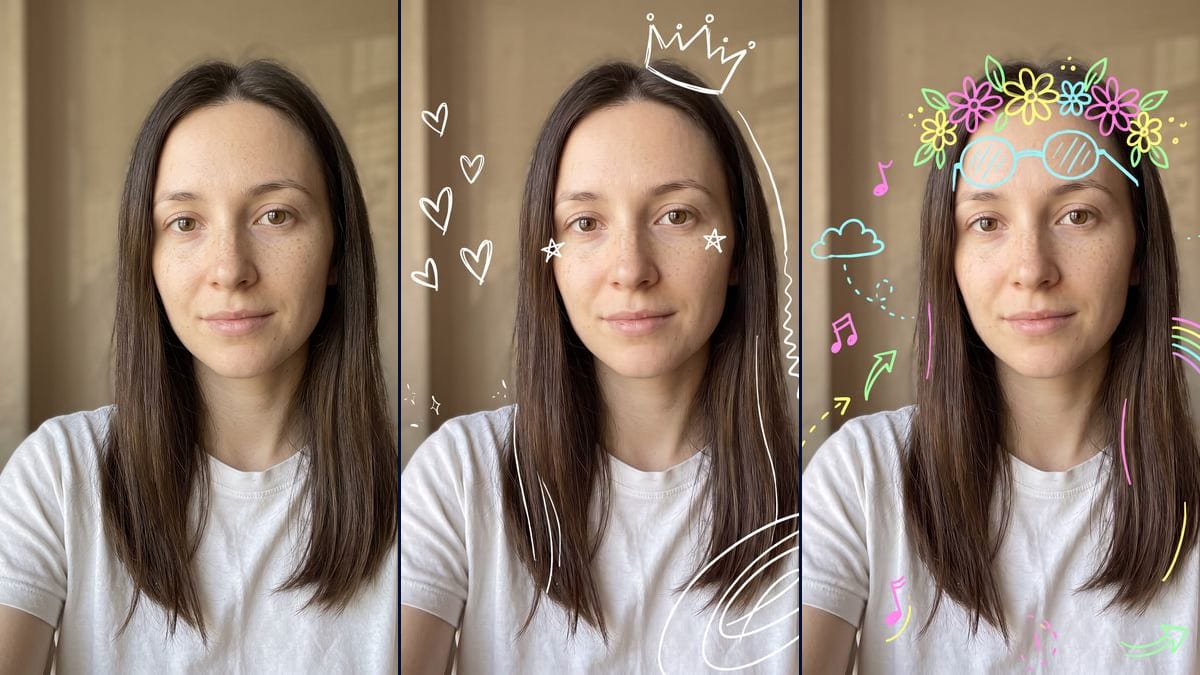
Your selfie covered in hand-made doodles: crown, stars and hearts in white marker, or flowers, a rainbow and notes in bright neon. Face untouched, drift shown. Workflow visible here.
Real workflow: a woman with brown hair in a white t-shirt against a beige wall, then the same selfie with white marker doodles, crown, stars, hearts, sparkles and a spiral, and with colourful neon doodles, a flower crown, glasses on the forehead, a rainbow, music notes, clouds and arrows. The face stays untouched. One hair line runs far off and the spiral is made of ovals spilling over the t-shirt.
At a glance
You provide
1 photo · a text or a brief
What the workflow produces
2 images in 3:4
Canvas structure
6 nodes wired by 4 connections
Models wired in
Nano Banana Pro
Cost of one full run
about 38 credits, roughly $0.46
Account
The demo is visible without an account; generating requires a free account, trial credits included
The doodled selfie, or photo doodle, means drawing by hand over your own photo: a crown, stars, hearts, the way you would with a finger in an editing app. We found it in a pixazo.ai guide updated on 23 September 2026, read on 2 November. That's one source with no audience figures, so there's nothing to back up talk of a wave. This workflow makes the two versions in the demo: plain white lines, and chattier colourful neon.
The model, Nano Banana Pro, leaves the face untouched: the drawings avoid the eyes, nose and mouth, and the skin, freckles and hairstyle stay the photo's. It takes liberties with the drawings. The hair line it was asked for starts at the crown and runs down to the shoulder, the spiral becomes ovals spilling over the t-shirt, and in colour the glasses climb up to the crown. The render is a still image, not an animation of strokes, and not a layer you edit afterwards.
These are the files of the workflow above, exactly as the models produced them, unretouched. The starting point is shown when there is one.
Starting point
Your selfie
Render
The same selfie with white marker doodles: a crown above the head, two small stars on the cheeks next to the eyes, five hearts on the left, sparkles near the shoulders, a wavy line on the right and big nested ovals at the bottom right; face untouched, but the crown sits off to the right, the wavy line runs from the crown down to the shoulder, straight strokes trail along the hair and the spiral is a set of ovals spilling over the t-shirtGenerated with Nano Banana ProThe same selfie with neon pink, yellow, light blue and green doodles: a flower crown, round glasses drawn on the forehead, a rainbow on the right, music notes, clouds with dotted trails and arrows; face untouched, but the glasses almost touch the crown, vertical strokes trail along the hair and the colour fill is light, most shapes stay plain outlinesGenerated with Nano Banana Pro
Who it is for
People who want to do the doodled selfie trend for their stories or profile picture, content creators who follow the editing formats of the moment, friends planning a set of fun photos.
Which files to provide
A sharp, front-facing, well-lit selfie of you or of someone who agreed, on a background that leaves room around the head, and the exact description of their features in the prompt. The photo is optional.
How it works
1
Take a sharp selfie with room around it
Face straight on, good light, a plain background that leaves space around the head and shoulders. The drawings go in that space: a cluttered wall drowns them.
2
Adapt the face description
The prompts describe the demo's woman: brown eyes, freckles, long straight brown hair with a centre parting. Write your own features instead, otherwise the model mixes your face with the description.
3
Pick white or colour
White marker gives a light look that reads on a mid-tone or dark background. Neon colours hold on any background and make a busier image. Run both, or a single node for 19 credits.
4
Check that the face is clear
In the demo, no stroke touches the eyes, nose or mouth, but lines trail along the hair. If a drawing bothers you, tighten the prompt ("no lines along the hair") and rerun that node.
Variations and use cases
The same canvas, tuned for different needs: each variation is two or three lines of prompt away.
Plain white or colourful neon
White marker gives a few spaced-out drawings, a light look like a selfie touched up with a finger. Neon colours add flowers, a rainbow, notes and clouds: more drawings, more colour, a happier look. Both keep the face untouched.
A specific theme: birthday or wedding
Replace the list of drawings with a theme: balloons, confetti and a paper crown for a birthday, a bouquet and rings for a wedding. Keep the sentence about the eyes, nose and mouth, and no text. Not tested on the demo.
A single well-placed drawing
For a calmer look, limit the prompt to one drawing: a crown, or a flower crown, and nothing else. The model should add fewer stray lines. This version was not tested.
A photo of a couple or friends
Start from a group photo where every face is sharp and add "every face stays untouched". One crown per person can get confusing. Not tested here, and everyone must agree to the use of the photo.
Doodles on your dog or cat
The same idea should work on a pet photo: crown, stars and hearts around the head. Rewrite the face description for your animal. Not tested on the demo.
Animating the strokes in a video
The render is a still image. Plug a Video node into it and ask for the drawings to twinkle or move slightly: this follow-up was not tested, and video costs extra credits.
Common mistakes
White marker on a very light background
In the demo, the wall is mid-tone beige and the white strokes read well. On a white wall or a bright window, they would almost vanish: pick the colour version or a darker background.
Asking for text in the drawings
Both prompts forbid letters and words. Generated text often comes out misspelled, and one wrong word ruins the selfie. If you want a name or a date, add it afterwards in an editing app.
Letting the model draw on the face
Without the sentence that protects the eyes, nose and mouth, a stroke can cross the face. Keep that sentence when you edit the list of drawings.
Using someone's photo without their consent
The image is made so the person is recognisable. Only use photos of people who said yes, and never a photo of a well-known person.
No, it's optional. Without one, the model invents a person from the prompt. With your selfie, it keeps your face and puts the drawings around it, which is the whole point of the trend.
Why not just ask Gemini directly?
You can. Here, the two prompts are ready and wired to the same photo, the model is picked for face fidelity, and the demo shows you in advance what it keeps and what it misses.
Do the drawings touch my face?
Not in the demo. The prompt forbids drawing over the eyes, nose and mouth, and the model followed it in both versions. The two small stars in the white render sit on the cheeks, next to the eyes.
How much do the two doodled selfies cost?
38 credits, 19 per render on Nano Banana Pro. Rerunning a single image costs 19 credits.
Is there a cheaper version?
Yes, by switching the node to Nano Banana 2.1 in 1K, 7 credits per render. The face is less faithful and this option was not tested on this selfie. That's why the demo runs on Nano Banana Pro.
How big are the images?
1792 x 2400 pixels, in vertical 3:4. That's enough for a story, a profile picture or a small print, not for a poster.
Are the drawings animated or editable?
No. The render is a still image: you don't see the strokes being drawn, and the drawings aren't on a vector layer you can move afterwards. To change a drawing, rerun the node with a corrected prompt.
Why does a stroke wander far from the prompt?
The prompt asked for a wavy line along the hair and a spiral in one corner. The model drew a line running from the crown down to the shoulder and a set of ovals over the t-shirt. Say where and how big each drawing should be, or rerun: the result changes from one try to the next.
 Nano Banana Pro
 Flux Kontext
 Seedream 5 Pro