The post that makes people laugh
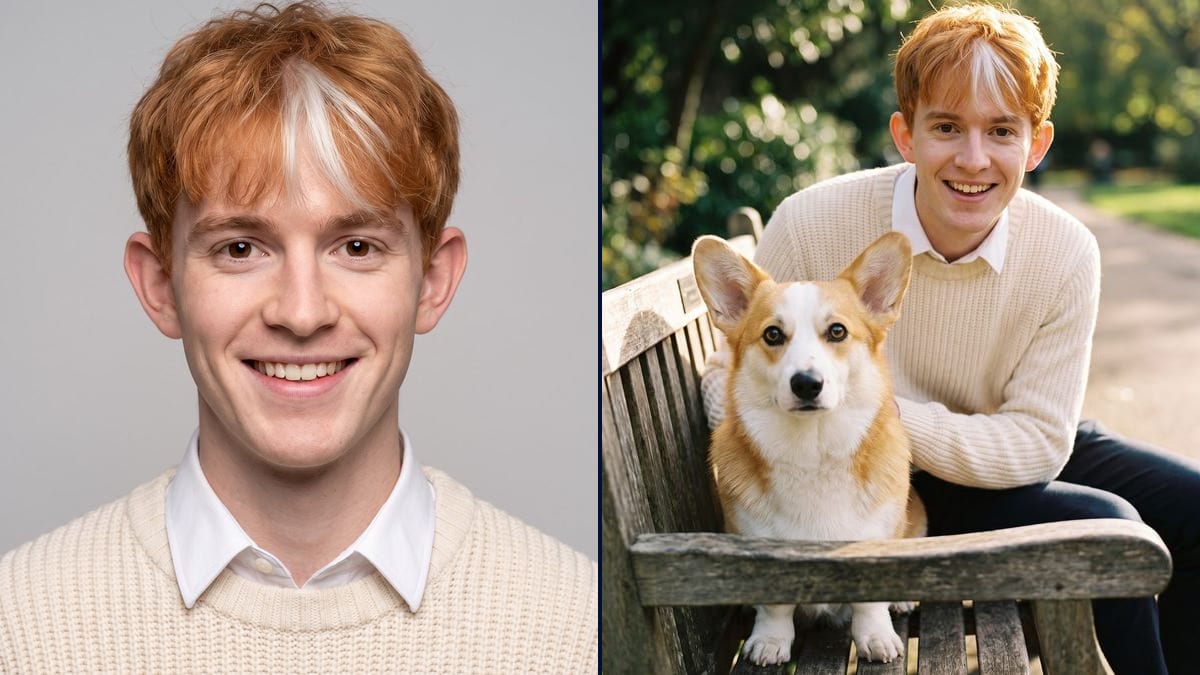
The dog and its human double on a bench, posted with the question "who looks like whom?": the kind of picture friends comment on and share.
One photo of your dog or cat, and the AI imagines the person it would be, then shows you both side by side. For a laugh and to share. Workflow visible here, no account needed.
Real workflow: a corgi's photo becomes the portrait of a ginger young man with a white streak, then both pose together on a bench with the same look.
At a glance
"If my dog were a person, what would they look like?" This workflow starts from a photo of your pet, imagines the human it would be, with its colours in the hair and its look in the eyes, then has them pose side by side so the resemblance jumps out.
The hard part is staying human. Left to itself, a model sticks dog ears on a face and the picture slides into fancy dress. The prompt carries each feature over, coat into hair, white patch into a streak, eager look, and rules out ears, snout and fur.
For a costumed portrait of the pet itself, see your pet as a character; to turn it into stickers, the sticker pack. Both pictures cost thirty-eight credits.
These are the files of the workflow above, exactly as the models produced them, unretouched. The starting point is shown when there is one.
Starting point
Render
Dog and cat owners, shelters and groomers who want a funny, shareable picture.
A sharp, front-facing photo of the pet, and the features to carry over into the person.
A sharp photo of the pet
Front-facing, well-lit, looking at the camera. The model reads the coat colours, the patches and the expression to carry over.
Carry each feature over
Ginger coat to ginger hair, white patch to a streak, light chest to a white collar, eager eyes. One trait of the pet, one trait of the person.
Rule out fancy dress
No dog ears, no snout, no fur on the skin. Without that line, the picture turns into a costume.
Have them pose together
The second node gets the pet and the portrait: same face, same pet, side by side. That is the picture people share.
The same canvas, tuned for different needs: each variation is two or three lines of prompt away.
The dog and its human double on a bench, posted with the question "who looks like whom?": the kind of picture friends comment on and share.
A friend's cat as an elegant lady, printed and framed for her birthday, with the photo of the cat beside it.
A shelter introduces its residents with their human version, to give each one a personality and get people to read the listing to the end.
A grooming salon offers clients the human version of their dog, a playful touch that gets passed around and makes the salon known.
A children's author turns the family dog into the human hero of a book, then keeps them consistent with the same character.
The dog, the cat and the rabbit as humans, brought together in one family photo with the group photo.
Without "no ears, no snout, no fur", the model sticks animal features on a human face and the picture turns into a mask.
"This dog as a human" gives you a random person. Name the colour, the patch, the look: that is what creates the resemblance.
The model can't carry over a look it can't see. A sharp, front-facing photo with the head clearly visible.
Without the portrait as a reference, the second node invents a new person and the resemblance is lost. Wire both pictures in.
Yes, with any animal whose head you can see clearly: cat, rabbit, horse. Describe the features to carry over, as for the dog.
Yes: write it in the first prompt, an elderly lady, a child, a man of fifty. The other features follow.
The portrait alone raises a smile, but the side-by-side photo shows the resemblance at a glance.
Thirty-eight credits, nineteen per picture on Nano Banana Pro. Another scene with the same pair costs nineteen credits more.
Because it holds two references at once, the pet and the portrait, and keeps the same face and the same animal in the scene.
In the demo, yes: same ginger and white coat, same big ears, same white blaze, and the young man keeps his face and his jumper.
3:4, a portrait. Change it in the node for a square to post.
Yes, by flipping the prompt: the person becomes the animal they would be, with their colours and their look.
Turn your pet into a human with AI
Use this workflowFree account, no card required. The workflow opens pre-filled in your canvas.
 Nano Banana Pro
 GPT Image 2.5 Sunburst
 Seedream 5 Pro
 Flux Kontext