The baker before summer
She needs extra help for July and August. The cream poster goes in the window on Monday with "Summer contract" instead of permanent, and customers mention it to their student kids.
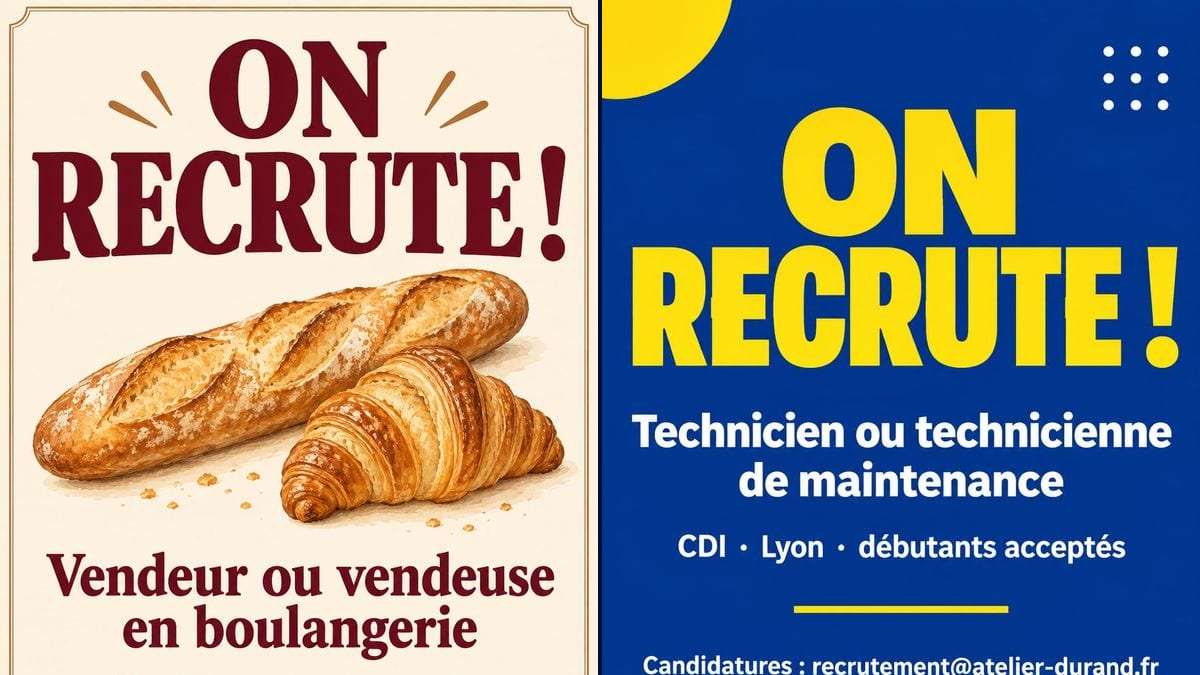
Two A4 hiring posters, one for a shop window and a bolder one for a small business, with role, contract and contact written letter for letter. Workflow visible here, no account needed.
Real workflow: a cream French hiring poster in burgundy with a baguette and a croissant for a bakery, then a dark blue one with a yellow heading for a maintenance technician job in Lyon.
At a glance
In a local shop, most hiring starts with a sheet of paper taped to the window. Handwritten or typed in Arial, it says too little about the job and gets lost among the special offers. This workflow gives you two printable A4 posters: a warm one for a bakery and a punchier one for a small business.
The hard part is getting the text exactly right. One wrong letter in the email address and the applications never arrive. The prompt gives every line in quotes and forbids inventing others. Sunburst writes them letter for letter, @ sign and punctuation included, for three credits a poster.
To put your opening hours next to it, use the opening hours sign; for something to hand out, the trade flyer. Both posters cost six credits.
These are the files of the workflow above, exactly as the models produced them, unretouched. The starting point is shown when there is one.
Render
Shopkeepers, tradespeople, restaurants and small businesses hiring locally, charities looking for volunteers.
The four lines to write in quotes: heading, role, contract, contact, plus the style you want.
Name the role
The job title people actually search for: sales assistant, line cook, technician. It's the line read right after the heading, so keep it to two lines at most.
Sum up the contract
Three facts separated by middle dots: contract type, hours or place, one perk. The detail comes at the interview.
Give one way to apply
In store, by email or by phone, not all three. A poster with a single path gets more replies than a block of contact details.
Test the address
Send yourself an email at the address copied on the image before printing. One letter off and the poster is useless.
The same canvas, tuned for different needs: each variation is two or three lines of prompt away.
She needs extra help for July and August. The cream poster goes in the window on Monday with "Summer contract" instead of permanent, and customers mention it to their student kids.
An independent garage is looking for a mechanic. The blue and yellow version goes up at reception and on the company page, with the workshop number as the last line.
A seaside restaurant needs waiting staff and kitchen porters for the season. Two posters, one per role, on the door and shared in the local community group.
A small company has a stand at the town's job fair. The modern poster, printed large, gives the trade and the place at a glance, so visitors know whether to stop.
The owner is looking for an apprentice. A line saying "Apprenticeship · starts September" replaces the contract line, and the poster stays up until someone signs.
A community food bank needs volunteers on Saturday mornings. Same poster, with "VOLUNTEERS WANTED!" as the heading and the time slots on the second line.
"General staff" tells nobody whether it's for them. Write the job the way candidates search for it: sales assistant, cook, technician.
A job ad shouldn't put anyone off applying. Keep titles neutral, and leave out age or gender wording; that's what the demo does with its job titles.
Salary bands, detailed shifts, duties, benefits: the poster turns into an unreadable job description. Three facts on the contract line are enough.
A filled job that stays in the window for three months makes it look like nobody wants to work for you. Take it down the day the contract is signed.
In the demo, yes: the four lines of each poster are exact, including the email address and the French accents.
Yes, two at most: one line per role, in quotes. Beyond that the poster stops reading from a distance; make one per role.
Not through the model, which draws a fake, unreadable code. Paste a real QR code afterwards in a corner left free.
Six credits, three per poster on GPT Image 2.5 Sunburst at medium quality. A poster for a second role costs three more.
Because it spells correctly, accents, @ sign and punctuation included, and it's the cheapest model in the catalogue. It's most reliable on a light background; in the demo the dark blue one holds up too.
The render comes out at 2:3, 1024 x 1536 pixels, close to A4. Print on A4 for the window; for anything bigger, run it through the Enhance node first.
Not in this workflow, which starts from a blank page. Add the logo afterwards in a corner left free, or start from the logo generator if you don't have one.
It brings in the people who walk past. For a wider search, post the full ad on job sites too, with pay and duties.
Make a now hiring poster with AI
Use this workflowFree account, no card required. The workflow opens pre-filled in your canvas.
 GPT Image 2.5 Sunburst
 Nano Banana 2.1
 Recraft V4.1