The first nose piercing
She has thought about it since school without daring. A fine hoop on her own portrait, then a small stud instead, and she knows which one she'll ask for at the studio on Saturday.
Your portrait with a fine gold nose ring, then gold jewellery on the ear. To pick the spot before you see the piercer. Workflow visible here, no account needed.
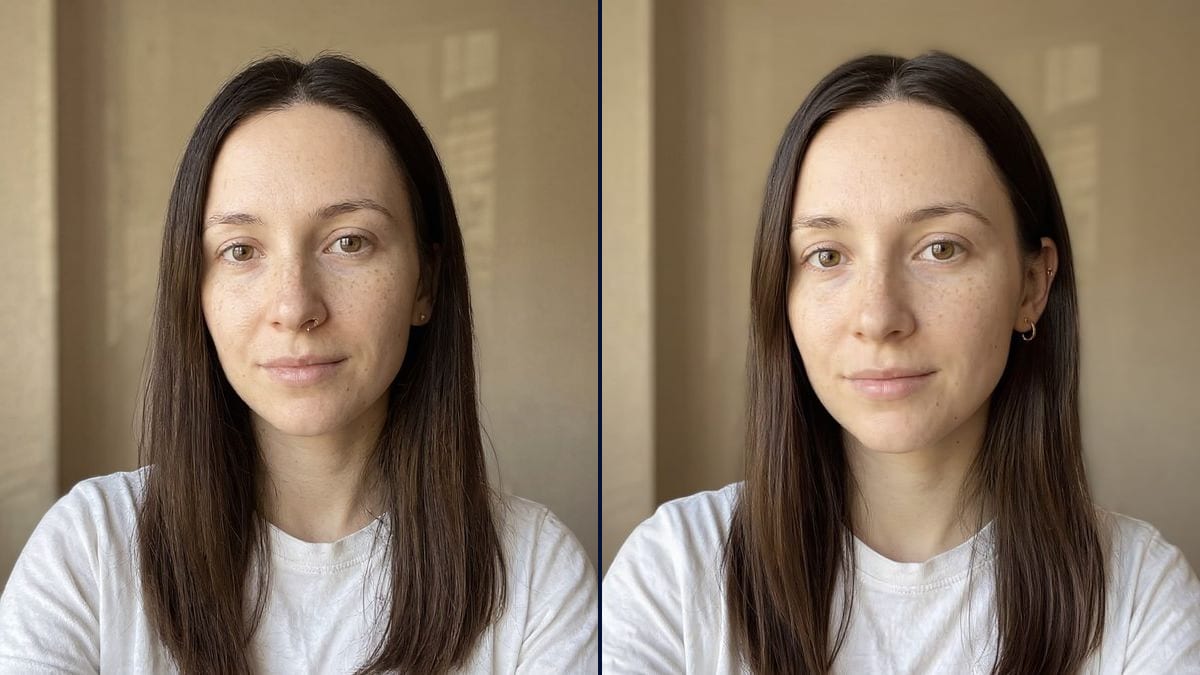
Real workflow: a portrait of a dark-haired woman with no jewellery, in a white T-shirt, then the same woman with a fine gold nose ring and with a gold stud and hoop on her ear, hair tucked back. The requested helix hoop is missing.
At a glance
A piercing deserves some thought: you see it every day, and a hole in the wrong place shows even once the jewellery is out. Yet people often choose from a photo of someone else. This workflow starts from YOUR portrait and shows two options: a fine nose ring, and a small set of jewellery on the ear.
The hard part is scale. A nose ring is a few millimetres across, and an image model left to itself draws it too big or puts it next to the nostril. The prompt gives the placement, the metal and the size; Flux Kontext adds the piece without touching the face. You still need to check each piece, and the demo shows why.
For something bolder, see the tattoo try-on; for the whole face, the makeup try-on. Both try-ons cost twelve credits.
These are the files of the workflow above, exactly as the models produced them, unretouched. The starting point is shown when there is one.
Starting point
Render
People weighing a piercing, piercers showing a placement, body jewellery shops.
A sharp front-facing portrait with no jewellery, and each piece described with its placement, size and metal.
Take a front-facing portrait
Sharp face, soft light, no jewellery. For the ear, tuck your hair back in the photo if you can.
Place each piece
Left or right nostril, lobe, helix, tragus, conch: one exact spot per piece, using the person's own left and right.
Describe the size
Fine, small, tiny, a diameter in millimetres, gold, silver, steel: that's what makes the try-on believable.
Count the pieces
Check that every piece you asked for is there, and nothing more. Then show the render to your piercer.
The same canvas, tuned for different needs: each variation is two or three lines of prompt away.
She has thought about it since school without daring. A fine hoop on her own portrait, then a small stud instead, and she knows which one she'll ask for at the studio on Saturday.
At the studio, the piercer photographs the client and shows her two spots on her ear before reaching for the needle. The choice is made on the picture, not by guesswork in the mirror.
She already has three holes and wants two more. She tries several combinations of hoops and studs on her photo to keep the whole set balanced before booking.
He wonders whether a discreet nose stud works in his line of work. He sees himself with it, face on, the way a recruiter would, and decides with his eyes open.
A body jewellery store shows customers each piece on their own photo. They pick the hoop size and metal that suit their face before they place an order.
Their sixteen-year-old wants a piercing. Seeing it on her own portrait becomes the start of a real conversation at the dinner table, rather than an instant yes or no.
The model mixes up the person's side and the picture's side: in the demo, the requested right ear became the one on the right of the image. Say which, then check.
Three pieces requested on the ear, two drawn. For a busy set, add them in two passes.
Without "fine" or "small", the ring comes out thick and heavy, nothing like what a piercer fits for a first piercing.
A piercer looks at the shape of your ear or nose: not every spot suits everyone. The picture helps you choose a style.
No: same face, same skin, same expression. In the demo, the portrait is identical apart from the jewellery.
Not always. In the demo, a stud appeared on the earlobe without being asked for, and the helix hoop is missing from the ear. Count them on every render.
Yes: name the spot and the piece, for example "a fine silver septum ring". One node per spot.
Twelve credits, six per render on Flux Kontext. A third spot on the same photo costs six more.
Because it adds a small detail without rebuilding the portrait: the face stays the one in the photo. You do need to check the number and position of the pieces.
Yes: write "silver", "steel", "titanium" or "rose gold" in the prompt.
Yes, the prompt works on any front-facing portrait. Swap "woman" for "man".
The format of your photo, here 3:4. Zoom in to judge a piece a few millimetres wide.
Try on a piercing on your photo with AI
Use this workflowFree account, no card required. The workflow opens pre-filled in your canvas.
 Flux Kontext
 Nano Banana 2.1
 GPT Image 2.5 Sunburst